EasyManua.ls Logo

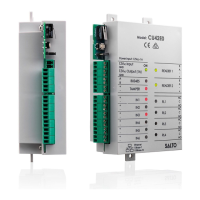
Salto CU42 Series - User Manual

Salto CU42 Series
8 pages
Print Icon
To Next Page IconTo Next Page
Loading...
All contents current at time of publication.
SALTO Systems S.L. reserves the right to change availability of any
item in this catalog, its design, construction, and/or materials.
224901 -ED0 -27/04/2015
European view
© 2015 SALTO Syst ems S.L.
1/8
CU42xx
READER 1
A
B
TAMPER
IN1
IN2
IN3
IN4
IN5
IN6
READER 2
RL1
RL2
RL3
RL4
C
NC
NO
C
NC
NO
C
NC
NO
C
NC
NO
BUS485
Ethernet
10Base-T
100Base-TX
ON
12VDC Input
+
A
B
-
12V
DC
Output (1A)
Power Input: 12VDC-1A
GND
GND
+
-
+
-
+
-
+
-
+
-
+
-
+
-
A
B
+
-
Model: CU42E0
104
[4-1/8"]
121
[4-3/4"]
43
[1-11/16"]
10
[3/8"]
44
[1-3/4"]
131
[5-3/16"]
Ø
4
[
5
/
3
2
"
]
Mechanical Installation:
Instalación mecánica:
Mechanische Installation:
Installation mécanique:
Mechanische installatie:
Mekanisk installation:
Eng
Esp
Deu
Fra
Ned
Sve
CU42xx Installation Guide
Guía de instalación CU42xx
Installationsanleitung CU42xx
Guide d'installation CU42xx
Installatiehandleiding CU42xx
Installationsguide CU42xx
Eng
Esp
Deu
Fra
Ned
Sve

Other manuals for Salto CU42 Series

Question and Answer IconNeed help?

Do you have a question about the Salto CU42 Series and is the answer not in the manual?

Summary

Factory Configuration

Factory Input Port Configuration

Details default settings for input ports IN1-IN6 across multiple languages.

Factory Output Relay Configuration

Details default settings for output relays RL1-RL4 across multiple languages.

Electrical Characteristics

Environmental Operation Conditions

Lists operating environmental conditions like temperature and humidity.

Input and Output Electrical Specifications

Specifies input voltage, current consumption, and output port current ratings.

Recommended Cabling Specifications

Recommends specific cable types for Ethernet, BUS485, inputs, and readers.

Installation Examples

CU42 E0 Wiring Example

Illustrates wiring and connections for the CU42E0 unit.

CU4200 RJ45 Connection Example

Shows installation example for CU4200 using RJ45 connectors.

Device Configuration and Addressing

Network Setup and IP Addressing

Details network setup, dipswitch configuration, and IP addressing for CU4200/CU42E0.

Dipswitch Configuration

CU4200 BUS485 Node Ordering

Explains using CU4200 dipswitches for node order on BUS485.

System LED Indicators

CU42 E0;CU4200 LED Status Meanings

Describes the meaning of various LEDs on CU4200 and CU42E0 units.

Salto CU42 Series Specifications

General IconGeneral
BrandSalto
ModelCU42 Series
CategoryController
LanguageEnglish

Related product manuals