EasyManua.ls Logo

SALUDA MEDICAL Evoke SCS - User Manual

SALUDA MEDICAL Evoke SCS
53 pages
Print Icon
To Next Page IconTo Next Page
Loading...
~
saluda MEDICAL
Rx
Only
Evoke® SCS System User Manual
Evok SCS System User Manual
Instructions for the use of the Evoke SCS System
CLIN-UMAN-005176 Revision: 4.01 Page 1 of 53

Other manuals for SALUDA MEDICAL Evoke SCS

Questions and Answers

  • M
    Michelle AlvarezSep 14, 2025
    What to do if my SALUDA MEDICAL Medical Equipment EPC does not appear to be working?
    • S
      sherrysmithSep 14, 2025
      If your EPC does not appear to be working, ensure that the EPC is on. Consider the following: * Low battery: If the ‘EPC low battery indicator’ light is on, change the batteries. * EPC not communicating with the stimulator: * Turn on the audio indicators (if they are off). * Try to use the EPC again. If you hear 2 or 3 beeps, the command isn't getting through to the stimulator. * Bring the EPC closer to the stimulator.
  • A
    Amy MillerAug 25, 2025
    What to do if SALUDA MEDICAL Medical Equipment CI does not respond or is slow to respond?
    • A
      angelaandersonAug 25, 2025
      If the CI doesn't respond or is slow, the operating system may not be functioning correctly. Restart the CI by shutting it down or restarting it. If it still doesn't respond, press the power button for 10 seconds to shut it down, then release and press again to restart.
  • B
    Barry FletcherAug 25, 2025
    Why am I unable to start stimulation on CPA with SALUDA MEDICAL Evoke SCS?
    • R
      Roger EvansAug 26, 2025
      If you're unable to start stimulation on the CPA, it could be due to: 1. A minimum electrode configuration not being programmed. Configure stimulation and return electrodes. 2. Stimulation parameters being too high. Check the pulse width, frequency, maximum current, and interphase gap (IPG) to ensure they are within system limits.
  • S
    Sheryl BookerAug 26, 2025
    What to do if SALUDA MEDICAL Evoke SCS software freezes or has a very slow response?
    • C
      Cody BrownAug 27, 2025
      If the software freezes or responds very slowly, it might be due to other applications being open. Restart the software and close any other running applications.
  • T
    Travis SmithSep 15, 2025
    What to do if my SALUDA MEDICAL Evoke SCS charger started beeping during charging?
    • S
      Shawn MartinezSep 15, 2025
      If your charger started beeping during charging, the link between the charger coil and your CLS has likely dropped below two bars, preventing charging. Adjust the position of the coil until the ‘Charging Link’ indicator displays at least two bars.
  • S
    shodgeSep 23, 2025
    What to do if the stimulation level indicator lights do not change when I increase or decrease stimulation on my SALUDA MEDICAL Medical Equipment?
    • M
      Michael JohnsonSep 23, 2025
      Sometimes you will need to press the or button multiple times before the lights will change. This is normal. However, you should feel a change in stimulation intensity almost every button press. If you feel you need to be reprogrammed, please contact your clinical team.
  • E
    Eric GibbsSep 7, 2025
    What to do if touching the programming software (Evoke CPA) icon does not start the software on SALUDA MEDICAL Evoke SCS Medical Equipment?
    • C
      Connie BurnsSep 7, 2025
      If touching the Evoke CPA icon doesn't start the software, the shortcut link may be broken or the target file moved. Use the CI search function to locate and select 'Evoke CPA'. The program should start. If this procedure fails, please call your Saluda representative.
  • A
    Alexis JacksonSep 8, 2025
    What does it mean when the Contact Clinician Indicator Light is on either the Charger or EPC of SALUDA MEDICAL Evoke SCS?
    • D
      David Villegas VSep 8, 2025
      If the Contact Clinician Indicator Light is on either the Charger or EPC, the stimulator is likely in Safe Mode. Note down the error on the screen and perform a ‘Soft Reset and Reconnect’.
  • M
    Michael GraySep 2, 2025
    What to do if SALUDA MEDICAL Medical Equipment shows 'Electrode disconnected'?
    • S
      Sara Flowers MDSep 2, 2025
      If you see an 'Electrode disconnected' error: 1. The electrode may be broken or in highly resistive tissue. Reprogram using a different electrode. 2. The electrode may be disconnected from the intraoperative cable, lead adapter, or stimulator. Remove the proximal connector end from the intraoperative cable, lead adapter (or CLS if permanent implant procedure), clean the contacts, and re-insert.
  • J
    Jason PetersonAug 31, 2025
    Why is there no data in the rolling plot (green background) for SALUDA MEDICAL Evoke SCS Medical Equipment?
    • I
      iansnowAug 31, 2025
      If there's no data in the rolling plot with a green background: 1. The system may be busy. Wait for the condition to clear or restart the software. Close other applications that are running. 2. Communication may be disrupted. Move the CST closer to the device and ensure there is no EMI from other devices.

Summary

Description of the Evoke SCS System

Evoke External Closed-Loop Stimulator (eCLS)

External stimulator used during trial stimulation period. Delivers therapy via percutaneous leads.

Evoke Closed-Loop Stimulator (CLS)

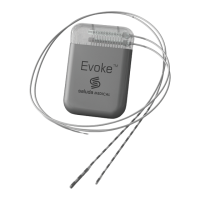
Implanted spinal cord stimulator for long-term therapy. Delivers therapy via percutaneous leads.

Evoke 12 C Percutaneous Leads

Leads placed in epidural space, connected to eCLS or CLS for therapy delivery.

Evoke 12 C Lead Extensions

Used to connect leads to eCLS for trial or permanently implanted to CLS.

Evoke Pocket Console (EPC)

Controls therapy and monitors stimulator. Communicates wirelessly with stimulator.

Evoke Charger

Recharges the stimulator (CLS) battery wirelessly. Powered by adapter.

Evoke Accessory Belt

Elasticated belt with pouch to hold eCLS or Charger coil.

Indications for Use

Contraindications

Safety Information

4.1 Warnings

Key warnings including diathermy, MRI, CT scans, and electromagnetic fields.

4.2 Precautions

Precautions for patients with implanted stimulators, operating equipment, and post-surgery care.

4.3 Potential Risks and Side Effects

Lists potential risks associated with implantation and use of the SCS system.

Temporary Trial Stimulation

5.1 Percutaneous Lead Placement Procedure

Details the surgical process of implanting percutaneous leads near the spinal cord.

5.2 Programming the eCLS

How the clinician customizes and configures the eCLS for patient therapy needs.

5.3 How it Should Feel

Describes expected sensations from stimulation and actions for discomfort.

5.4 Lead;Extension Removal & Next Steps

Explains the process for removing leads/extensions after the trial period.

5.5 The eCLS

Information about the External Closed-Loop Stimulator (eCLS) device.

5.5.1 Using the eCLS

Instructions on connecting and wearing the eCLS during the trial period.

5.5.2 eCLS Battery

Details on the eCLS battery, its rechargeability, and replacement.

5.5.3 Stopping Stimulation

Methods for stopping therapy using the EPC or a magnet.

5.5.4 Do Not Open the eCLS Case

Warnings and cautions against opening the eCLS case.

5.5.4.1 Disconnecting the eCLS

Step-by-step guide for a caregiver to disconnect the eCLS.

5.5.4.2 Reconnecting the eCLS

Instructions for reconnecting lead adapters to the eCLS.

Fully Implantable Evoke System

6.1 Lead and Stimulator Implant Procedure

Surgical steps for implanting permanent leads and the CLS stimulator.

6.2 Programming

How the implanted CLS is configured for therapy after surgery.

6.3 How it Should Feel

Describes expected stimulation sensations and actions for discomfort.

6.4 The CLS

Details about the implantable Closed-Loop Stimulator (CLS).

6.4.1 Controlling the CLS

Using the EPC to control the therapy delivered by the CLS.

6.4.2 Charging the CLS Battery

Instructions on how to charge the CLS battery using the Charger.

6.4.2.1 Battery Best Practices

Recommendations for prolonging the CLS battery life.

6.4.3 Stopping Stimulation

Methods for stopping therapy using the EPC or a magnet.

6.4.3.1 Using the EPC

Steps to stop CLS therapy using the Evoke Pocket Console.

The Evoke Pocket Console (EPC)

7.1 EPC Buttons and Indicators

Explains the function of each button and indicator on the EPC.

EPC Lock;Unlock Button

Function of the button to turn the EPC on/off and lock/unlock controls.

Stop Button

How to use the Stop button to immediately cease therapy.

Increase;Decrease Therapy Buttons

How to adjust stimulation intensity using the Up/Down buttons.

Change Program Button

How to switch between different therapy programs stored in the stimulator.

Stimulator Battery Level Indicator

Indicates the remaining battery charge level of the stimulator.

EPC Low Battery Indicator

Indicates when the EPC's own batteries need replacement.

Contact Clinician Indicator

Alerts the user to contact their clinician due to a detected problem.

7.2 EPC Audio Indicators

Describes the various beeps the EPC makes to indicate functions or issues.

7.2.1 Switching Audio Indicators

Instructions on how to enable or disable audio feedback on the EPC.

7.3 Changing EPC Battery

Step-by-step guide for replacing the EPC's AAA batteries.

The Evoke Charger

8.1 Charger Buttons and Indicators

Details the buttons and indicators on the Evoke Charger.

Start Charging Button

How to initiate the charging cycle for the CLS using the Charger.

Charging Link Indicator

Shows the quality of the wireless connection between the Charger coil and CLS.

Charger Battery Level Indicator

Indicates the remaining battery charge level of the Charger itself.

CLS Battery Level Indicator

Shows the remaining battery charge level of the implanted CLS.

Contact Clinician Indicator

Alerts the user to contact their clinician due to a Charger or CLS problem.

8.2 Charging Evoke CLS

Detailed steps for wirelessly charging the CLS battery with the Evoke Charger.

8.3 Charger Audio Indicators

Describes the various beeps the Charger makes to indicate functions or issues.

8.4 Recharging Evoke Charger

Instructions on how to recharge the internal battery of the Evoke Charger.

The Evoke Accessory Belt

9.1 Wearing eCLS with Belt

Step-by-step guide for wearing the eCLS in the Accessory Belt during trial.

9.2 Wearing Charger Coil with Belt

Instructions for using the Accessory Belt to position the Charger coil during charging.

Maintenance

Disposal of Devices

Patient ID Card

Troubleshooting

Contact Clinician Indicator Issues

Troubleshooting steps when the Contact Clinician indicator is active.

Charger Operation Issues

Resolving issues with the Charger beeping, not powering on, or during charging.

EPC Operation Issues

Troubleshooting EPC power, communication, and program change problems.

Therapy Delivery Issues

Steps to take if therapy stops, varies, or does not increase.

Package Contents

Technical Specifications

15.1 Device Specifications

Technical details for the Evoke SCS system devices.

15.1.1 Evoke CLS

Technical specifications for the implantable Closed-Loop Stimulator (CLS).

15.1.2 Evoke eCLS

Technical specifications for the Evoke eCLS and its accessories.

15.1.3 Evoke 12 C Percutaneous Lead

Technical specifications for the Evoke 12C Percutaneous Leads.

15.1.4 Evoke 12 C Lead Extension

Technical specifications for the Evoke 12C Lead Extensions.

15.1.5 Evoke EPC

Technical specifications for the Evoke Pocket Console (EPC).

15.1.6 Evoke Charger

Technical specifications for the Evoke Charger.

15.1.7 Evoke Accessory Belt

Technical specifications for the Evoke Accessory Belt.

15.2 Wireless Communication

Details on the wireless communication system of the Evoke SCS System.

15.2.1 Quality of Service & Wireless Coexistence

Information on the MICS frequency band and communication performance.

15.2.2 Wireless Security

Details on the security mechanisms for wireless communication.

15.3 Electromagnetic Interference

Information on the electromagnetic environment and system compliance.

15.3.1 Guidance and Manufacturers Declarations

Guidance and declarations regarding electromagnetic emissions and compatibility.

Glossary

Symbols

Contact Us

SALUDA MEDICAL Evoke SCS Specifications

General IconGeneral
BrandSALUDA MEDICAL
ModelEvoke SCS
CategoryMedical Equipment
LanguageEnglish

Related product manuals