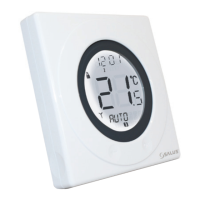
The Salus ST620 is a stylish and accurate 5/2 or 7-day programmable electronic thermostat designed for Volt Free heating applications. It combines the functions of both a room thermostat and a heating controller into a single unit, switching the heating system by means of time and temperature changes. Unlike standard programmers, it controls the temperature according to a series of programmed time and temperature settings that take effect at different times of the day.
Function Description:
The ST620 allows users to program their heating system with individual, 5/2 (weekdays/weekend), or 7-day control cycles. It comes with a set of default programs designed to meet common user needs, but these can be easily reprogrammed with custom settings. The device features a large, easy-to-read Liquid Crystal Display (LCD) with a white backlight, showing the current room temperature and various status indicators.
The thermostat utilizes revolutionary Touch Ring technology for simple operation. Users can navigate menus and adjust settings by moving their finger around the Touch Ring that surrounds the display. Two touch-sensitive buttons (OK and Arrow/Back) and a slide switch for key lock functionality further enhance usability.
Key operational modes and features include:
- Programming: Users can set up to six time/temperature settings per day. The programming process involves selecting the desired day option (weekdays, weekend, 7 days, or individual days), then setting the hour, minutes, and temperature for each of the six programs. A "COPY TO" function is available to quickly transfer settings from one day to another, saving time during individual day programming. It's crucial that program time settings are in sequence to ensure predictable operation.
- Holiday Override Mode: This mode allows users to override all current program settings with a specific temperature for a defined period (between a start and end date). During Holiday mode, the FROST protection mode is disabled. The thermostat automatically returns to AUTO mode when the holiday end date is reached.
- Frost Protection Mode: The ST620 offers a frost protection mode, which maintains a preset temperature of 5°C to prevent freezing. This temperature is factory-set and cannot be adjusted. When active, the FROST mode indicator is displayed, and the unit will not show "MANUAL" or "AUTO" indications.
- Manual Override Mode: When in NORMAL mode, users can temporarily override the programmed temperature by pressing the Touch Ring. The currently set temperature will flash, allowing adjustment via the Touch Ring. This manual setting remains active until the next program time, a program or clock setting change, an operating mode change, or until it is manually cancelled.
- Sleep Mode: This power-saving feature turns off the LCD display. The ST620 can be put into Sleep mode via the SLEEP menu, with a 5-second countdown. Pressing the Touch Ring for 3 seconds wakes the unit and restores it to AUTO mode. Note that the unit does not control heating while in Sleep mode.
- Radio Controlled Clock (RCC): The ST620 automatically updates its time and day settings daily (at 12:00 AM or 2:00 AM) using a highly accurate internal Radio Controlled Clock (MSF, UK Version). The RCC status indicator flashes during updates and remains displayed for a short period afterward. Manual time and date settings are also possible, but these will be overwritten by the next successful automatic update.
- Control Method Selection: Through the CONTROL menu, users (or qualified engineers) can select the heating control method: ON/OFF or Pulse Width Modulation (PWM). PWM mode should only be selected by an engineer.
- Service Function: The service menu, intended for engineers, allows for entering contact details (mobile or office telephone number) as a reminder for system servicing and a way for homeowners to contact the engineer.
Important Technical Specifications:
- Programming Modes: User selectable for 5/2 or 7-day option.
- Number of Programmes: Six (6) user programs plus factory default program.
- Override Facility: User selectable program override facility.
- Holiday Facility: User selectable option to temporarily override selected program.
- Temperature Scale: Celsius.
- Temperature Tolerance: Less than ± 0.5 °C at 25 °C.
- Sampling Rate: Every 15 seconds.
- Display Range: 0.0 °C to + 45.0 °C.
- Display Resolution: 0.5 °C.
- Set Temperature Range: 5.0 °C to + 35 °C.
- Power Source: 2 x AA alkaline batteries (rechargeable batteries are not recommended).
- Battery Life: Approximately 1 year.
- Memory Backup: Electrically Erasable Programmable Read Only Memory (EEPROM).
- Switching Voltage: 230V AC / 50Hz.
- Switching Current: 10A resistive, 3A inductive.
- Contact Type: Volt Free.
- Operating Temperature: 0 °C to + 50 °C.
- Storage Temperature: -10 °C to + 60 °C.
- Clock Type: Radio Controlled (RCC) MSF (UK Version).
- RCC Reception Frequency: 60 kHz ± 300 Hz.
- Display Modes: 12 or 24 hour clock display.
Usage Features:
- Touch Ring Technology: Intuitive control for adjusting temperature and navigating menus.
- Large LCD with White Backlight: Ensures clear visibility of information, even in low light. The backlight activates with any touch or key press and remains on for 6-10 seconds depending on the mode.
- Stylish Casing: Modern design.
- Battery Powered with Replacement Indicator: Provides flexibility in placement and alerts users when batteries are low.
- Burner on Symbol: Indicates when the heating output is active.
- Touch Lock Function: A slide switch on the side of the thermostat activates/deactivates a key lock to prevent accidental changes to settings. When locked, the Touch Lock indicator is visible on the LCD.
- Reset Button: Restores the thermostat to its default factory settings, deleting all previously entered user settings.
Maintenance Features:
- Cleaning: The outer casing can be wiped clean with a dry cloth. Solvents, polishes, detergents, or abrasive cleaners should not be used as they can damage the thermostat.
- Battery Replacement: The ST620 checks battery voltage frequently. A low battery indicator will be displayed when the voltage is low, prompting users to replace batteries to prevent the unit from entering OFF mode. Always isolate the AC Mains supply before opening the case to replace batteries. Do not mix new and old batteries, and do not use rechargeable batteries.
- Troubleshooting: If the thermostat malfunctions, users should first check if the batteries are correct and properly fitted, ensure the heating system time switch or programmer is on, and then try pressing the Reset Button.
- Servicing: There are no user-serviceable parts inside the unit. All servicing or repairs must be carried out by Salus Controls or their appointed agents.
- Energy Tip: To optimize energy consumption, users are advised to find the lowest comfortable temperature setting and maintain it, as a 1°C increase in temperature can lead to approximately 3% higher heating costs.

 Need help?
 General

 To Next Page