15
EN
Features
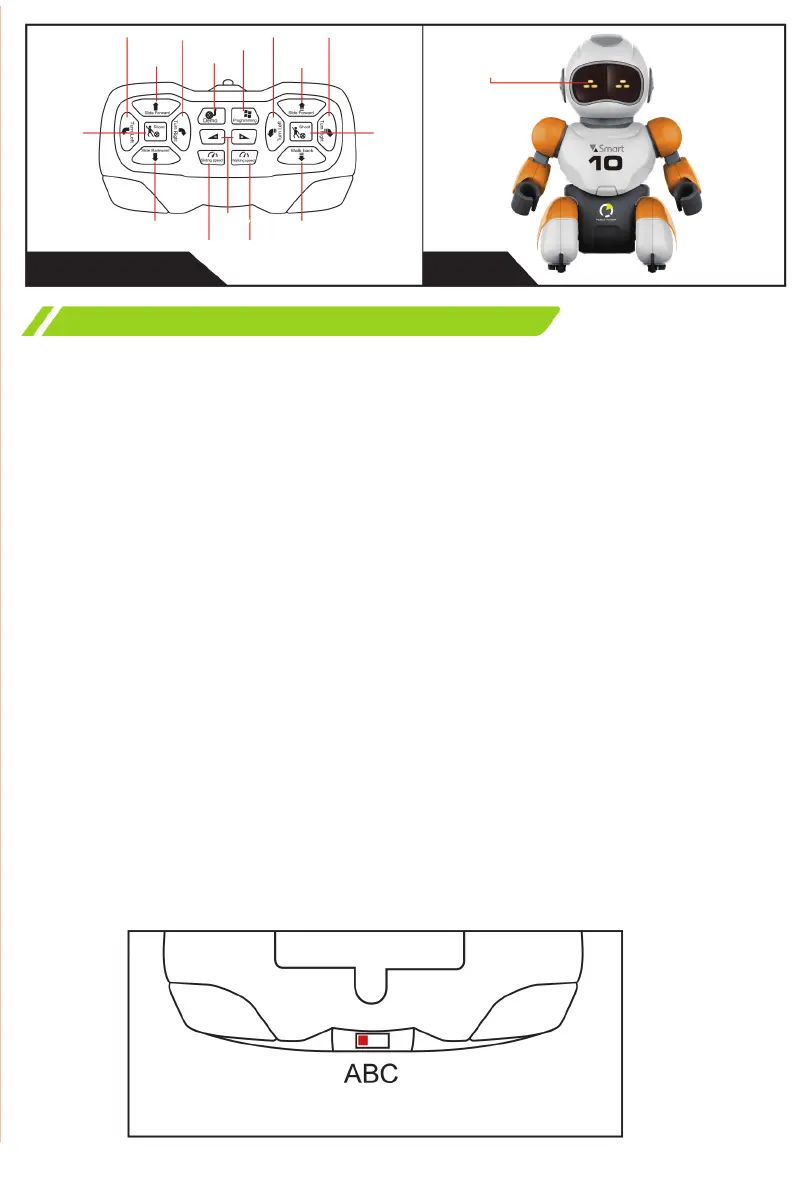
Remote control Robot
1. FIRST USE
After turning on, the robot automatically enters loading mode and emits a
beep. In sleep mode, press the power switch and the robot will beep briey.
2. STANDBY MODE
If you do not use the robot within 60 seconds after being turned on, the
robot enters standby mode.
In total, the robot gives 5 sound prompts.
3. AUTOMATIC FREQUENCY SYNCHRONIZATION
The remote control has three channels with the same frequency.
First, make sure both the robot and the remote control are turned o.
Second, select one of the channels and then turn on the robot. If the robot
responds correctly to any command transmitted by the remote control, it
means that the channels have been successfully established.
To change the channel, rst turn o the robot and then change the channel
on the remote control. You can establish up to three dierent channels. This
way you can control three robots simultaneously.
Set up sync before turning on.
Shoot
Slide
Backward
Sliding
Speed
Walking
Speed
Shoot
Turn Right
6 LEDs
Turn Left
Walk Forward
Programming
Demo
Turn Right
Turn Left
Slide
Forward
Volume
Control
Walk Back


 To Next Page