The Sami Wearable WS-2347 is a smart band designed for various health and activity tracking. It features a full touch screen and includes several sensors for comprehensive monitoring.
Function Description:
The Sami Wearable WS-2347 functions as a smart band that connects to your smartphone via Bluetooth. It provides notifications for incoming calls and messages (SMS, WhatsApp, Facebook, Twitter, Skype). The device offers multiple health monitoring features including heart rate, blood pressure, blood oxygen (SPO2), and sleep tracking. It also acts as a pedometer, counting calories, steps, and distance. For fitness enthusiasts, it includes various sports modes such as walking, running, hiking, cycling, and basketball. Other functionalities include a stopwatch, weather display, alarm clock, sedentary reminder, water drink reminder, and a "Find Phone" feature. A unique aspect is the temperature sensor, which measures both body and epidermal temperature. The device also supports remote selfie control for your smartphone's camera and gesture control to light up the display screen. GPS MAP Trace is available through the FITCLOUDPRO app, allowing users to track their routes during activities and share them. Women's health tracking is also supported via the app.
Important Technical Specifications:
- Display Screen: Capacitive FULL touch screen, 1.4 inches
- Screen Resolution: 240x240 pixels
- Internal Memory: RAM 128KB, ROM 64MB
- System: Nucleus
- CPU: REALTEK RTK8762
- Charge I/O Port: USB magnetic charging cable
- Battery: Built-in Li-Polymer 160 mAh
- Standby Time: 10-15 DAYS
- Working Time: 5 DAYS
- Bluetooth: V 5.0
- Water-resist Rating: IP67 (resists raindrops, not waterproof)
- Weight: 38 g
- Sensors: Built-in vibrating motor, heart rate sensor, gravity sensor, temperature sensor.
Usage Features:
- Power On/Off: Long press the Power On/Off button on the right side of the device for a few seconds. To turn off via touchscreen, slide from top to bottom, then right to left to find the Power Off icon, or navigate to "Settings menu" > "System" > "Shut down".
- Control: Short tap the touchscreen to select, and slide left/right/up/down to navigate between menu pages. Short press the Power On/Off button to return to the previous screen.
- Charging: Connect the magnetic USB charging cable to the charging points on the back of the device. Use a 5V, 1A power adapter if not charging via computer. Charging time is approximately 2 hours. Avoid connecting the charger to AC with magnets touching metallic surfaces to prevent damage.
- Pairing (Android): Download the FITCLOUDPRO app from Google Play Store or www.sami.es. Allow all application permissions and auto-run. Enable notifications when prompted. Turn on your phone's Bluetooth, open FITCLOUDPRO, select the "Device" icon, tap "+Add Device", then "SEARCH". Select "T98" or "WS-2347" from the available devices and tap "enjoy now".
- Pairing (iPhone): Download the FITCLOUDPRO app from the APP Store. Turn on your iPhone's Bluetooth, open FITCLOUDPRO, select the "Device" icon, tap "+Add Peripheral Now", then "Search Now". Select "T98" or "WS-2347" and tap "enjoy now".
- Initial Setup: Upon first pairing, the FITCLOUDPRO app will ask for personal information (gender/age/height/weight).
- Notifications: To enable all notifications (WhatsApp, Facebook, Skype, Twitter), go to the FITCLOUDPRO app, select the "Device" icon, then "Message Notification", and turn on "Enable All Reminder".
- Display Interface: The main screen displays time, date, battery, and temperature. There are five different home digital clocks; long press the display screen to change them. Temperature display shows both epidermal and body temperature.
- Shortcut Menu: From the home screen, slide from top to bottom to access the shortcut menu, which includes options for temperature (thermometer), brightness, power off, and device info.
- Data Sync: Data from the wearable syncs to the FITCLOUDPRO app on your smartphone when Bluetooth is paired.
- Health Measurement: All health functions (temperature, heart rate, blood pressure, blood oxygen) can be measured simultaneously by pressing the "Click to measure all items" button in the home screen of the FITCLOUDPRO app.
- Important Note: The device is NOT a medical instrument, and all values are approximate.
Maintenance Features:
- Cleaning: To prevent damage to the plating or printing, do not use chemical products like 96° alcohol for cleaning. It is recommended to use a slightly wet cloth.

 Need help?
 General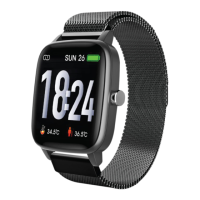

 To Next Page
