Configuring Your Speaker System
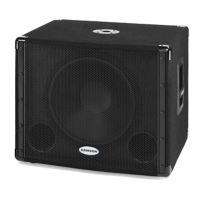
In larger rooms, as well as in theaters
and theme park installations (for low fre-
quency special audio effects), two or more
Auro D1200's can be used in stereo. For
additional low-end, you can daisy chain
a pair of Auro D1200 subwoofers to each
side of your speaker system using the par-
allel THRU outputs.
To create a stereo full range audio system,
two D1200s can be used with any pair of
powered full range enclosures (like the
Samson Auro D208 and D210). Follow
these steps below for a system set-up
using two D1200s with a mixer and a pair
of powered satellite loudspeakers.
• Lower your mixer’s master outputs until they are turned off.
• Connect the mixer’s left output to the left side D1200 LINE INPUT A, and the
mixer’s right output to the right side D1200 LINE INPUT B.
• Connect the left side D1200 THRU A output to the line input of the left powered
satellite, and the right side D1200 THRU B output to the line input of the right
satellite.
• Set the level of your powered satellites up to normal operating level. Run an
audio signal (such as music from a CD) through your mixer, and raise the level to
a comfortable listening volume.
• Slowly raise the D1200 GAIN controls and adjust the two subwoofers to the
desired level of low frequency output.
• When you raise and lower your mixer’s output, the two D1200 subwoofers and
satellites will track at the same relative volume.
Stereo Sub Operation
14



 To Next Page
 Loading...