EasyManua.ls Logo

Samson Go Mic - Installing the Go Mic; Getting Started with Windows XP

Samson Go Mic
28 pages
Print Icon
To Next Page IconTo Next Page
To Previous Page IconTo Previous Page
Loading...
Installing
the
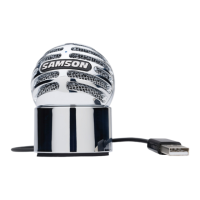
Go Mic
Installing
the
Go Mic
is
a
simple
procedure
that
takes
just
a few minutes.
Since
the
Go
Mic
is
USB
compliant,
you can use either
a MAC
or
PC,
connect
the
included
USB
cable
and plug
and
play.
You
will
be
able
to
control
your
Go
Mic using
the
standard
audio interface
controls
in
the
MAC
or
Windows operating system.
You
will
find
detailed
instructions on setting
up
with
MAC
OS
and Windows in
the
following
sections
of
this
manual.
Getting Started with Windows
XP
1. The first
time
you
plug
the
Go Mic
into
a
USB
port, Windows
will install
the
universal
drivers for
that
port
. A balloon
tip
will
pop
up
,
telling
you
it
has
"Found
new
Hardware" (figure
1
).
2.
When
it
is
finished installing
the
drivers,
it
will
say
"Your
new
hardware
is
installed
and ready
to
use" (figure
2).
Note:
This
balloon
will
not
pop
up
again
for
the same
USB
port.
6
J,;
Found
Ne
w
Ha
rdw
are
~
USB
Audio
CODEC
~
Foun d
New
Hardw
are
I
Vollrne
. .
II
Advanced
.•.
So\l1d
re..."'Olllng
;ff
Oeld
de...ce
SarnsonGoMc:
[
Vollrne
..
II
Advanced
..
~~~
ou'IIC
playback
~
Oelddew:e
..=:::;
Microsoft
GS
Wavet!lble
SW
s;rth
I
Vollrne
..
.Abot.t
...
"
"'

Related product manuals