Need help?
Do you have a question about the Samson Go Mic Direct and is the answer not in the manual?
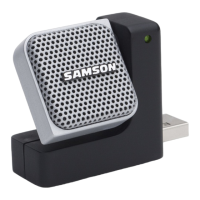
Describes the two-color LED indicator for power and clipping status.
Details the dual studio quality microphone capsules for 360° audio capture.
Explains the retractable USB connector and its slide-and-lock mechanism.
Detailed steps for setting up the microphone on Windows operating systems.
Detailed steps for setting up the microphone on Mac OSX operating systems.
 General
| Type | Laptop microphone |
|---|---|
| Bit rate | 16 bit |
| Sample rate | 44.1 kHz |
| Microphone frequency | 20 - 20000 Hz |
| Device interface | USB |
| Connectivity technology | Wired |
| Product color | Black, Grey |

 To Next Page