SM4 4-Channel Mixer 7
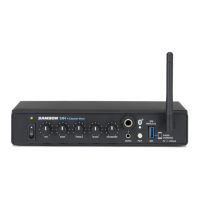
1. Power Switch - Use this switch to turn the SM4 on and off. To avoid potential
damage to your speakers, turn the SM4 on before you turn on any connected
power amps, and turn it off after the power amps are turned off.
2. Power Indicator - LED lights white indicating the unit is powered on.
3. MIC Volume - This knob controls the level of the MIC input.
4. BASS Equalizer Knob - Controls the MIC channel low frequency band, +/- 15dB at
100Hz.
5. TREBLE Equalizer Knob - Controls the MIC channel high frequency band, +/- 15dB
at 10kHz.
6. MUSIC Volume - This knob controls the level of the Music inputs (rear panel RCA,
front panel 1/4” and 1/8”).
7. VOICEOVER - Controls the level the Music channel and Bluetooth® audio will be
lowered when there is signal on the Mic channel.
8. 1/8” (3.5mm) Music Input - Stereo 1/8” (3.5mm) jack to connect line level
sources. Level of this input is controlled by the MUSIC Volume knob.
9. 1/4” Music Input - Stereo 1/4” jack to connect line level sources. Level of this
input is controlled by the MUSIC Volume knob.
10. Pairing Indicator - Displays the Bluetooth
status of the SM4.
11. Pairing Button - Press and hold this button to enable discoverable mode in order
to pair with a Bluetooth audio device.
12. Samson XPD WIRELESS USB Input - Connect an optional Samson XPD USB Digital
Wireless receiver to this input. The wireless level is controlled by the MIC Volume
control. The USB connector supplies 5V 200mA at of power to charge a small
portable USB device like an MP3 player or smartphone.
13. Bluetooth Antenna - This antenna receives signal from a paired device and should
be placed in a vertical position when using the Bluetooth. The Bluetooth receiver
has a range of approximately 100’ (30m).
Front Panel Callouts



 To Next Page