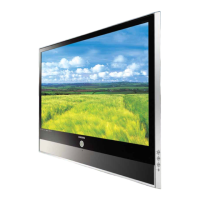
This document describes the Samsung Colour Television, covering its functions, technical specifications, usage features, and maintenance.
Function Description
The Samsung Colour Television is designed for home entertainment, offering various features for viewing television programmes, connecting external devices, and utilizing teletext services. It supports automatic and manual channel storage, allowing users to customize their channel lineup. The television includes picture and sound adjustment settings to enhance the viewing experience, such as different picture standards (Custom, Standard, Sports, Natural, Mild) and sound effects (Custom, Standard, Music, Movie, Speech). It also features a Digital Noise Reduction function to improve picture quality in areas with weak signals. For convenience, the television offers a sleep timer, automatic on/off scheduling, and a childlock feature to restrict access to certain channels. Teletext functionality (if option is available) provides access to written information like programme times, news, weather, and sports results.
Important Technical Specifications
The manual lists several models, indicating a range of screen sizes and possibly different feature sets. The listed models are:
- 15A8
- 21A8/21A9/21M6/21S5/21S8
- 564B/566B/569B
- 25A6/25D4/25M6
- 29D4/29D6/29D8/29U2
- 30A9/7601
Power Supply: The main voltage is indicated on the rear of the TV set, and the frequency is 50 or 60Hz.
Audio Output: The television supports various sound standards including Custom, Standard, Music, Movie, and Speech. It also features "Turbo Sound" for enhanced audio and "Pseudo stereo" to convert monaural signals into identical left and right channels.
Video Input: The device supports multiple input types:
- AV-1 or 2 Input/Outputs: These are typically SCART connectors (21-pin RGB) for connecting VCRs, decoders, video disc players, and camcorders.
- Rear S-VIDEO Input (Option): For equipment with an S-Video output, such as camcorders or VCRs.
- Rear DVD Input (Option): Uses DVD/RCA (AUDIO-L and R) connectors for devices with DVD output.
- RCA Input: For camcorders, video disc players, and video game devices, using VIDEO + AUDIO-L and R connectors.
Headphone Output: A 3.5 mm mini-jack socket is available for connecting headphones.
Antenna Input: A 75Ω coaxial socket is provided for connecting an outdoor aerial or a cable television network.
Usage Features
Remote Control: The television is primarily operated via an infrared remote control, which includes buttons for power, channel selection (direct and one/two-digit), volume adjustment, menu display, external input selection, sound mode, picture standard, sleep timer, and teletext functions.
Front Control Panel: Basic controls are also available on the front panel, including TV/VIDEO selection, menu display, volume adjustment, channel selection, and power on/off.
Plug & Play Feature: Upon initial setup or after a factory reset, the Plug & Play feature guides the user through selecting the language, performing an auto store for channels, and setting the current time.
Channel Management:
- Automatic Storage: Scans and stores available channels automatically within a selected area (e.g., ASIA W/EUROPE, CIS E/EUROPE, CHINA - HONGKONG U/K - AUSTRALIA - NZ/INDONESIA - SOUTH AFRICA - AMERICA).
- Manual Storage: Allows users to manually search for and store channels, including setting the colour system and sound system.
- Channel Naming: Users can assign custom names to stored channels using letters (A-Z), numbers (0-9), and special characters.
- Skipping Unwanted Channels: Channels can be marked as "Added" or "Erased" to exclude them from the channel scan operation.
- Fine Tuning: Enables precise adjustment of channel reception for clearer picture and sound quality.
- Sorting Stored Channels: Allows users to modify the numeric order of stored channels.
Picture Adjustments:
- Picture Standard: Selectable modes include Custom, Standard, Sports, Natural, and Mild.
- Picture Settings: Adjustable parameters include Contrast, Brightness, Sharpness, Tint (NTSC only), and Colour.
- Picture Format: Options include Full (12:8.9, extra 1 inch), Normal (for 4:3), Zoom (expansion to a 16:9 picture), and 16:9 (for 16:9 screen format).
- Digital Noise Reduction (DNR): Can be activated or deactivated to reduce static and ghosting in weak signal conditions.
Sound Adjustments:
- Sound Standard: Selectable modes include Custom, Standard, Music, Movie, and Speech.
- Sound Settings: Adjustable parameters include Balance, Bass, and Treble. An Equalizer is available for fine-tuning sound frequencies.
- Extra Sound Settings: Includes "Auto volume" to automatically adjust volume levels between channels, "Melody" for sound on/off, and "Pseudo stereo" for converting mono signals.
- Turbo Sound: Emphasizes higher and lower sound bands for a more dynamic audio experience.
- Volume Adjustment: Standard volume control via remote or front panel.
- Mute Function: Temporarily switches off the sound.
Timers and Scheduling:
- Sleep Timer: Sets a period (30 to 180 minutes) after which the television automatically switches to standby mode.
- Current Time Display: Displays the current time.
- Automatic On/Off: Allows scheduling the television to switch on and off automatically at specific times and tune to a chosen channel.
Childlock: Activates a childlock feature to prevent unauthorized viewing of specific channels by requiring a password.
Teletext Function (Option):
- Teletext Decoder: Displays teletext information, including programme times, news, weather, and sports results.
- Displaying Teletext Information: Activates teletext mode and displays the contents page.
- Selecting Specific Pages: Users can enter three-digit page numbers directly or navigate using page up/down buttons.
- Display Options: Includes hidden text, normal screen, secondary pages, and double-size letters.
- FLOF (Fastext) Selection: Uses color-coded buttons to select teletext topics.
- Storing Teletext Pages: Allows storing up to four teletext pages for quick access.
External Source Viewing: Supports viewing content from connected external devices (VCR, DVD, camcorder, etc.) by selecting the appropriate input.
Maintenance Features
Automatic Degaussing: The television performs automatic degaussing to remove colour patches that may appear on the screen, especially if the television has been moved. This process occurs automatically when the TV is switched off for about 30 minutes. Users can also manually trigger degaussing by switching the TV off and on from the front panel.
Troubleshooting: The manual provides a troubleshooting guide for common issues such as no sound/picture, normal picture but no sound, no picture or black and white picture, sound and picture interference, blurred or snowy picture, distorted sound, and remote control malfunctions. It advises users to check connections, settings, and battery condition before contacting service personnel.
Battery Replacement: Instructions are provided for inserting and replacing batteries in the remote control, emphasizing correct polarity.
Cleaning: Users are advised to use a soft and dry cloth (not containing volatile matter) when cleaning the TV.
Service Contact: Users are encouraged to contact their retailer or service agent if a change in product performance indicates a faulty condition.

 Need help?

 To Next Page
 General