Settings & Upgrade
45
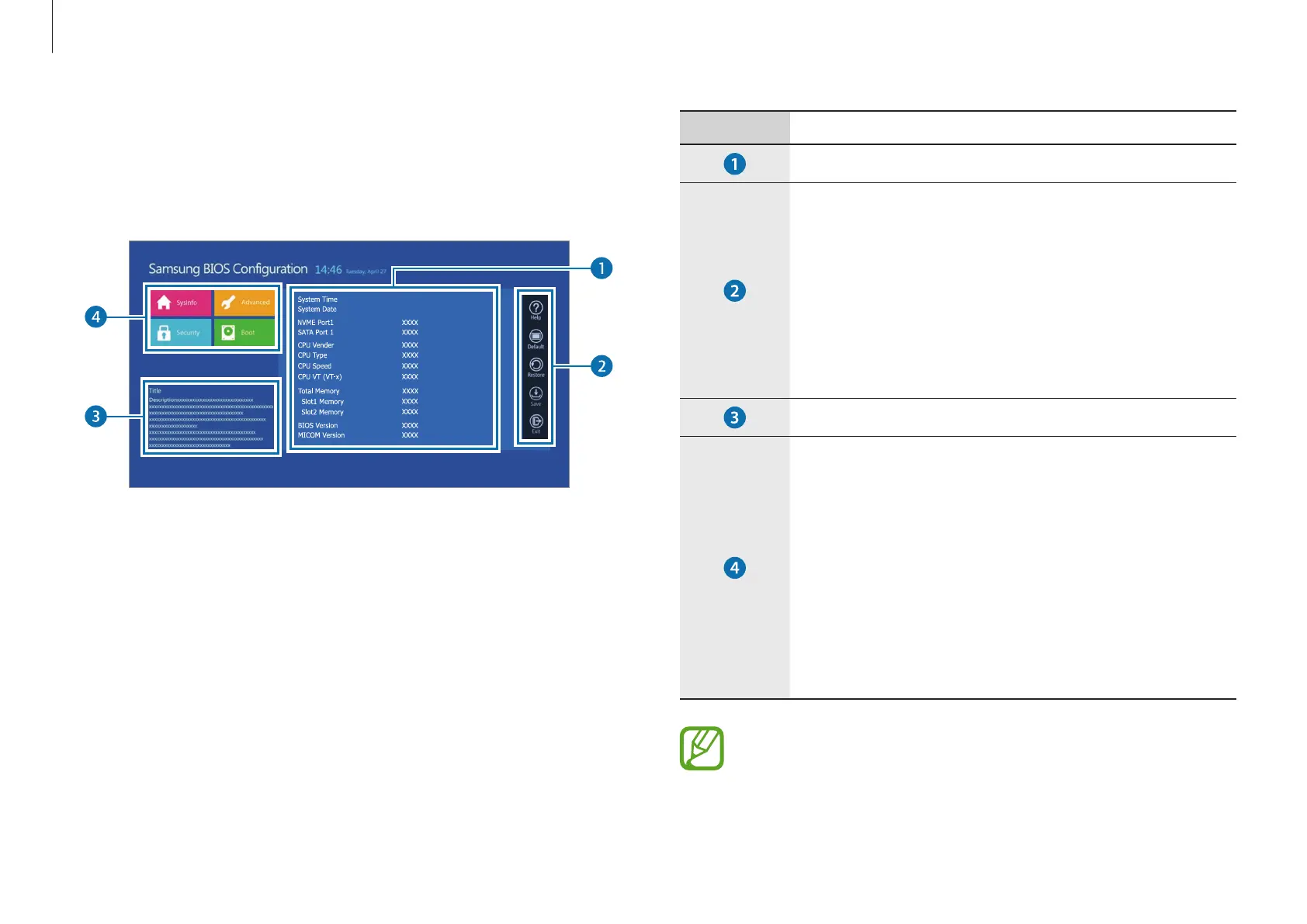
Number Name
•
Setup items
•
Setup tools
–
Help
: View the help for BIOS set up.
–
Default
: Return to the default settings.
–
Restore
: Cancel changes.
–
Save
: Save settings.
–
Exit
: Exit BIOS setup.
•
Help
•
Setup menu
–
SysInfo
: View the basic specifications of the
computer.
–
Advanced
: Configure the chipsets and
additional functions.
–
Security
: Configure security functions.
–
Boot
: Configure peripherals and boot-
related settings.
The BIOS setup screen appears only in English.
The BIOS screen
The BIOS setup screen appears as shown below.
You can change BIOS settings using the keyboard or mouse.
Aptio Setup Utility - Copy (C) XXXX American Megatrends, Inc.



 To Next Page