English - 8
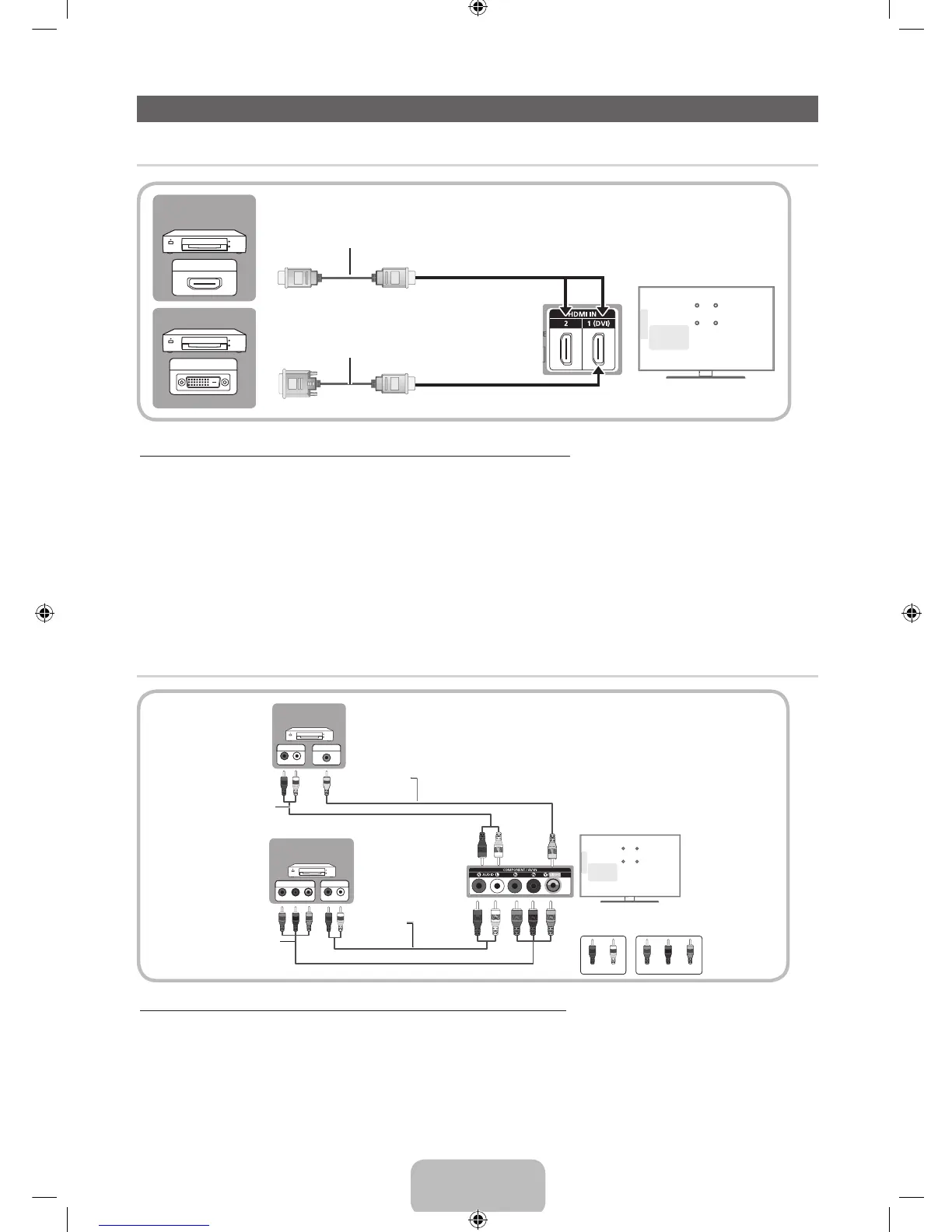
Connecting to an AV devices
¦ Available devices: DVD, Blu-ray player, HD cable box, HD STB (Set-Top-Box) satellite receiver
Using an HDMI or an HDMI to DVI Cable: HD connection (up to 1080p)
✎
HDMI IN 1(DVI), 2
x
If an HDMI to DVI cable is connected to the HDMI IN 1(DVI) port, the audio does not work.
x
The picture may not display normally (if at all) or the audio may not work if an external device that uses an older
version of HDMI mode is connected to the TV. If such a problem occurs, ask the manufacturer of the external device
about the HDMI version and, if out of date, request an upgrade.
x
Be sure to purchase a certified HDMI cable. Otherwise, the picture may not display or a connection error may occur.
x
A basic high-speed HDMI cable or one with ethernet is recommended. This product does not support the ethernet
function via HDMI.
¦ Available devices: DVD, Blu-ray player, cable box, STB satellite receiver, VCR
Using a Component (up to 1080p), Using an Audio/Video Cable (480i only)
✎
When connecting to AV IN, the color of the AV IN [Y/VIDEO] jack (green) will not match the video cable (yellow).
✎
For better picture quality, the Component connection is recommended over the A/V connection.
HDMI OUT
DVI OUT
Device
Device
HDMI Cable (Not Supplied)
HDMI to DVI Cable (Not Supplied)
TV Rear
R W
G
B
R
VIDEO OUTAUDIO OUT
R-AUDIO-L
PR PB Y
COMPONENT OUT
AUDIO OUT
R-AUDIO-L
G
B
R R
R
W
R
W
W
G
B
R
R
W
Y
Y
Device
Device
Red White Red Blue
Green
Component Cable
(Not Supplied)
Audio Cable
(Not Supplied)
Video Cable
(Not Supplied)
Audio Cable
(Not Supplied)
TV Rear
[UE6030-ZS]-BN68-04469F.indb 8 2012-05-21 �� 3:13:40








 To Next Page