You
can control your set-top-box or satellite
box
with the Samsung Smart Control.
To
establish control, you must first set up
theIR
extender cable. If you
don't
have an STB,
skip this section.
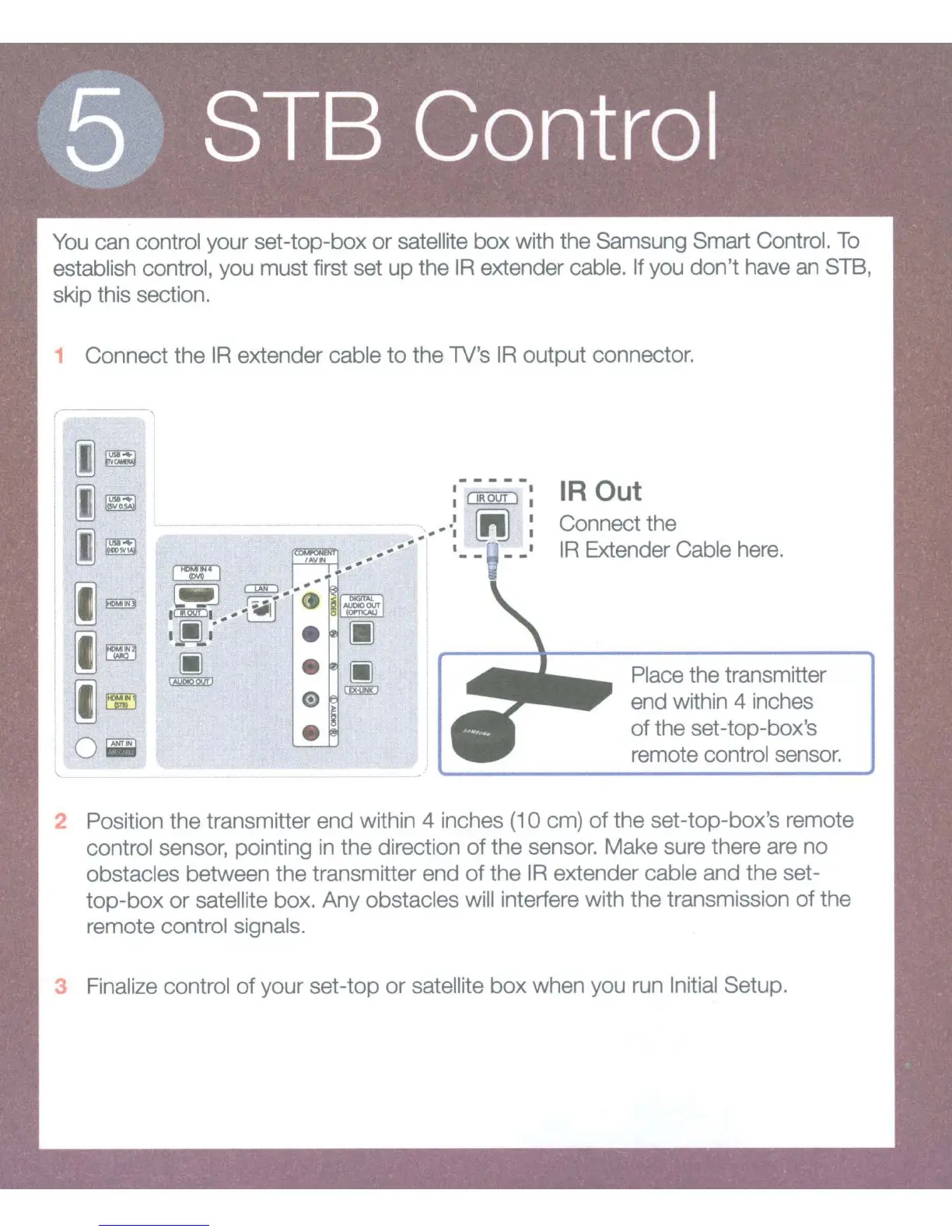
1 Connect
theIR
extender cable
to
the
lV's
IR
output connector.
I
~~
~~
~~
I~
I~
I~
0~
\.. - - - -
IR Out
Connect the
IR
Extender Cable here.
Place the transmitter
end within 4 inches
of
the set-top-box's
remote control sensor.
2 Position the transmitter end within 4 inches
(1
0 em)
of
the set-top-box's remote
control sensor, pointing
in
the
direction
of
the sensor. Make sure there are
no
obstacles between the transmitter end
of
the I R extender cable and the set-
top-box
or
satellite box. Any obstacles will interfere with the transmission
of
the
remote control signals.
3 Finalize control
of
your set-top
or
satellite
box
when you run Initial Setup.









 To Next Page