6 Smart Control
Introducing the
Samsung
Smart
Control
Your
1V
comes with a Samsung Smart Control. Unlike conventional remote controls
that have only buttons, the Samsung Smart Control has:
Buttons for quick access
to
frequently used functions.
• A motion sensor that lets you move
the
pointer
or
focus
on
the
screen
by
simply
moving
the
Samsung Smart Control.
Inserting
the
Batteries
0 0
0
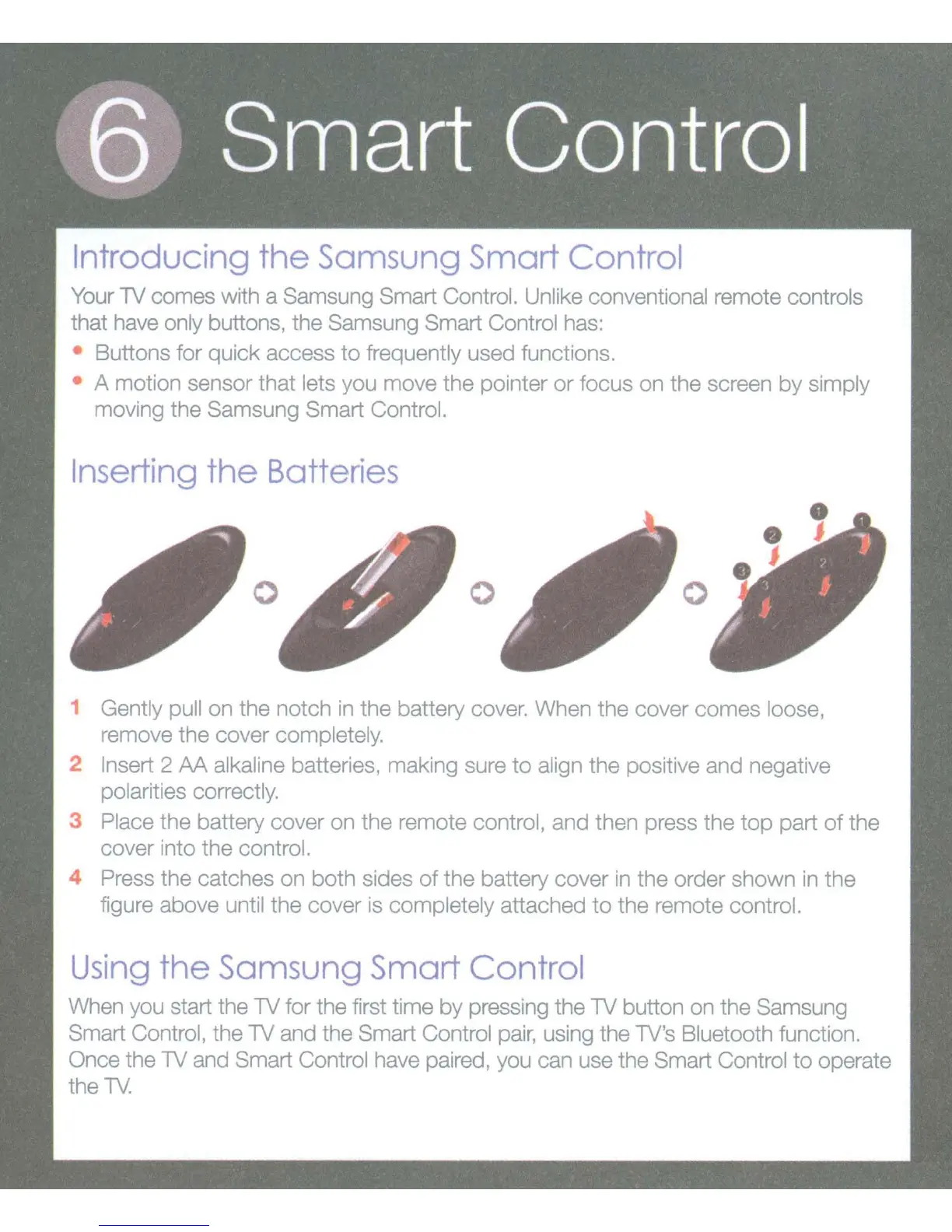
1 Gently pull on the notch in
the
battery cover. When the cover comes loose,
remove
the
cover completely.
2 Insert 2
AA
alkaline batteries, making sure
to
align the positive and negative
polarities correctly.
3 Place the battery cover
on
the remote control, and then press
the
top
part
of
the
cover into the control.
4 Press the catches on both sides
of
the battery cover in the order shown in
the
figure above until the cover is completely attached
to
the remote control.
Using
the
Samsung
Smart
Control
When you start the
1V
for the first time
by
pressing the
1V
button on the Samsung
Smart Control, the
1V
and the Smart Control
pair,
using the 1V's Bluetooth function.
Once the
1V
and Smart Control have paired, you can use the Smart Control
to
operate
the
1V.









 To Next Page