EasyManua.ls Logo

Samsung 6400 - Using the Samsung Smart Control Motion Function to Operate the TV

Samsung 6400
58 pages
Print Icon
To Next Page IconTo Next Page
To Previous Page IconTo Previous Page
Loading...
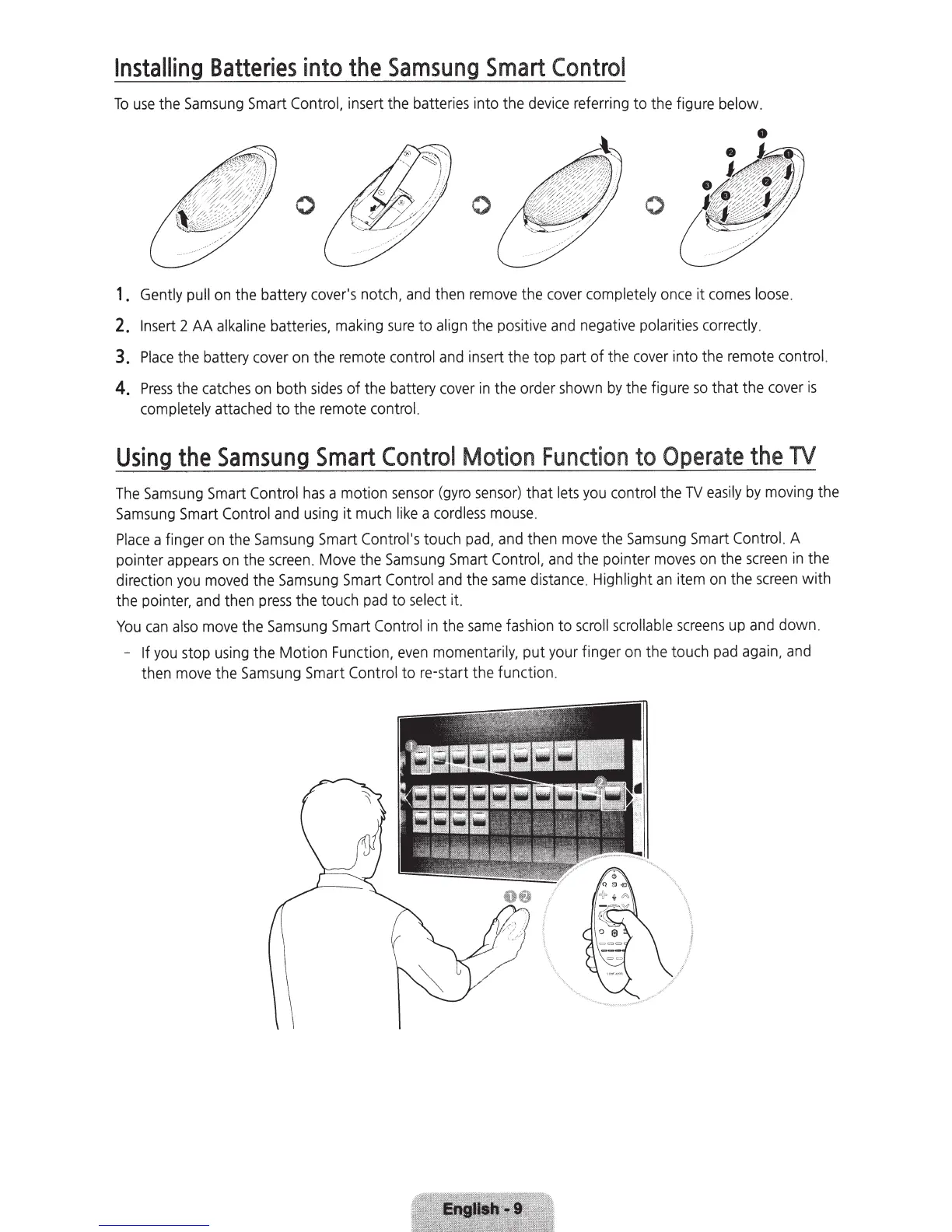
Installing
Batteries
into
the
Samsung
Smart
Control
To
use
the
Samsung
Smart
Control,
insert the
batteries
into the
device
referring to the f
igure
below.
0
0
0
1 .
Gently
pull
on
the battery
cover's
notch,
and
then
remove
the
cover
completely
once
it
comes
loose
.
2.
Insert
2
AA
alkaline
batteries,
making
sure
to
align
the
positive
and
negative
polarities
correctly
.
3.
Place
the battery
cover
on
the
remote
control
and
insert
the top part of the
cover
into the
remote
control.
4.
Press
the
catches
on
both
sides
of
the
battery
cover
in
the order
shown
by
the figure
so
that the
cover
is
completely
attached
to the
remote
control.
Using
the
Samsung
Smart
Control
Motion
Function
to
Operate the
TV
The
Samsung
Smart
Control
has
a motion
sensor
(gyro
sensor)
that
lets
you
control
the
TV
easily
by
moving
the
Samsung
Smart
Control
and
using
it
much
like
a
cordless
mouse.
Place
a finger
on
the
Samsung
Smart
Control's
touch
pad,
and
then
move
the
Samsung
Smart
Control.
A
pointer
appears
on
the
screen
.
Move
the
Samsung
Smart
Control,
and
the pointer
moves
on
the
screen
in
the
direction
you
moved
the
Samsung
Smart
Control
and
the
same
distance
.
Highlight
an
item
on
the
screen
with
the pointer,
and
then
press
the touch
pad
to
select
it.
You
can
also
move
the
Samsung
Smart
Control
in
the
same
fashion to
scroll
scrollable
screens
up
and
down.
-
If
you
stop
using
the Motion
Function,
even
momentarily,
put
your
finger
on
the touch
pad
again,
and
then
move
the
Samsung
Smart
Control
to re-start the function.

Related product manuals