5
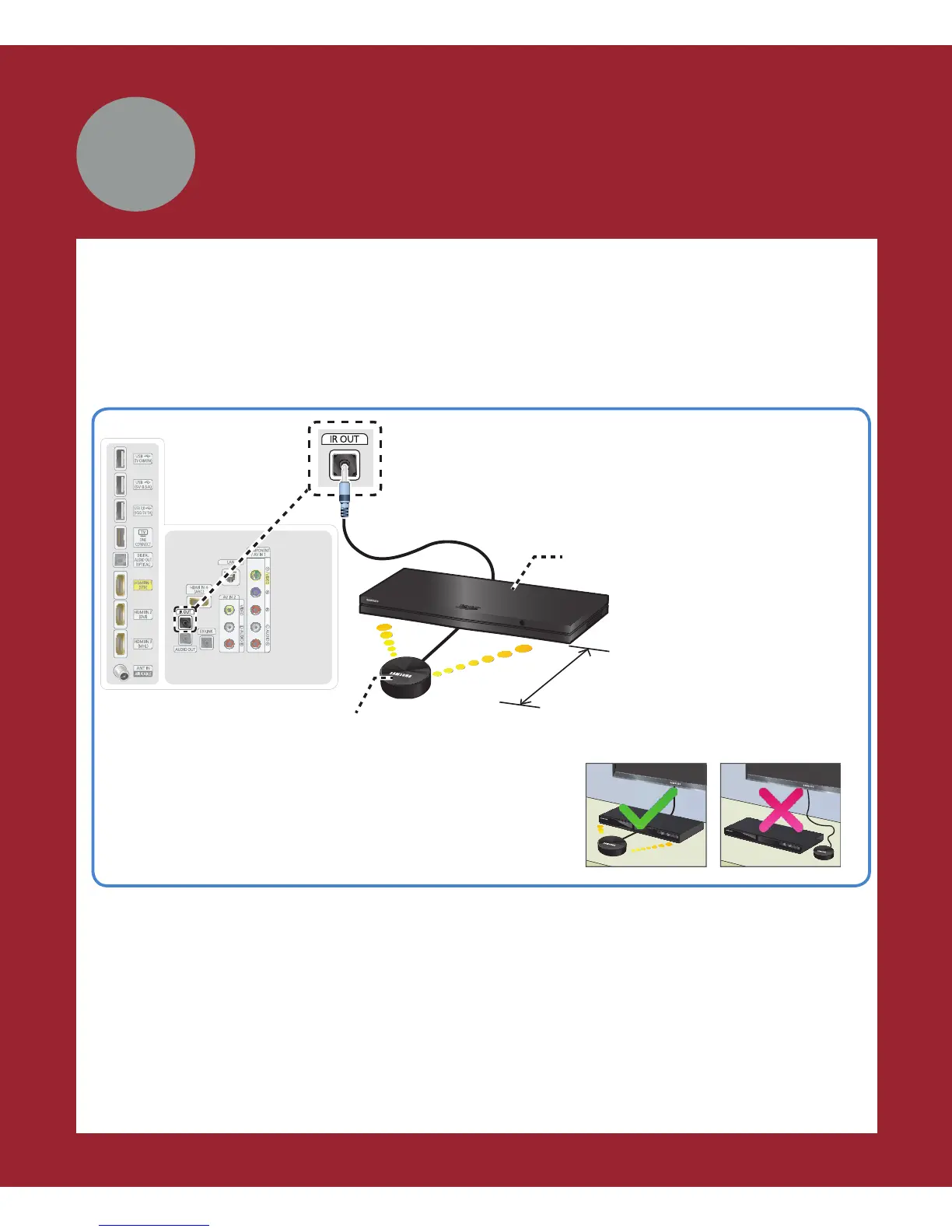
You can control your cable or satellite box with the Samsung Smart Control. To
establish control, you must first set up the IR extender cable. If you don’t have an cable
or satellite box, skip this section.
1 Connect the IR extender cable to the TV’s IR output connector.
✎
To help hold the IR extender in place, set the
extender cable under your satellite or cable box.
Position the transmitter in front of the box.
TV’s IR Out
Connect the IR extender cable to the back of the TV.
Position the transmitter end 4
inches in front of the cable or
satellite box.
Cable or satellite box
IR extender
4 inches
2 Position the transmitter end within 4 inches (10 cm) of the cable or satellite box’s
remote control sensor, pointing in the direction of the sensor.
✎
Make sure there are no obstacles between the transmitter end of the IR
extender cable and the cable or satellite box. Any obstacles will interfere
with the transmission of the remote control signals.
3 Finalize control of your cable or satellite box when you run Initial Setup.
Cable/SAT box
(Cable or Satellite box)




 To Next Page