EasyManua.ls Logo

Samsung 890V - Page 23

Samsung 890V
57 pages
Print Icon
To Next Page IconTo Next Page
To Previous Page IconTo Previous Page
Loading...
23
English
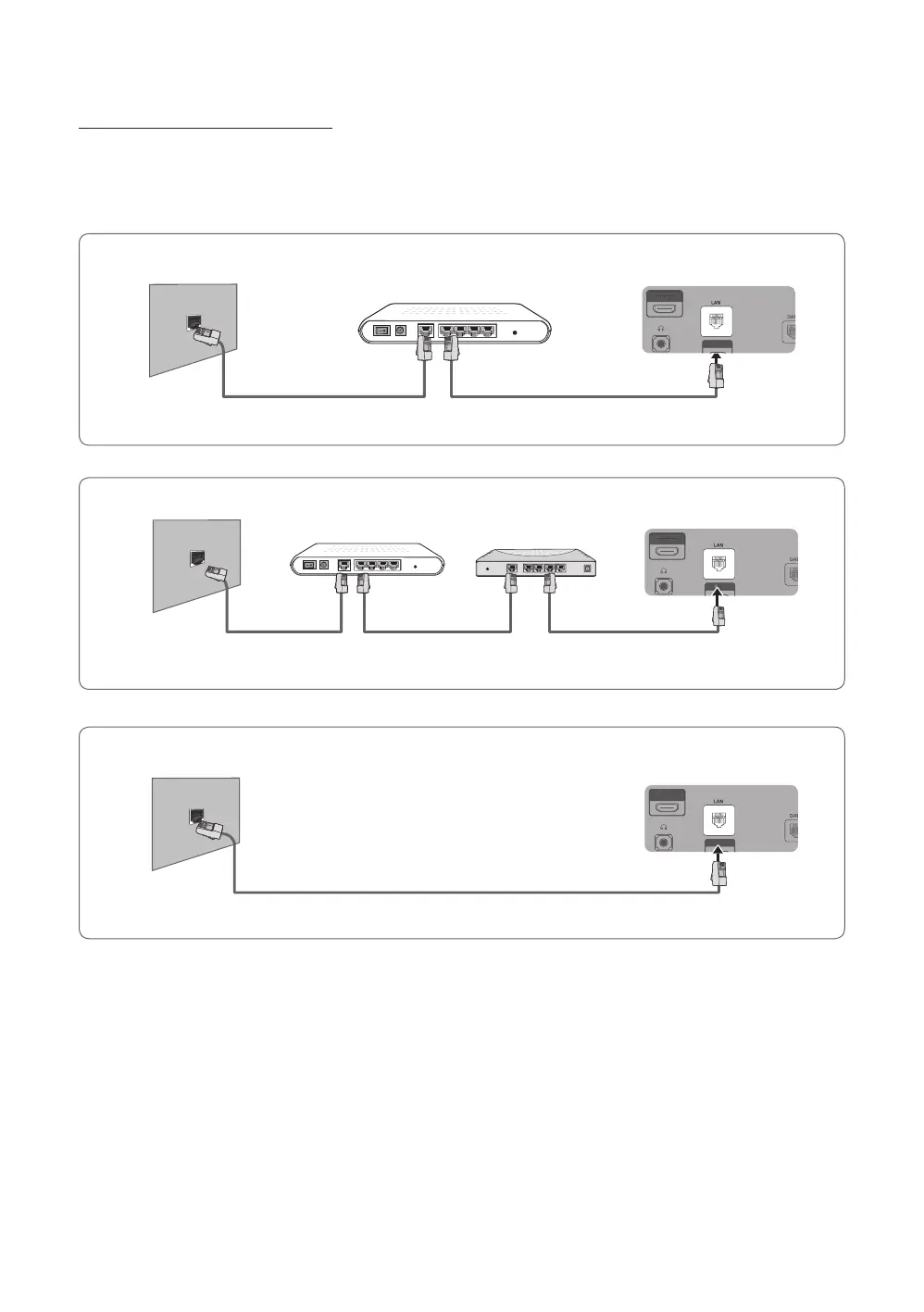
Network Connection - Wired
There are three main ways to connect your TV to your network using cable, depending on your network setup. They are
illustrated below:
y HC690 Model
PC IN
HDMI IN 3
(ARC)
PC IN
HDMI IN 3
(ARC)
PC IN
HDMI IN 3
(ARC)
PC IN
HDMI IN 3
(ARC)
PC IN
HDMI IN 3
(ARC)
PC IN
HDMI IN 3
(ARC)
The Modem Port on the Wall
TV Rear Panel
LAN Cable (Not Supplied)Modem Cable (Not Supplied)
External Modem
(ADSL / VDSL / Cable TV)
PC IN
HDMI IN 3
(ARC)
PC IN
HDMI IN 3
(ARC)
PC IN
HDMI IN 3
(ARC)
PC IN
HDMI IN 3
(ARC)
PC IN
HDMI IN 3
(ARC)
PC IN
HDMI IN 3
(ARC)
The LAN Port on the Wall
TV Rear Panel
LAN Cable (Not Supplied)
PC IN
HDMI IN 3
(ARC)
PC IN
HDMI IN 3
(ARC)
PC IN
HDMI IN 3
(ARC)
PC IN
HDMI IN 3
(ARC)
PC IN
HDMI IN 3
(ARC)
PC IN
HDMI IN 3
(ARC)
The Modem Port on the Wall
TV Rear Panel
LAN Cable
(Not Supplied)
Modem Cable
(Not Supplied)
LAN Cable
(Not Supplied)
External Modem
(ADSL / VDSL / Cable TV)
IP Router that has a
DHCP Server

Related product manuals