EasyManua.ls Logo

Samsung 890V - Connecting the Bathroom Speakers

Samsung 890V
57 pages
Print Icon
To Next Page IconTo Next Page
To Previous Page IconTo Previous Page
Loading...
28
English
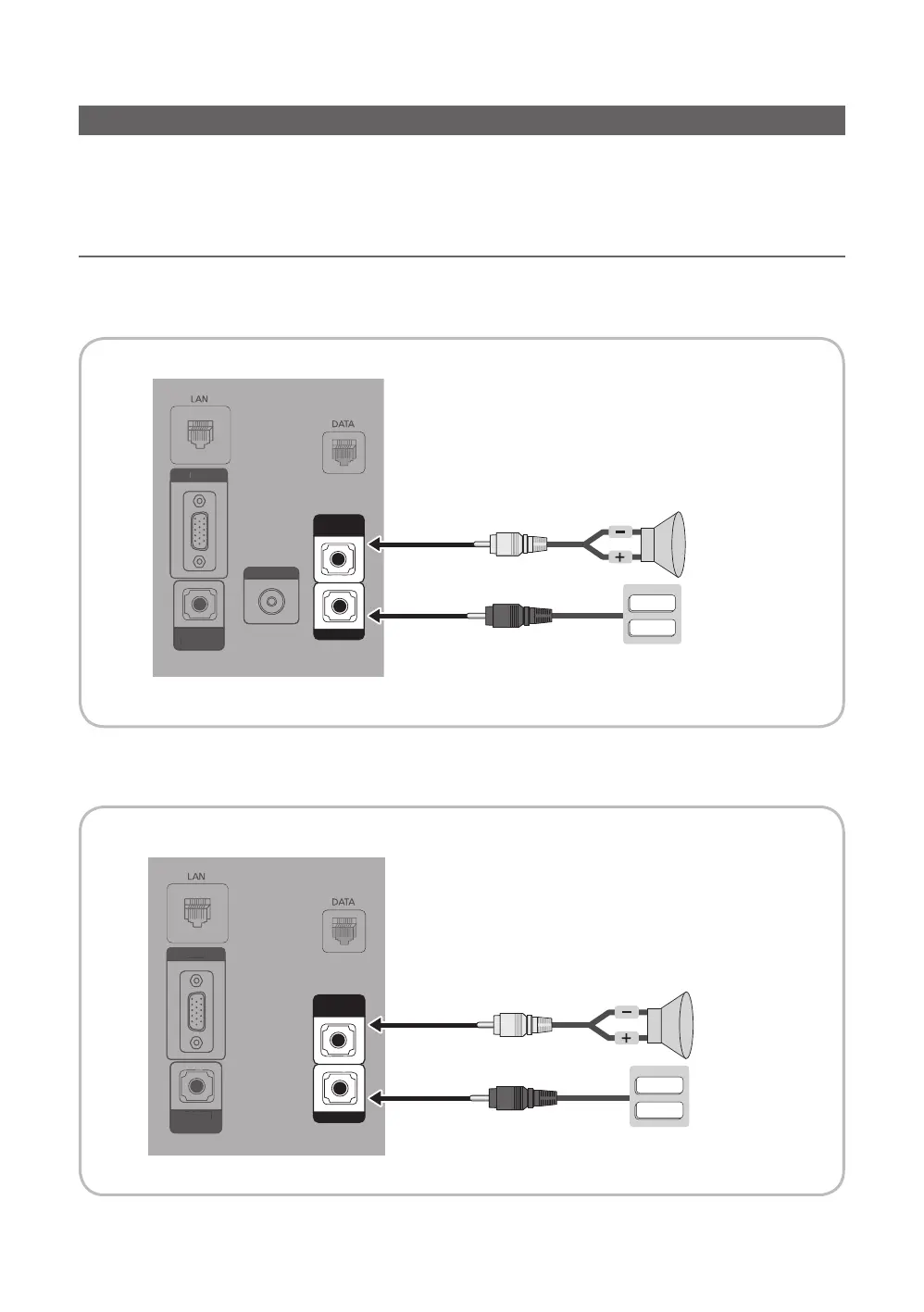
Connecting the Bathroom Speakers
You can connect the Bathroom Speakers using the following method.
¦ Connecting through the Variable Output (available without an external
amplifier)
(Inlay sample may vary depending on the model.)
y HG690 model
PC IN
HP-ID
DOOR-EYE RJP
VIDEO OUT
HDMI IN 3
(ARC)
PC/DVI
AUDIO IN
HDMI IN 2
(DVI)
USB
(5V 0.5A)
(HDD/1.0A)
/ CLONING
AV IN
AUDIO
VIDEO
HDMI IN 1
P
C
I
N
H
P
-I
D
D
OO
R-EYE
RJP
VIDE
O
OUT
HDMI IN
3
(
ARC
)
PC
/
DVI
AU
DI
O
I
N
H
D
MI IN
2
(
DVI
)
U
S
B
(5V 0.5A
)
(
HDD/1.0A
)
/
CLONIN
G
AV
IN
A
U
DI
O
V
IDE
O
H
D
MI IN 1
VARIABLE
AUDIO OUT
VOL-CTRL
VOL+
VOL
-
TV Rear Panel
Volume Control Box
Speaker
2
1
y HG890 model
PC IN
HP-ID
DOOR-EYE RJP
HDMI IN 3
(ARC)
PC/DVI
AUDIO IN
HDMI IN 2
(DVI)
USB
(5V 0.5A)
(HDD/1.0A)
/ CLONING
AV IN
AUDIO
VIDEO
HDMI IN 1
P
C
I
N
H
P
-I
D
D
OO
R-EYE
RJP
HDMI IN
3
(
ARC
)
PC
/
DVI
AU
DI
O
I
N
H
D
MI IN
2
(
DVI
)
U
S
B
(5V 0.5A
)
(
HDD/1.0A
)
/
CLONIN
G
AV
IN
A
U
DI
O
V
IDE
O
H
D
MI IN 1
VARIABLE
AUDIO OUT
VOL-CTRL
VOL+
VOL
-
TV Rear Panel
Volume Control Box
Speaker
2
1

Related product manuals