5
English
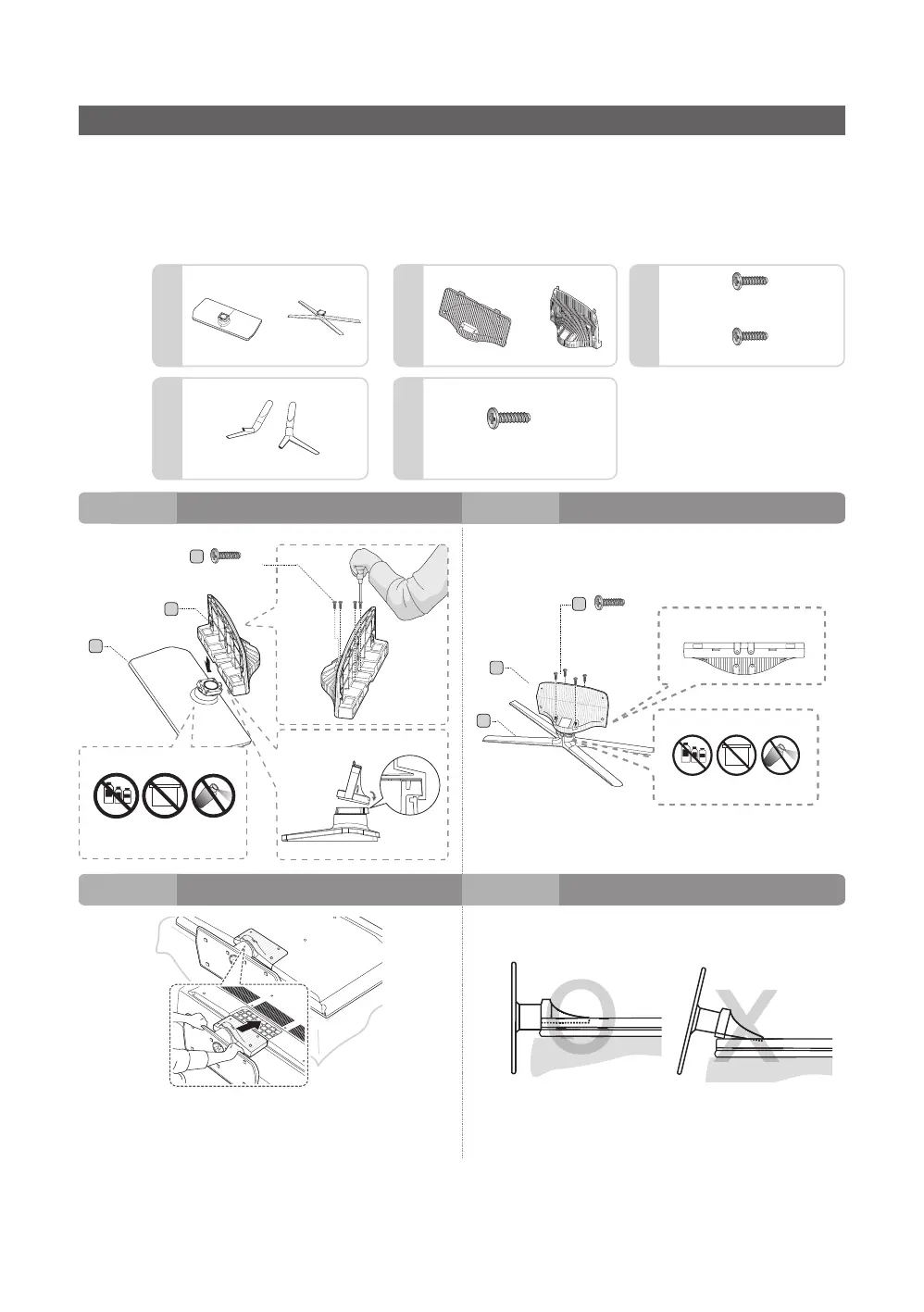
Installing the LED TV Stand
y HG690 Model
y Stand Components
When installing the stand, use the provided components and parts.
B
B
X4(M4 X L12)
40~65 inch
75 inch
C
or
A
A
×8(M4×L12, for inch 40 48)
or
×8(M4×L10, for inch 60” 65”)
40/48 inch:
M4 X L12
60/65 inch:
M4 X L10
Front
Front
Rear
Top View
Side
ATTENTION
ATTENTION
DO NOT USE
CHEMICALS
DO NOT USE
CHEMICALS
DO NOT USE
GREASE
DO NOT USE
GREASE
DO NOT USE
OIL
DO NOT USE
OIL
A
A
B
B
x4
(M4 X L12)
C
Top View
x4
(M4 X L10)
C
1 - 1 1 - 2
− Place a soft cloth over a table to protect the TV, and then
place the TV on the cloth screen side down.
− Insert the Stand Guide into the slot on the bottom of the TV.
2 3
or






 To Next Page