33
English
y HG890V model
⬊ᄥ⤀ⴑ
HP-ID
PC
䕨
ANT
䕨ܺ
᮵㒔᳞㒔
ৄভ䷈书䕨ߏ
ᘧ䞤䷈书䕨ߏ
ᄥ⤀ⴑ
-I
P
ভ䷈书䕨ߏ
ᘧ䞤䷈书䕨ߏ
HDMI 䕨ܺ
3 (DVI)
HDMI 䕨ܺ
2
HDMI 䕨ܺ
1 (ARC)
RJP
HDMI
USBRS/232
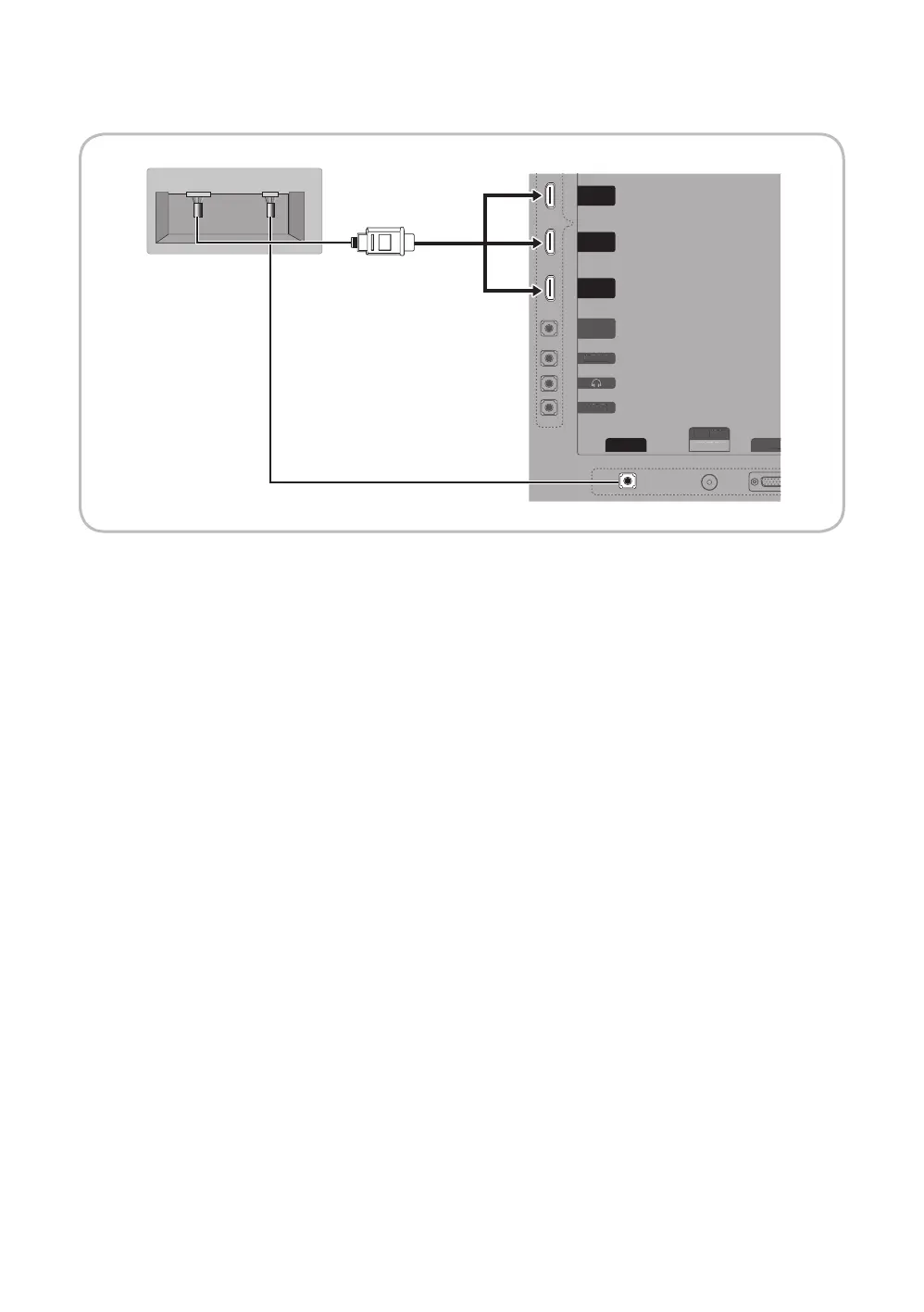
TV Rear Panel
MediaHub HD Rear
2
HDMI cable
1
RS-232 Data Cable
1. Connect the RJP port of the TV and the RS/232 port of the MediaHub HD.
2. Connect the 1 or 2(DVI) or 3(ARC) (HDMI IN 1(ARC), 2, 3(DVI) for HC890V model) port of the TV and the HDMI port of the
MediaHub HD.
y MediaHub HD
− The MediaHub HD is a hardware module that has different Audio Video inputs (A/V, Audio, PC, HDMI and USB)
and corresponding outputs. The corresponding output sources connect from MediaHub to the TV. MediaHub
communicates with the TV via RS232. Hot Plug & Play is a function that allows hotel guests to connect an external
source to the MediaHub. MediaHub communicates with the TV by sending messages regarding Active/Inactive
sources. The TV switches to the Active external source.
− You have to connect the HDMI of the MediaHub to the HDMI port of the TV.
− When the TV is on, connect the TV and the RJP within 10 seconds.
y Special features
− Plug & Play
− Auto Detection






 To Next Page