36
English
1. Connect the PC IN / PC/DVI AUDIO IN port of the TV to the PC/AUDIO port of the RJP.
2. Connect the AV IN [L-AUDIO-R] port of the TV to the AUDIO port of the RJP.
3. Connect the AV IN [VIDEO] port of the TV to the VIDEO port of the RJP.
4. Connect the HDMI IN(1, 2(DVI) or 3(ARC)), HG890V model: HDMI IN(1(ARC), 2, 3(DVI)) port of the TV and the HDMI port
of the RJP.
5. Connect the RJP port of the TV and the RS/232 port of the RJP.
✎ The RJP (Remote Jack Pack) compatible with this Samsung TV is TeleAdapt TA-7610, TA-7650 (HD) and TA-7660 (HD
Plus).
y RJP (Remote Jack Pack): RJP stands for Remote Jack Pack. The RJP is a hardware module that has different Audio
Video inputs (A/V, Audio, PC and HDMI) and corresponding outputs. The corresponding output sources are connected
from RJP to TV. The RJP communicates with the TV via RS232. Hot Plug & Play is a function that allows hotel guests to
connect an external source to the RJP. The RJP communicates with the TV by sending messages regarding Active/Inactive
sources. The TV will switch to the Active external source according to the priority set by the User.
✎ You can select HDMI IN(1, 2(DVI) or 3(ARC)), HG890V model: HDMI IN(1(ARC), 2, 3(DVI)) and AV IN for connecting
RJP.
✎ When the TV is on, connect the TV and the RJP within 10 seconds.
y The RJP can be returned to the factory default settings by pressing the A/V and HDMI buttons simultaneously for 10
seconds. All LEDs blink 5 times to acknowledge that this has been finished.
y The RJP will automatically turn off any LEDs after 5 minutes to avoid unnecessary light pollution in the hotel room. The
LEDs that were turned off will turn on again if the guest touches any of the buttons and the 5 minute timer will restart. If the
guest then touches another source button, the TV will change to the selected source and the corresponding LED will be lit.
y After an RJP Reset or a TV Power OFF/ON, it takes approx. 10 seconds to establish communications between the TV and
the RJP.
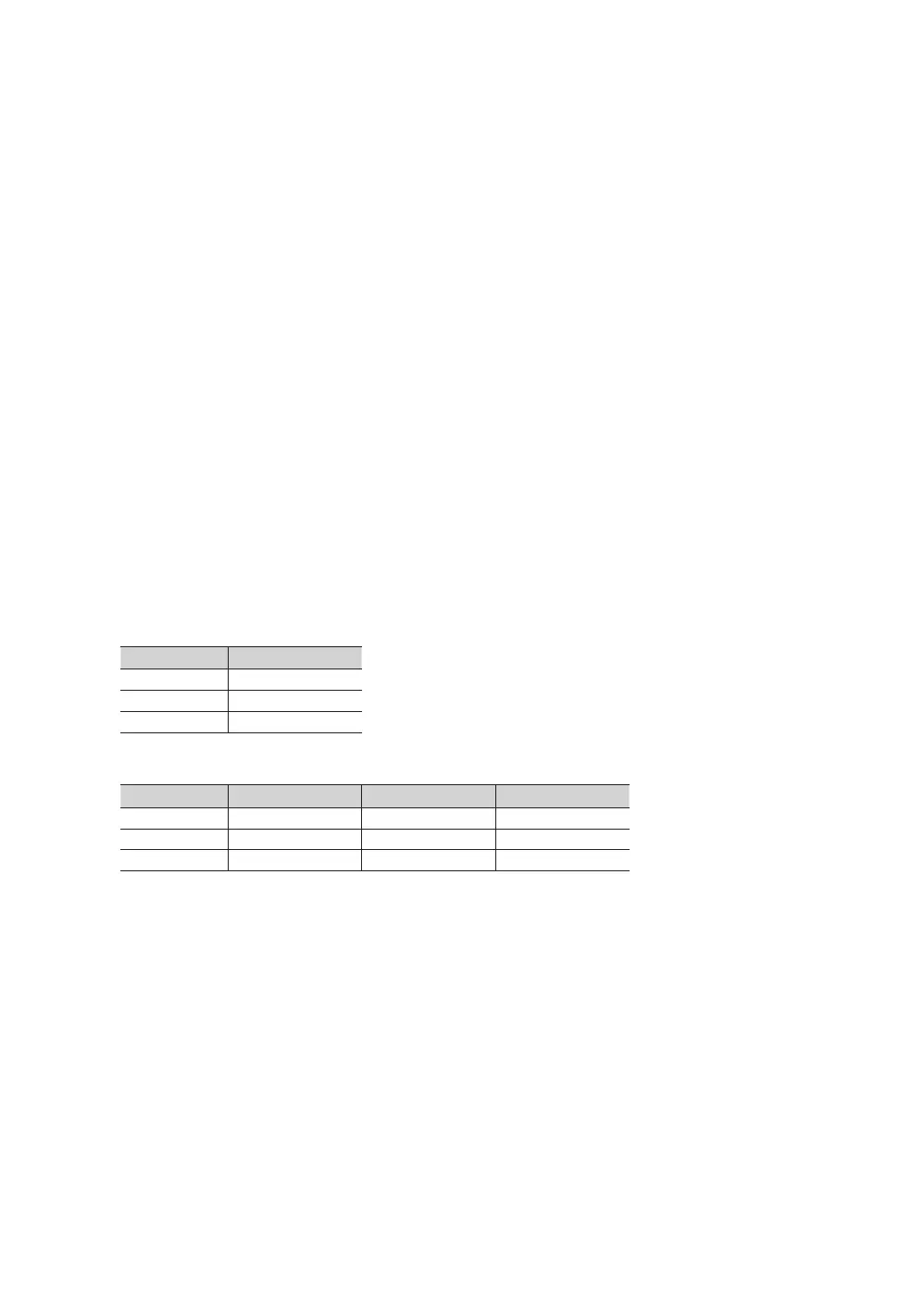
y The following table shows the approximate time in seconds to switch from the TV to the input source, based on the priority.
✎ Scenario 1: When no inputs are connected.
Source To Connect
AV 2 Sec
PC 0.7 Sec
HDMI 3.9 Sec
✎ Scenario 2: When two or more inputs are connected and an Input source is disconnected and then reconnected.
Source Disconnect To Connect Total
AV 4.5 Sec 2 Sec 6.5 Sec
PC 0.7 Sec 0.7 Sec 1.4 Sec
HDMI 3.9 Sec 3.9 Sec 7.8 Sec
✎ E.g. If the RJP has all its live sources AV, PC and HDMI connected, AV is viewed as the highest priority. If the RJP is
in HDMI mode, and a guest removes and reconnects the AV, the minimum time required to switch to the AV is 6.5
seconds.
y To connect audio (Ipod or Mp3), Music mode should be ON.
y A/V, PC and HDMI input sources are supported.








 To Next Page