3 Disassembly and Reassembly
3-1
3 Disassembly and Reassembly
This section of the service manual describes the disassembly and reassembly procedures for the
MZ19FS LCD Monitor.
WARNING: This monitor contains electrostatically sensitive devices. Use caution when handling
these components.
3-1 Disassembly
Cautions: 1. Disconnect the monitor from the power source before disassembly.
2. When IP-BOARD has a defect, the whole PCB ASS’Y, not a single part, should be
replaced.
3. R/Cover opening jig : BH81-00001A
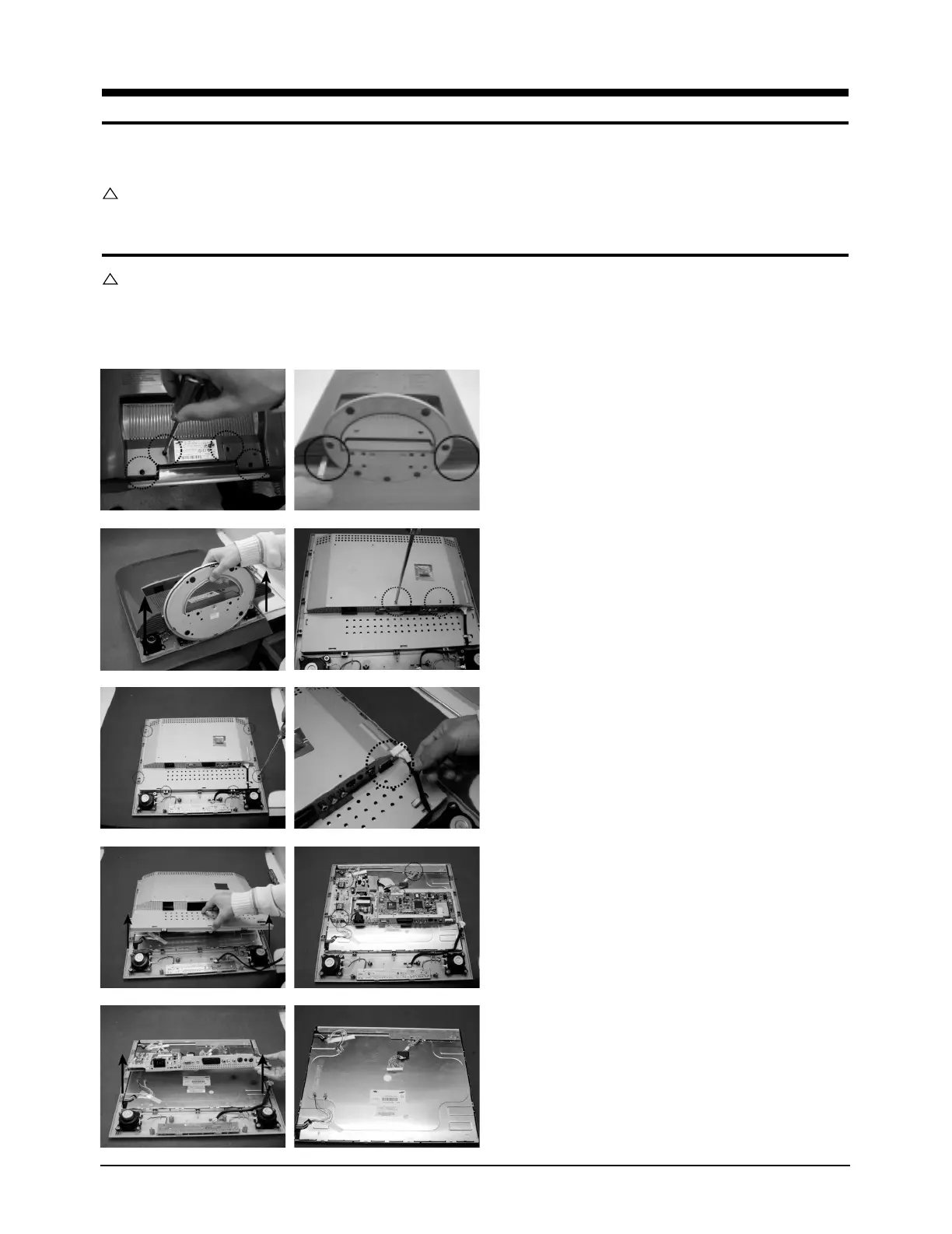
1. Place monitor face down on cushioned table.
Remove 4 screws from grip on the stand.
Remove the rear cover by using opening.
2. Remove rear cover from the monitor.
Remove 2 screws from the main shield.
3. Remove 6 screws from the main shield cover.
Disconnect speaker cable and function cable.
4. Lift up the shield cover.
Disconnect inverter cables, LVDS cable from the
main board.








 To Next Page