9
4. Check the test operation status by pressing the PCB switch
4. S/W-A and S/W-B of outdoor unit.
4. • Check the operation status by pushing the switch one at time.
4. • Perform the test operation only for the unit selected last.
4. • Check the pipe pressure and the other operation status during the test operation.
4. • Check items when the error occurs during the test operation (each unit)
- Check there is enough refrigerant.
- Check pipe connections.
If the lamp is not flickering, check as follows:
A. Check the display part of indoor unit of each unit (A,B) after outdoor unit PCB switch S/W-A is on.
A. Check the status of each unit indoor room select switch.
A. (Adjust the select switch suitable to the unit A, B.)
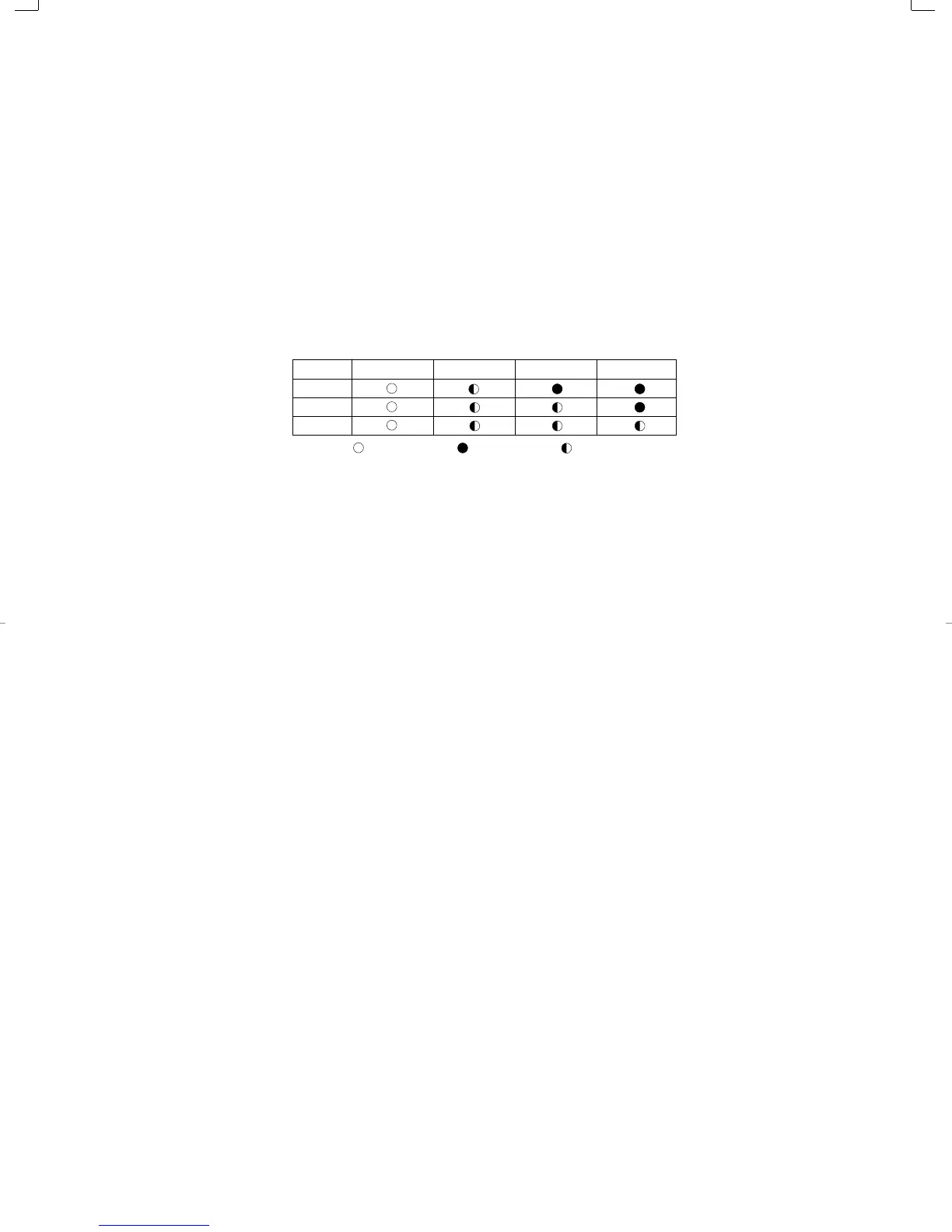
A. - A unit : STANDARD LED on, TIMER LED flickering
A. - B unit : STANDARD LED on, TIMER and NATURE LED flickering
A. - C unit : STANDARD LED on, TIMER and NATURE, POWER LED flickering (In case of triple
split multi air conditioner)
UNIT
A
B
C
Lamp ON
STANDARD TIMER NATURE POWER
Lamp OFF Lamp Flasher
DB98_05645A(1)_1 5/30/02 7:04 PM Page 9



 To Next Page