Need help?
Do you have a question about the Samsung AH68-02272Y and is the answer not in the manual?
Warnings regarding electric shock and exposure to moisture.
Information on Class 1 and Class 3B laser product safety.
Guidelines for proper grounding of CATV system cable.
Guidelines for safe operation, installation, and environmental factors.
Lists the items supplied with the product.
Combines multi-disc playback, FM tuner, and USB HOST capabilities.
Automatically adjusts TV screen brightness and unit power.
Details HDMI output and iPod connectivity options.
Explains DVD features and lists compatible disc types.
Lists incompatible discs and provides copy protection guidelines.
Information on compatibility and playback of CD-R and CD-RW discs.
Guidelines for playing MP3, JPEG, and DivX files on discs.
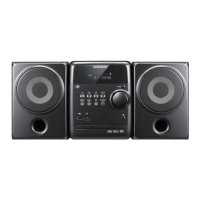
Identifies controls and ports on the front of the unit.
Identifies controls on the top of the unit.
Details connectors for MM-C430D/C530D models.
Details connectors for MM-C550D model.
Explains the functions of each button on the remote control.
Step-by-step guide for inserting batteries into the remote.
Specifies the operating range and angles for the remote.
Guidance on placing the DVD player and speakers for optimal setup.
Visual guides for connecting speakers to different models.
Connects the unit to a TV using an HDMI cable for best quality.
Connects using component video cables for better quality.
Connects using composite video cables for good quality.
Details HDMI auto detection, interface, and connection descriptions.
Explains HDMI advantages over analog and the purpose of HDCP.
Explains Anynet+ for linked operation with Samsung TVs.
How to control the unit using a Samsung TV remote.
Optimizing picture quality with BD Wise compliant TVs.
Steps to enable or disable audio transmission via HDMI.
How to choose the desired video output resolution for HDMI.
Compares interlaced and progressive scanning techniques.
How to select between I-SCAN and P-SCAN modes for video output.
How to connect an iPod and play music files.
Lists the iPod models compatible with the system.
Steps to connect external analog audio/video sources.
Instructions for connecting the FM antenna for radio reception.
Precautions regarding the unit's cooling fan for safe operation.
Procedure to set the current time on the unit.
How to view the remaining time for DVD/CD/MP3 playback.
Guide for inserting discs and initiating playback.
Instructions for stopping, pausing, and resuming playback.
How to load and play music from MP3/WMA CDs.
Selecting albums/tracks and stopping MP3/WMA playback.
Controls for rotating and flipping JPEG images.
How to use the slide show feature and adjust its speed.
How to skip forward or backward between DivX files.
How to playback DivX files at various fast-forward speeds.
How to skip forward or backward by 5 minutes in DivX playback.
How to display and select audio and subtitle tracks.
Table outlining supported DivX video, audio, and subtitle formats.
How to connect an iPod and play music files.
How to browse music by category and select tracks.
How to connect an iPod and play video files.
How to browse and select video files from the iPod.
Steps to connect a USB device and select USB mode.
How to stop, skip, and fast playback USB media files.
Details USB host specifications, compliance, and limitations.
Lists compatible devices and file formats for USB playback.
How to view title, chapter, audio, and subtitle information.
Defines DVD titles and chapters for navigation.
How to select different fast playback speeds for discs.
How to select different slow playback speeds for discs.
How to skip to the next or previous chapter, track, or file.
How to advance playback one frame at a time.
How to switch between multiple angles recorded on a DVD.
How to set repeat modes for playback (Track, Folder, Title, etc.).
Explains Normal, Repeat Track, Folder, All, and Shuffle modes.
How to set start (A) and end (B) points for specific playback loops.
How to exit the A-B repeat mode and return to normal playback.
How to zoom in on and move around areas of the displayed image.
How to select different audio languages available on a disc.
How to select different subtitle languages available on a disc.
How to jump directly to a specific title or chapter on a disc.
How to jump directly to a specific point in playback time.
Steps to open and navigate the interactive menu on a DVD.
How to open and navigate the title menus for multi-title discs.
How to set the language for the player's OSD and disc menus.
How to set preferred audio and subtitle languages for playback.
How to select screen aspect ratios like 4:3 or 16:9.
How to set video output modes such as I-SCAN or P-SCAN.
Explains 16:9 Wide, 4:3 Letter Box, and 4:3 Pan&Scan modes.
How to restrict playback based on content rating levels.
How to enter the password for parental controls.
Steps to change the existing parental control password.
How to adjust DRC for optimal Dolby Digital sound at low volumes.
How to adjust audio delay to match video sync with digital TV.
Instructions for tuning into FM stations using the remote control.
How to select stations using the main unit's function button.
How to select Mono or Stereo audio output for radio.
Steps to preset up to 15 FM stations for easy tuning.
How to copy audio tracks from a CD to an MP3 file on USB.
How to start, stop, and handle potential issues during ripping.
How to program the unit to turn on or off at specific times.
Setting volume and source for timed playback operations.
How to cancel the programmed timer settings.
How to resume previously set timer operations.
Enhances bass and high frequencies for powerful audio.
Amplifies bass for a more powerful and realistic sound.
How to select various DSP modes and EQ settings for music genres.
How to program the unit to automatically turn off.
How to temporarily silence the audio output.
How to view a demonstration of the system's features.
How to adjust the display brightness using the dimmer function.
How to connect headphones to the front panel for private listening.
How to connect a microphone for singing or voice input.
Guidelines for touching and handling discs to avoid damage.
Instructions for cleaning and storing discs to maintain playback quality.
Remedies for disc tray not opening or playback not starting.
Solutions for remote not working or no sound produced.
How to address picture problems or condensation effects.
Remedies for disc not producing picture or poor quality.
Solutions for language, menu, or aspect ratio problems.
Remedies for radio reception issues or unit not working.
Steps for forgotten parental control password and unit reset.
Definitions of terms used in the manual, such as DVD, PCM, PBC, Region Number.
Explains the one-year warranty for labor and parts.
Lists damages and conditions not covered by the warranty.
Provides contact numbers and web links for Samsung customer care globally.
 General
| Type | Stereo System |
|---|---|
| Brand | Samsung |
| Model | AH68-02272Y |
| Category | Stereo System |
| Channels | 2.0 |
| Bluetooth | No |
| USB Port | Yes |
| FM Radio | Yes |

 To Next Page