EasyManua.ls Logo

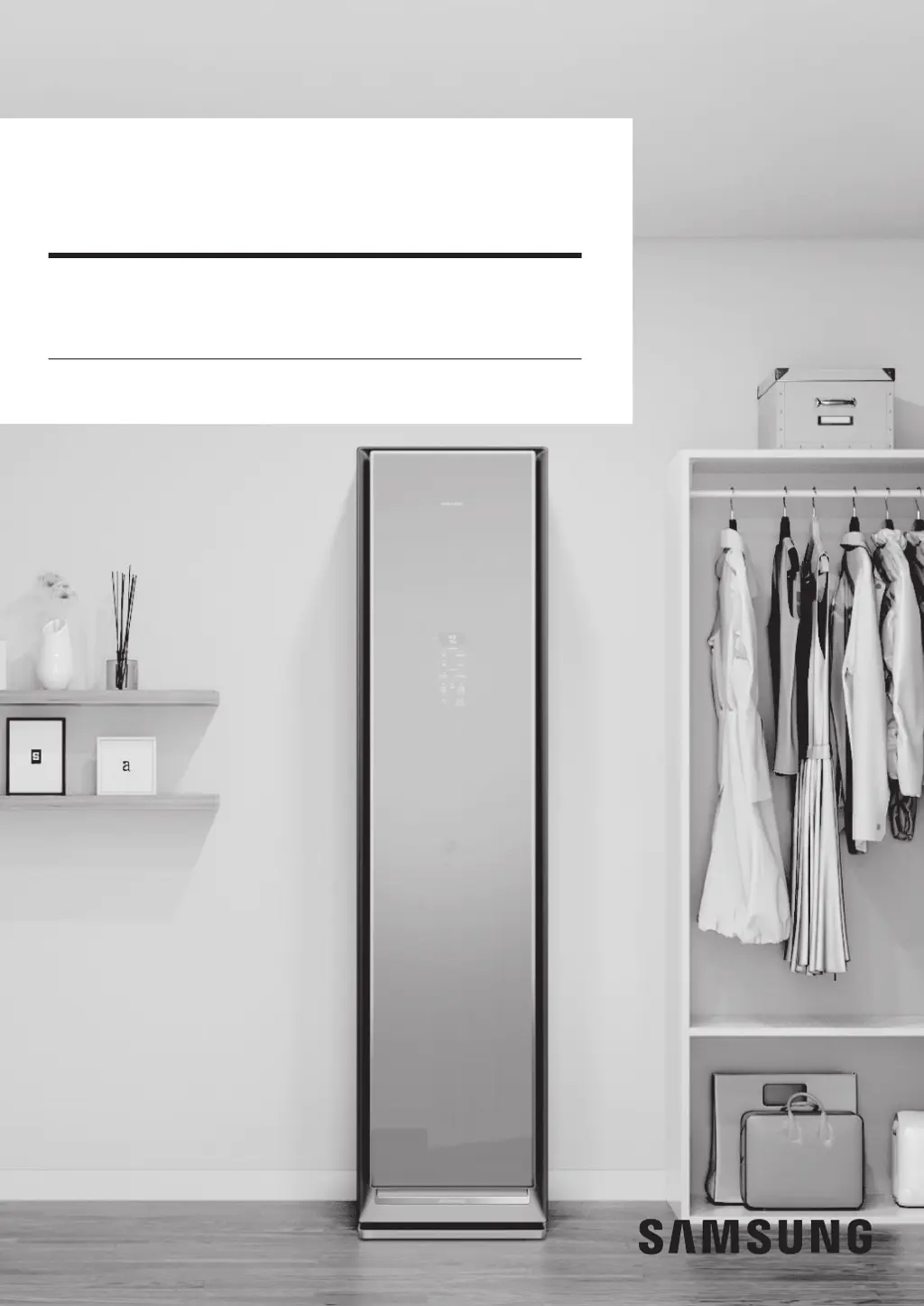
Samsung AIRDRESSER - User Manual

Samsung AIRDRESSER
120 pages
Print Icon
To Next Page IconTo Next Page
Loading...
Clothing Care System
(AIRDRESSER)
User manual
DF60*8****G
Untitled-3 1 2020-01-06 PM 2:23:15

Table of Contents

Other manuals for Samsung AIRDRESSER

Questions and Answers

  • A
    Abigail HigginsAug 19, 2025
    How to fix a Samsung Household Appliance that does not turn on?
    • J
      Jennifer WhiteAug 19, 2025
      If your Samsung Household Appliance isn't turning on, try these steps: * Tap the Power button. * Ensure the power cord is correctly plugged in. * Check that the circuit breaker is on. * Confirm the power cord is connected to a suitable power outlet.
  • M
    Michael HenryAug 21, 2025
    What to do if my Samsung Household Appliance does not operate?
    • W
      Wendy SmithAug 21, 2025
      If your Samsung Household Appliance isn't working, make sure of the following: * The door is completely closed before tapping Start/Pause. * Child Lock is off. * If you hear water sounds, the appliance is likely preparing for a steam process, which is normal. If you've used any liquids other than water, contact a Samsung service center.
  • T
    Timothy OnealAug 23, 2025
    Why is steam coming out of my Samsung AIRDRESSER door?
    • J
      Joan MillerAug 23, 2025
      If steam or air is coming out from the door of your Samsung Household Appliance, make sure that there are no items caught in the door and that the door is properly closed.
  • K
    Kayla WilsonAug 26, 2025
    What to do if items are wet after cycle in Samsung Household Appliance?
    • A
      Alexandra RichAug 26, 2025
      If items are wet after a cycle in your Samsung Household Appliance: * Ensure the lint filter is clean and properly inserted. * Check the door gasket for damage or obstructions. If damaged, unplug the power cord and contact a Samsung service centre.
  • E
    eric25Aug 27, 2025
    How to stop Samsung Household Appliance from vibrating?
    • M
      Miss Donna BarkerAug 27, 2025
      If your Samsung Household Appliance is vibrating, ensure it is installed on a solid, level surface and that the product is level.
  • C
    Catherine HaysAug 29, 2025
    What to do if Samsung AIRDRESSER shows 'Door Open'?
    • I
      iwatsonAug 29, 2025
      Here's what to check if you see the 'Door Open' message on your Samsung Household Appliance: * Ensure the door is fully closed before tapping Start/Pause.
  • K
    Katherine ThompsonSep 1, 2025
    How to refill water tank in Samsung AIRDRESSER?
    • S
      scolemanSep 1, 2025
      If the Reflil Tank of your Samsung Household Appliance needs refilling, check the following: * Ensure the Reflil Tank has enough water, filling it to the MAX line before reinserting it, then tap Start/Pause. * Verify the Reflil Tank is properly inserted before tapping Start/Pause.
  • C
    Christine DominguezSep 3, 2025
    Why is the control panel on my Samsung AIRDRESSER not working?
    • C
      Carol RamirezSep 3, 2025
      If the control panel of your Samsung Household Appliance isn't responding, wait a moment after plugging it in, as it takes about 10 seconds to become active. If it still doesn't work, clean the control panel. If the problem continues, contact a Samsung service center.
  • R
    Ronnie JohnstonSep 5, 2025
    Why is my Samsung Household Appliance making sounds?
    • P
      Paul HendersonSep 5, 2025
      If your Samsung Household Appliance is making sounds, it is likely normal operation. Sounds can occur due to compressor operation, air circulation, steam processes, water pumping, or water flowing through the pipe when the door is opened. If the noises become louder, contact a Samsung service centre.
  • M
    Michael HallSep 7, 2025
    Why is my Samsung Household Appliance not deodorising items?
    • K
      Kevin GarciaSep 7, 2025
      If your Samsung Household Appliance is not deodorizing items, consider the following: * Wash items with strong odors or those stored for a long time. * Wash items contaminated by oils. * For large items like down-filled jackets, run an additional cycle. * Separate items by odor strength. * Ensure the lint filter and both tanks are clean.

Summary

Safety Information

General Safety Instructions

Essential information and symbols for safe product operation.

Specific Safety Warnings

Covers Proposition 65, electrical, installation, and cleaning precautions.

Regulatory Notice

FCC Compliance

Information regarding compliance with FCC rules for radio frequency emissions.

IC Compliance

Details Industry Canada compliance and radio frequency exposure information.

Before You Start

Installation and Grounding

Instructions for proper installation and grounding of the appliance.

Product Overview and Accessories

Identifies product parts and lists available accessories.

Control Panel Operations

Explains the operation and features of the appliance's control panel.

Cycle Management

Details various cycles including daily, drying, special, and download options.

Fabric Care Guidance

Guidance on selecting appropriate cycles based on fabric types and care labels.

Smart Connectivity Setup

Steps for connecting and managing the appliance via the SmartThings app.

Open Source Software Information

Details about the open-source software included in the product.

Product and Accessory Use

Using a Cycle

Step-by-step guide on how to select and start a cycle on the AIRDRESSER.

Usage Guidelines

Important guidelines and recommendations for using the AIRDRESSER before, during, and after operation.

Accessory Guide

Instructions for using air hangers, regular hanger kit, weight kit, shelf, and accessory care zone.

Water Tanks and Fresh Finish

How to fill and maintain the water refill tank, drain tank, and use the Fresh Finish compartment.

Cleaning and Maintenance

Exterior Cleaning

Instructions for cleaning the outer surfaces of the AIRDRESSER.

Internal Component Cleaning

Steps for cleaning water tanks, water tray, air filter, and lint filter.

Descaling Procedure

Procedure for descaling the AIRDRESSER to maintain performance and lifespan.

Moving the Product

Safety tips and procedures for safely moving the AIRDRESSER.

Troubleshooting

Notification Messages and Actions

Explains common notification messages and their corresponding actions.

Problem Checkpoints

Lists common problems and their solutions or troubleshooting steps.

Limited Warranty (U.S.A.)

Air Dresser Warranty Details

Details the limited warranty specific to the Samsung Air Dresser product.

Warranty Exclusions and Limitations

Outlines limitations, exclusions for implied warranties, and remedies.

Samsung AIRDRESSER Specifications

General IconGeneral
Steam FunctionYes
Heat Pump DryingYes
Wi-Fi ConnectivityYes
Wrinkle RemovalYes
Voltage220-240 V
ColorWhite
Specialty CyclesWool
OptionsChild Lock
Smart FeaturesSmartThings App Control
DeodorizationYes
Allergen RemovalYes
Frequency50 Hz
Steam TemperatureInformation not publicly available