
 Need help?
Do you have a question about the Samsung AM012NNNDCH/AA and is the answer not in the manual?
Defines safety levels (WARNING, CAUTION) and provides general instructions for safe use.
Critical safety measures and warnings related to appliance installation.
Ensures proper grounding of the appliance to prevent electrical hazards.
Precautions for installing on a level floor and ensuring proper drain hose connection.
Guidelines for safe use of the power line and circuit breaker.
Safety measures to follow during the normal operation and use of the air conditioner.
Protective measures for children and avoiding foreign objects in the unit.
Cautions regarding placement, handling, and use of volatile materials near the appliance.
Safety warnings and precautions to be taken during cleaning and maintenance.
Detailed explanation of the indoor unit's components and display indicators.
Description of the functions indicated by various lights and symbols on the unit.
Specifies the recommended indoor and outdoor conditions for optimal operation.
Instructions on how to pair multiple indoor units with a single remote control.
Steps for cleaning the outer surfaces of the indoor air conditioning unit.
Procedure for cleaning the heat exchanger of the outdoor unit.
Detailed steps for detaching, cleaning, and drying the air filter.
Instructions for putting the air filter back and resetting the filter cleaning reminder.
Recommended maintenance tasks and intervals for the indoor unit.
Recommended maintenance tasks and intervals for the outdoor unit.
Solutions for the air conditioner not starting immediately or not operating at all.
Troubleshooting common problems related to temperature control and fan speed.
Steps to resolve issues with the wireless or wired remote control.
Resolving problems with timed operations and continuous blinking unit displays.
Troubleshooting tips for insufficient cooling or heating performance.
Diagnosing and resolving issues related to strange noises and unpleasant odors.
Understanding and troubleshooting steam production and water dripping.
This document is a user manual for a Samsung air conditioner, model AMNNNCH*. It provides comprehensive information on the safe and efficient operation, features, and maintenance of the appliance.
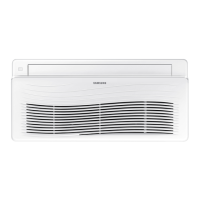
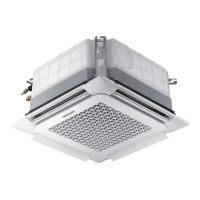
The Samsung air conditioner is designed to regulate indoor temperature and humidity, offering various modes such as Cool, Dry, and Heat. It is intended for use in residential or commercial settings to provide a comfortable indoor environment. The device includes an indoor unit with an air intake and an air outlet, which may feature a Wind-Free panel for enhanced cooling. An outdoor unit works in conjunction with the indoor unit to facilitate the cooling and heating processes. The air conditioner is controlled via a remote control, which can be either wired or wireless, depending on the model. The indoor unit features a display that shows various indicators such as On/Off operation, removing frost, timer, filter cleaning, and remote control sensor activity.
The air conditioner offers several operational modes to suit different environmental conditions and user preferences. The Cool mode is effective within an indoor temperature range of 64°F to 90°F (18°C to 32°C) and an indoor humidity of 80% or less. The Dry mode operates within the same temperature and humidity ranges. For heating, the Heat mode is designed for indoor temperatures up to 86°F (30°C) or less. The outdoor temperature specifications for these modes depend on the specific outdoor unit.
Users are advised to maintain the indoor humidity below 80% when using the air conditioner to prevent condensation and water leakage. The heating capacity may decrease if the outdoor temperature falls below 32°F (0°C). If the indoor unit operates outside its specified temperature and humidity range, a safety device may activate, causing the air conditioner to stop.
For installations with multiple indoor units, individual pairing of remote controls with indoor units is possible. This feature allows users to control each indoor unit independently. The pairing process involves selecting a zone (1-4) and confirming the setting on the remote control. It is crucial to complete the pairing within 60 seconds after initiating the process. The indoor unit number setting must be configured by the installer, and a service center should be contacted for resetting if needed.
To enhance cooling efficiency and save energy, it is recommended to operate the air conditioner with an electric fan. If the air is not cool or warm enough, users should check the set temperature, ensuring it is lower than the current temperature for cooling or higher for heating. In Cool mode, cool air may not come out immediately after restarting due to a protective mechanism for the compressor, taking about 3 minutes to begin. Similarly, in Heat mode, warm air may not come out immediately to prevent cold air from blowing at the start. The Fan mode does not provide cooling or heating, so users should select Cool, Heat, Auto, or Dry mode for temperature regulation.
Troubleshooting tips are provided for common issues. If the air conditioner does not operate immediately after restarting, it is due to a protective mechanism that delays operation by 3 minutes to prevent overloading. If the unit does not operate at all, users should check the power plug connection and ensure the auxiliary power switch (MCCB, ELB) is turned on. If the auxiliary power switch was off for an extended period, it should be turned on 6 hours before starting operation. If the indoor unit display blinks continuously, turning the unit off and on, or contacting a service center, is advised. Strange noises like hissing or rumbling during refrigerant circulation are normal, especially in certain outdoor temperature conditions. Noise from the drain pump when pressing the power button is also normal.
Regular cleaning and maintenance are essential for the optimal performance and longevity of the Samsung air conditioner. Before any cleaning or maintenance, the auxiliary power switch for the indoor unit must be turned off.
Cleaning the Indoor Unit Exterior: The surface of the indoor unit should be wiped with a slightly wet or dry cloth. For odd-shaped areas, a soft brush can be used to remove dirt. Harsh cleaning agents such as alkaline detergents, sulfuric acid, hydrochloric acid, or organic solvents (thinner, kerosene, acetone) should not be used as they can cause discoloration, deformation, or damage. Stickers should not be attached to the surfaces. Cleaning the indoor unit's heat exchanger requires disassembly and should only be performed by a local service center.
Cleaning the Outdoor Unit Heat Exchanger: The outdoor unit's heat exchanger should be cleaned by spraying water to remove dust. Caution is advised as the heat exchanger has sharp edges, and thick cotton gloves should be worn to prevent cuts. This task should be performed by a qualified technician or service center.
Cleaning the Air Filter: The air filter, located under the grille of the indoor unit, should be cleaned regularly. To detach the air filter, users need to push down the hooks on each side of the front grille to open it, then pull out the filter. The filter can be cleaned with a vacuum cleaner or a soft brush. If heavily soiled, it can be rinsed with running water and dried in a well-ventilated area. Scrubbing the filter with a brush or other cleaning utensil is not recommended as it may damage the filter. If the air filter dries in a humid area, it might produce offensive odors, in which case it should be cleaned again and dried in a well-ventilated area. The cleaning period varies, but it is recommended to clean the air filter weekly if the indoor unit is in a dusty environment. After cleaning and reassembling the air filter, the filter-cleaning reminder must be reset. For wired remote controls, press the "Filter Reset" button. For wireless remote controls, navigate through the options to "Filter Reset" (which will be blinking) and then press the "SET" button. It is important to reset the filter reminder even if the indicator light is not on, and to avoid operating the indoor unit without the air filter to prevent dust damage. If the air flow blade angle changes during maintenance, the auxiliary switch should be turned off and on again before operating the unit to ensure proper blade closure.
Periodical Maintenance: A detailed schedule for periodical maintenance is provided, indicating items that require attention and the recommended intervals.
These maintenance tasks ensure the air conditioner operates efficiently and safely, preventing potential issues such as reduced cooling/heating efficiency, strange noises, unpleasant odors, and property damage.
 General
| Cooling Capacity | 12, 000 BTU/h |
|---|---|
| Energy Efficiency Ratio (EER) | 11.0 |
| Refrigerant | R410A |
| Outdoor Unit Weight | 30 kg |
| Operating Temperature (Heating) | -15°C to 24°C |
| Type | Mini Split |
| Heating Seasonal Performance Factor (HSPF) | 9 |
| Indoor Unit Noise Level | 26 dBA |
| Outdoor Unit Noise Level | 50 dBA |
| Outdoor Unit Dimensions (WxHxD) | 780 x 540 x 285 mm |


 To Next Page