Need help?
Do you have a question about the Samsung AQV36JAXKCV and is the answer not in the manual?
Guidelines for safely installing the air conditioner, emphasizing professional installation and adherence to regulations.
Instructions on proper power connection, circuit breaker use, and electrical safety measures.
Safety advice for operating the air conditioner, including avoiding liquids and keeping children away.
Procedures for safely disposing of the air conditioner and its components, considering environmental impact.
Additional safety notes, including handling, supervision of users, and measurements.
Highlights key features like energy saving, multi-functional cleaning, and remote control.
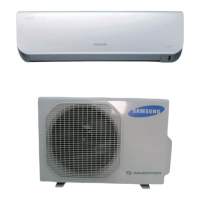
Identifies and illustrates the components of the indoor and outdoor units.
Detailed technical specifications for cooling, heating, power, dimensions, and components.
Compares specifications and design features between development and comparative models.
Lists included accessories and optional specifications for the air conditioner.
Step-by-step guide for disassembling the indoor unit components.
Step-by-step guide for disassembling the outdoor unit components.
Details indoor unit error codes indicated by LED lamps and their meanings.
Lists outdoor unit error codes (E-numbers) and their corresponding explanations.
Troubleshooting procedures based on specific symptoms and error codes.
Guidelines for inspecting PCBs, including pre-inspection notices and detailed inspection procedures.
Methods for inspecting key components like sensors and motors using a multimeter.
Procedure for entering setup mode and selecting options using the remote control.
Detailed list and diagram of parts for the indoor unit.
Detailed list and diagram of parts for the outdoor unit.
List of components for the Indoor Ass'y Control In PCB.
List of components for the Indoor Ass'y Control Out PCB.
Component lists for Outdoor Inverter, Main, EMI, and Display PCBs.
Circuit schematic diagram for the indoor unit, showing component connections.
Circuit schematic diagrams for outdoor unit PCBs including Inverter and EMI.
Diagram illustrating the refrigerant flow cycle between indoor and outdoor units.
Explanation of basic functions and modes (Auto, Cool, Heat, Dry, Fan) via remote control.
Details buttons and displays on the wireless remote control for operation.
Instructions for cleaning air filters and deodorizing/bio filters.
Steps for installing the unit, tightening flare nuts, and performing air-purge.
Graphs and tables showing pressure relationships and capacity data.
Guide to understanding model codes and their components.
 General
| Power Source | Electric |
|---|---|
| Refrigerant | R410A |
| Type | Split System |
| Power Supply | 220-240V/50Hz/1Ph |
| Operating Temperature (Heating) | -15°C to 24°C |
| Cooling Capacity | 36, 000 BTU/h |
| Heating Capacity | 38, 000 BTU/h |


 To Next Page