E-
30
To get the best possible use out of your air conditioner, you must
clean it regularly to remove the dust that accumulates on the air filter.
Before cleaning your air conditioner, ensure that you have
switched off the electric circuit breaker used for the unit.
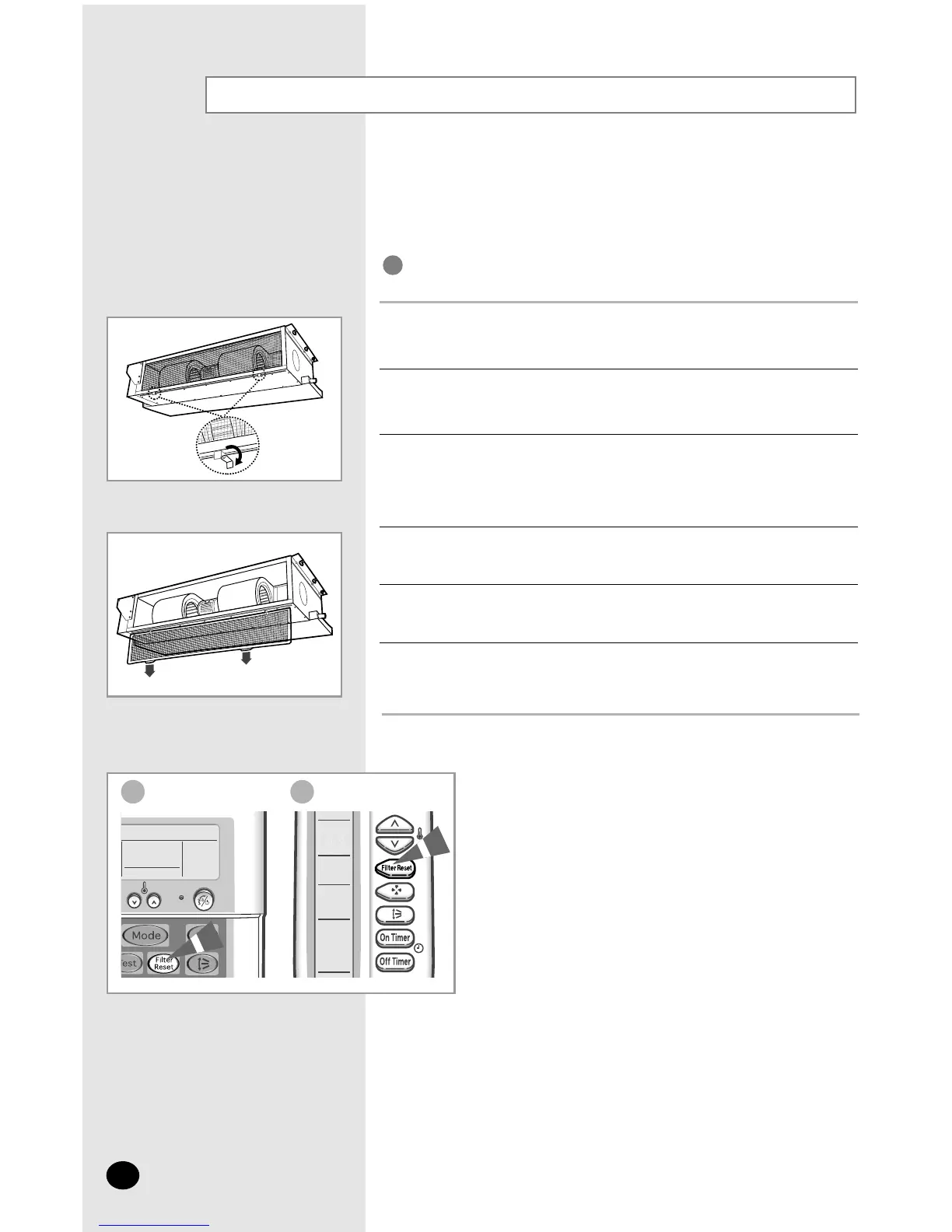
Turn the levers to the right or left not to prevent pulling out the air filter.
1
Pull out the air filter.
2
Remove all dust on air filter with a vacuum cleaner or a brush. In case of
serious dust accumulation, put the air filter in warm detergent water and
shake it vertically.
3
Dry the air filter.
4
When you have finished, insert the filter into the unit.
5
Return the levers.
6
IMPORTANT
After cleaning the air conditioner, press the Filter Reset button.
NN
NN
oo
oo
tt
tt
ee
ee
Wired Remote Controller Wireless Remote Controller
Cleaning Your Air Conditioner
✴✴
052/070/072
✴✴



 To Next Page