Samsung Electronics 3-5
Installation and Operating Instructions
3-2-7 LED lamp operation specifications
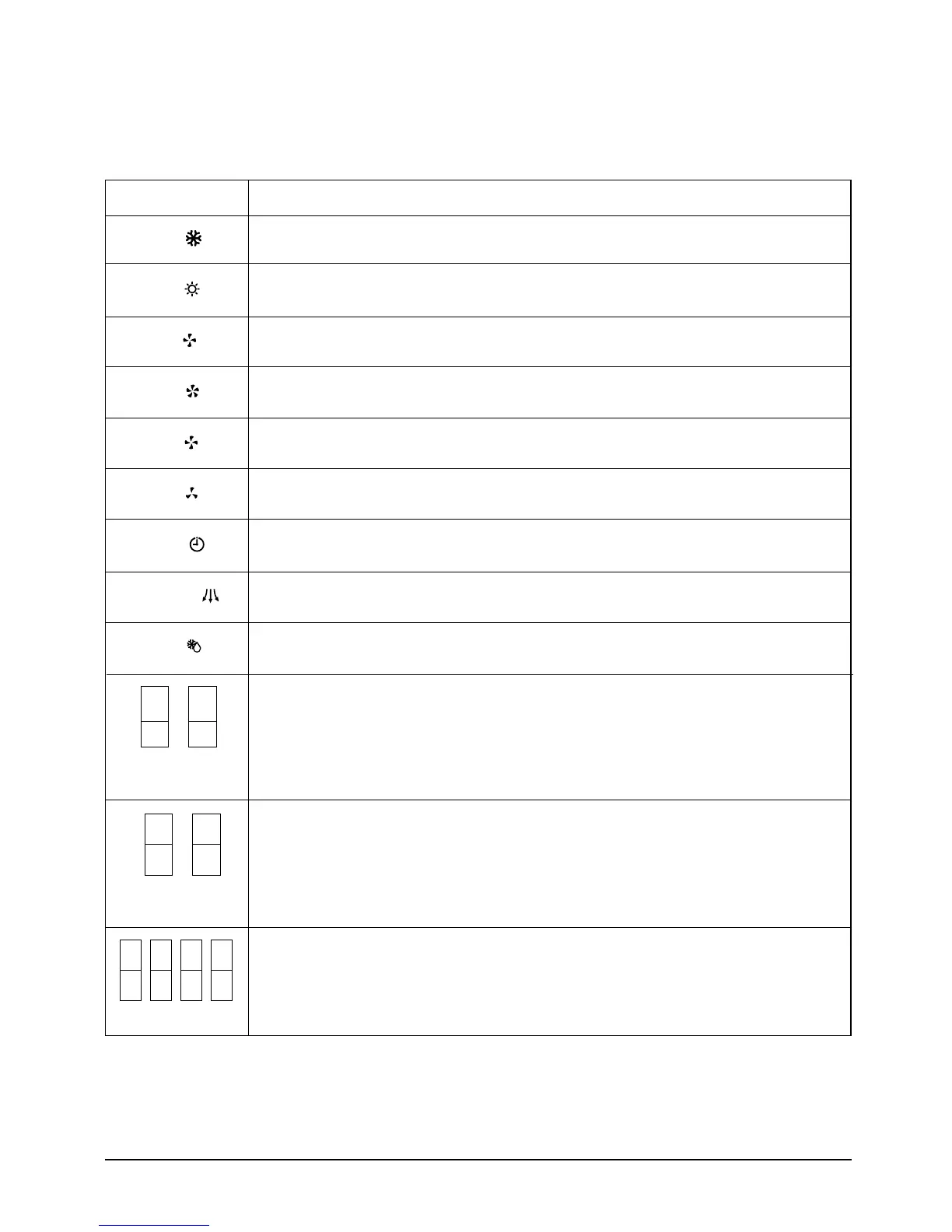
LAMP name Operations specifications
COOL ( )
The mode is set to
"
COOL
" –>
ON
Others
–>
OFF
HEAT ( )
The mode is set to
"
HEAT
" –>
ON
Others
–>
OFF
FAN ( )
The fan speed is set to
"
FAN
" –>
ON
Others
–>
OFF
HIGH ( )
The fan speed is set to
"
HIGH
" –>
ON
Others
–>
OFF
MED ( )
The fan speed is set to
"
MED
" –>
ON
Others
–>
OFF
LOW ( )
The fan speed is set to
"
LOW
" –>
ON
Others
–>
OFF
TIMER ( )
The mode is set to
"
TIMER
" –>
ON
Others
–>
OFF
AIR SWING
()
The mode is set to
"
Air Swing
" –>
ON
Others
–>
OFF
DEICE
()
Until the
"
DEICE
" operation is completed during heating operation –>
ON
Others –>
OFF
In case of set temperature display
-> NO. (1) 7–SEG LED DISPLAY indicates temperature of the tens digit
-> NO. (2) 7-SEG LED DISPLAY indicates temperature of the units digit
In case of time display
-> NO. (1) 7–SEG LED DISPLAY indicates time of the tens digit
-> NO. (2) 7–SEG LED DISPLAY indicates time of the units digit
In case of set temperature display
-> NO. (3) 7–SEG LED DISPLAY indicates temperature unit(˚)
-> NO. (4) 7-SEG LED DISPLAY indicates temperature unit(C), (F)
In case of time display
-> NO. (3) 7–SEG LED DISPLAY indicates time unit(H) of the tens digit
-> NO. (4) 7–SEG LED DISPLAY indicates time unit(r) of the units digit
First, 7–SEG LED DISPLAY
"
SLEEP
"
while 15 second,
Second, 7-SEG LED DISPLAY
"
8Hr
"
(1) (2)
(3)
(1) (2) (3) (4)
(4)
(J)DB98-03455A(1)-1 9/12/01 1:24 PM Page 3-5



 To Next Page