3-10 Samsung Electronics
Installation and Operating Instructions
1) Deicing detecting condition
• If one of A, B and C conditions is satisfied, deicing operation is carried out.(AUBUC)
• If counting time is overlapped due to detection reference temperature change during counting of the deicing con-
dition, deicing operation starts when the counting time is finished first.
• The maximum counting time is 100 minutes.
- During deicing operation, the left and right swing motor is turned off and stops at the position before swing.
- If operation is turned off during deicing operation, it is finished and the compressor is turned off.
-> Deice lamp ON, fan motor OFF.
2) Display indication.
• The deice lamp is turned on additionally during deicing cycle.
• Only the deice lamp is turned off when deicing is finished.
3) In case of turning off during deicing operation.
• The compressor is turned off after finishing the deicing operation.
• The deice lamp is turned on during deicing cycle and is turned off when deicing is finished.
4) In case of changing mode to cooling operation during deicing operation.
• Cooling operation is carried out after carrying out deicing operation.
• After the compressor is turned off and 1 minutes is passed, it is restarted.
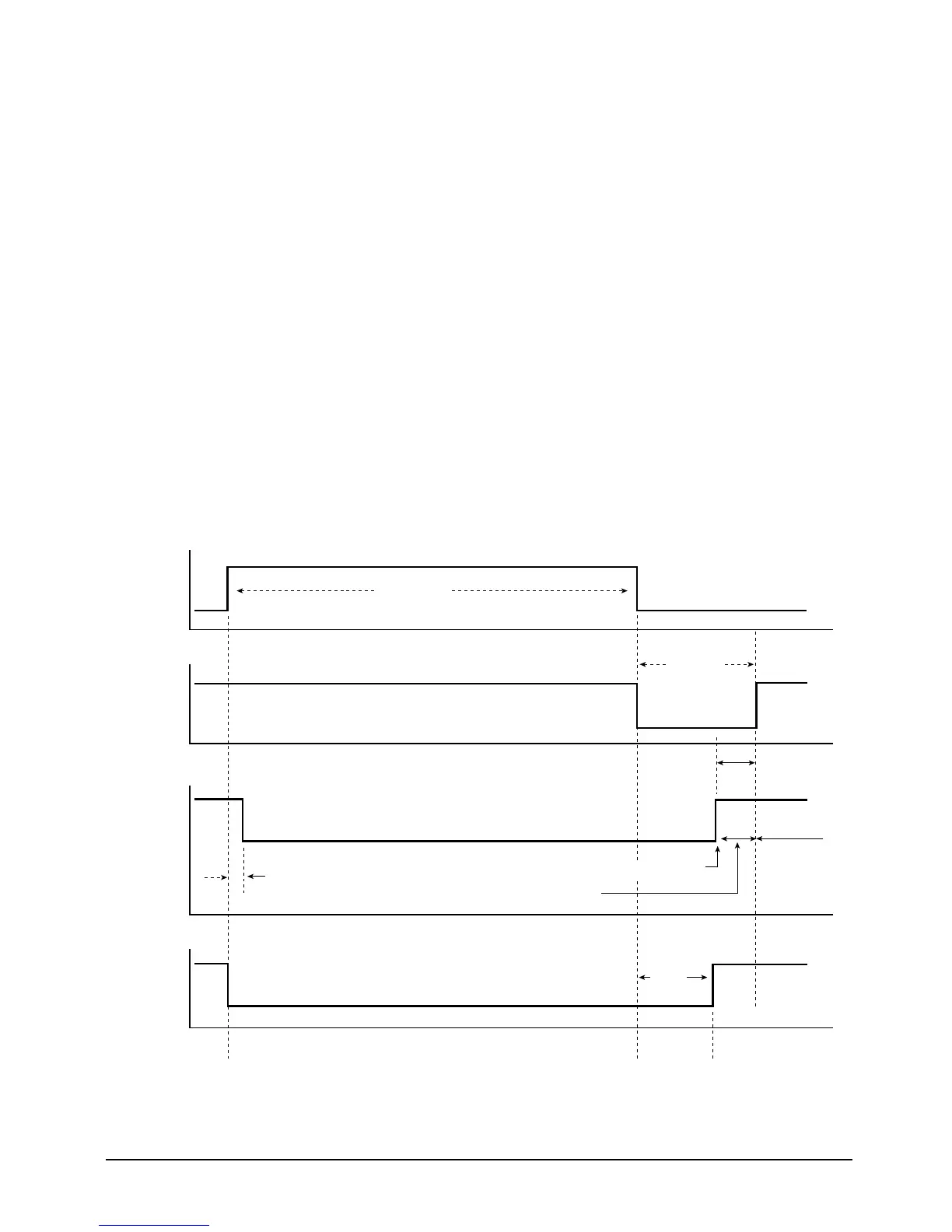
5) Load operation during deicing operation.
“DEICE” LED ON
Deice time
max 5 min
CYCLE
COMPRESSOR
FAN
MOTOR
4-WAY
VA LV E
ON
ON
1sec
ON
Cool blowing inhibition
THERMO ON
Set fan speed
and cool blowing
inhibition
OFF
OFF
OFF
2sec
1min
55sec
“DEICE” LED OFF
(J)DB98-03455A(1)-1 9/12/01 1:24 PM Page 3-10



 To Next Page