EasyManua.ls Logo

Samsung BD-D5700 - Page 72

Samsung BD-D5700
87 pages
Print Icon
To Next Page IconTo Next Page
To Previous Page IconTo Previous Page
Loading...
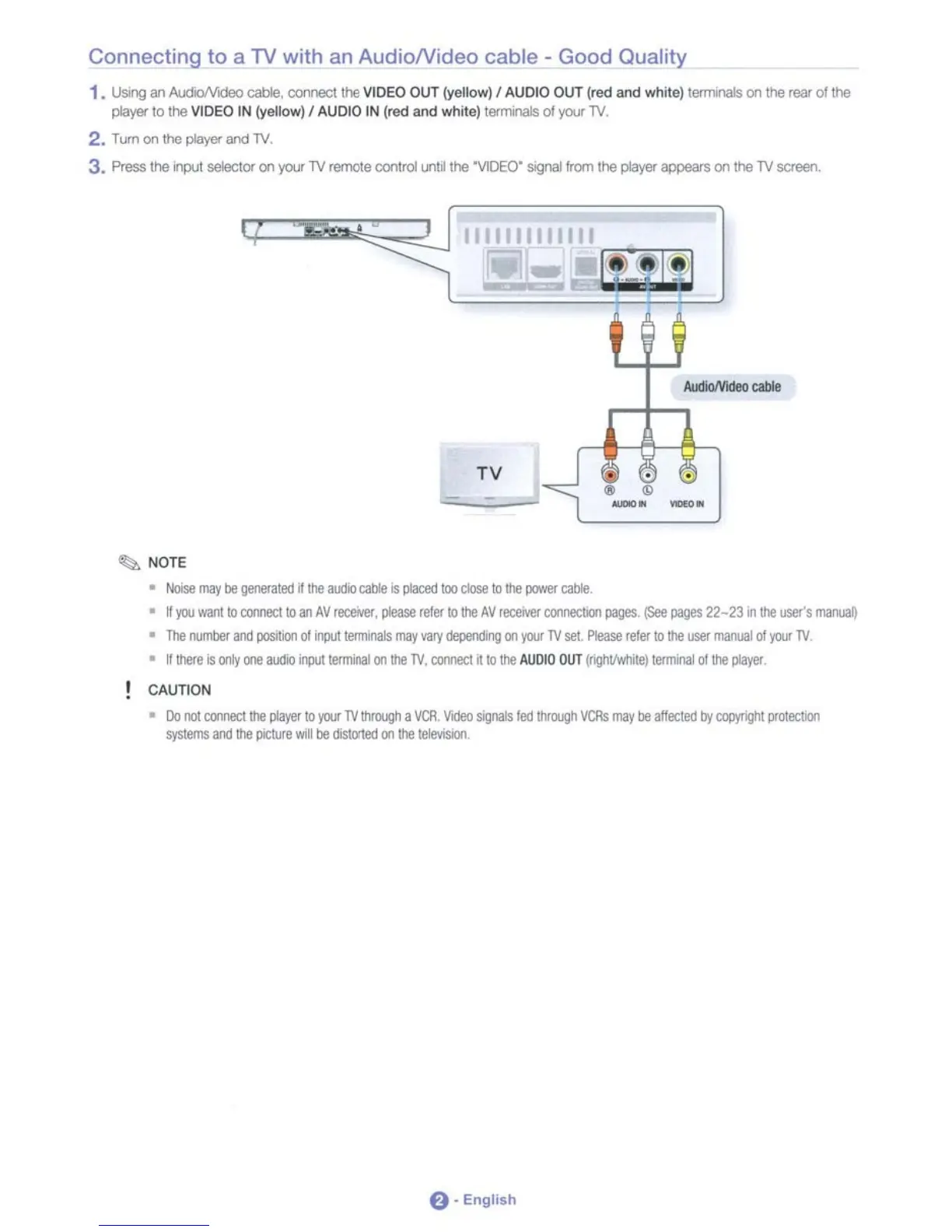
Connecting
to
a
TV
with
an
AudioNideo
cable·
Good Quality
1,
USII1g
an
AudioNIdeo cable,
co:voect
the
VIDEO
OUT
(yellow) I AUDIO
OUT
(red and white) termnals
on
the
rear
of
the
player
to
the
VIDEO
IN
(yellow) I
AUDIO
IN
(red and white)
tetl1"Wlals
of
you
TV.
2.
Tum
on
the
player and
TV.
3, Press
the
~
selactor
on
you
TV
remote
control
UI'lfj
the
'VIDEO'
sognaI!rom
the
player
appears
on
the
TV
screen.
--
TV
~
NOTE
•
NOISe
may
be
Ileoer.ltett
nItle
:uDo
cable
is
pIal::ed
lao
ck)se
tollle
power
cable
•
~
jQ.I
ward
to
oomect
to
an
AV
receivef,
please
reler
tollle
AV
recerver
OOOoleCliOI,
pages.
(See
pages
22-23
.,
IIIe
user's
manuaO
•
The
rwrOOer
iIOd
posllioo
01
irlIl/l
tenmnals
may
var;
deperOng
00
jWI'
TV
sel.
Please
retllf
tolhB
user
manual
of
jWI'
TV
•
~
there
is
~
one
audio
illlUllerminai
(01
the
TV,
comect
tt
to
the
AUDIO
OUT
(rlg/lt/1MUle)
terminal
of
the
~
CAUTION
•
Do
oollXJOllletlllle
~
to
jWI'
TV
througIl
a
VCR,
Vkleo
SIQ01IIs
fed
Ihroogh
VCRs
may
be
allettett
by
eopyrigIlt
proteclioo
systems
and
the
picture
\Oil
be
cislOrled
OIl
lhe
lelevisolo.
e·
English

Table of Contents