EasyManua.ls Logo

Samsung BD-D5700 - Page 73

Samsung BD-D5700
87 pages
Print Icon
To Next Page IconTo Next Page
To Previous Page IconTo Previous Page
Loading...
Connecting
to
the Network
TIlls
player
lets
you
use
nelWOfk
based
serVICeS such
as
Smart
Hub
and
BO·UVE,
and download software upgrades
when
tt
IS
COI"rlOCIed
to
a
netWOrk.
We
recommend
USIll9
an
AP
(Access Pointl or
IP
router lor
the
comecbon,
For
more
rlformatoon
on
router
comactlOOS.
rater
to
the
user manual
01
the
router or contact the router
man..rtacturer
lor
teo'1nical8SSislance.
For
e
de\ajed
explanation
01
hoW
to
comect
\'QUI"
player
to)'OlX
nelWOfk
and
sal the network
conn9GIoon
saltlOgS.
see
pages
24
and
25.
and
pages 33lt1rtJujJ36
rl
the
user's maruaI.
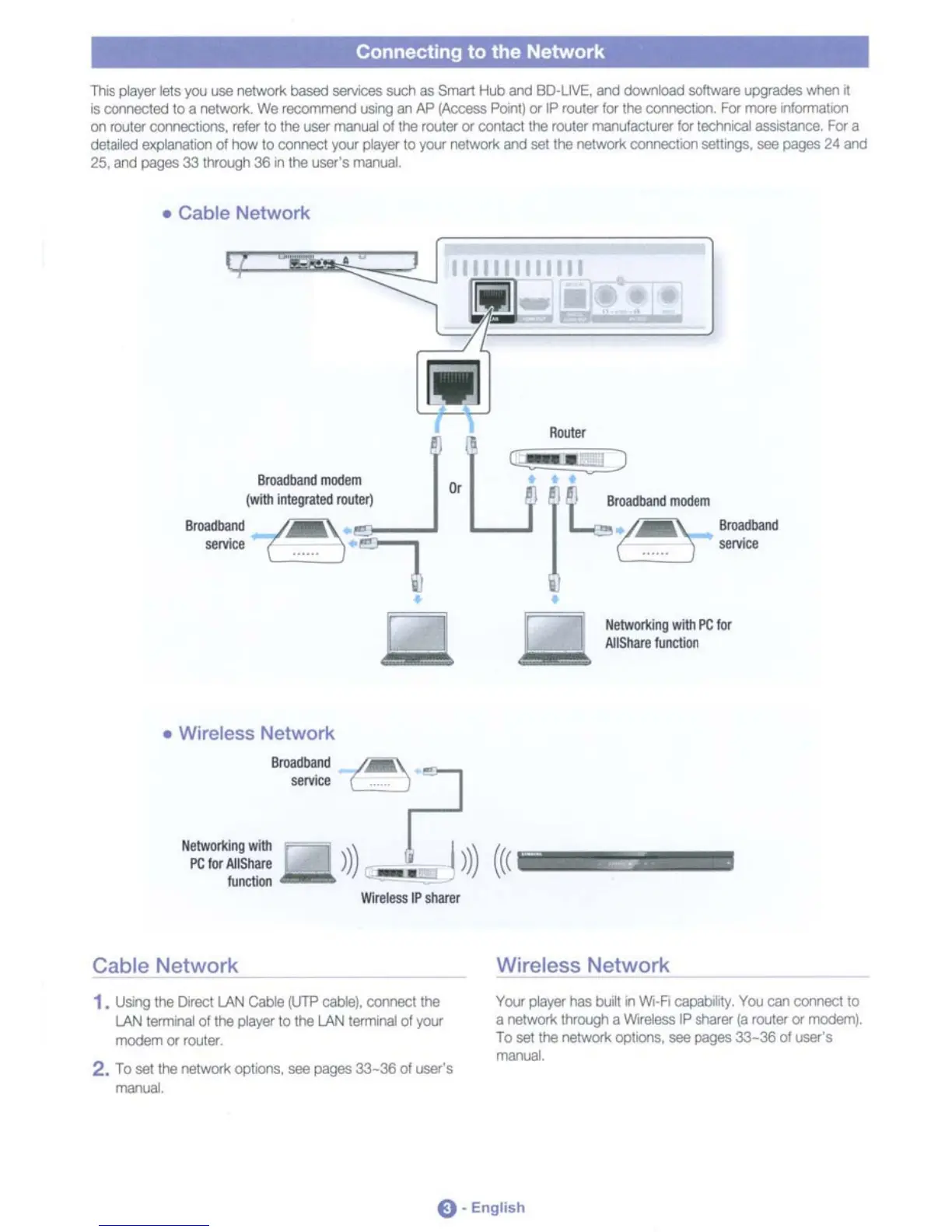
• Cable Network
"""
N~g
with
PC
tor
AlIShartl
function
_
...
-.
(will!
integrated
router)
-'::~'.~~,..........J
.
•
• Wireless Network
Ilroad~
~
..
Cable
Network
Wireless
Network
1. lJslrlg the [)roct
LAN
Cable
(UTP
cable),
COl'
oct the
LAN
terrrW'lal
01
the
player
to
the
LAN
terrrW'lal
01
)'OlX
modem or
router.
2.
To
sal the network
optIonS,
SIll!
pages
33-36
01
user's
"""'.
Your
player
has
tMJiII
in Wi·R
capal;MIrty.
You
can
coonect
to
a
nelWOfk
th'Ol.'Qh
a W.eless
IP
sharer
(a
router
or modem).
To
set
the
netWork
optlOOS,
see
pages 33-36
01
user's
"""'.
a·
English

Table of Contents