EasyManua.ls Logo

Samsung BD-D5700 - Page 74

Samsung BD-D5700
87 pages
Print Icon
To Next Page IconTo Next Page
To Previous Page IconTo Previous Page
Loading...
Initial
Settings
Accessing
the
Settings
Menu
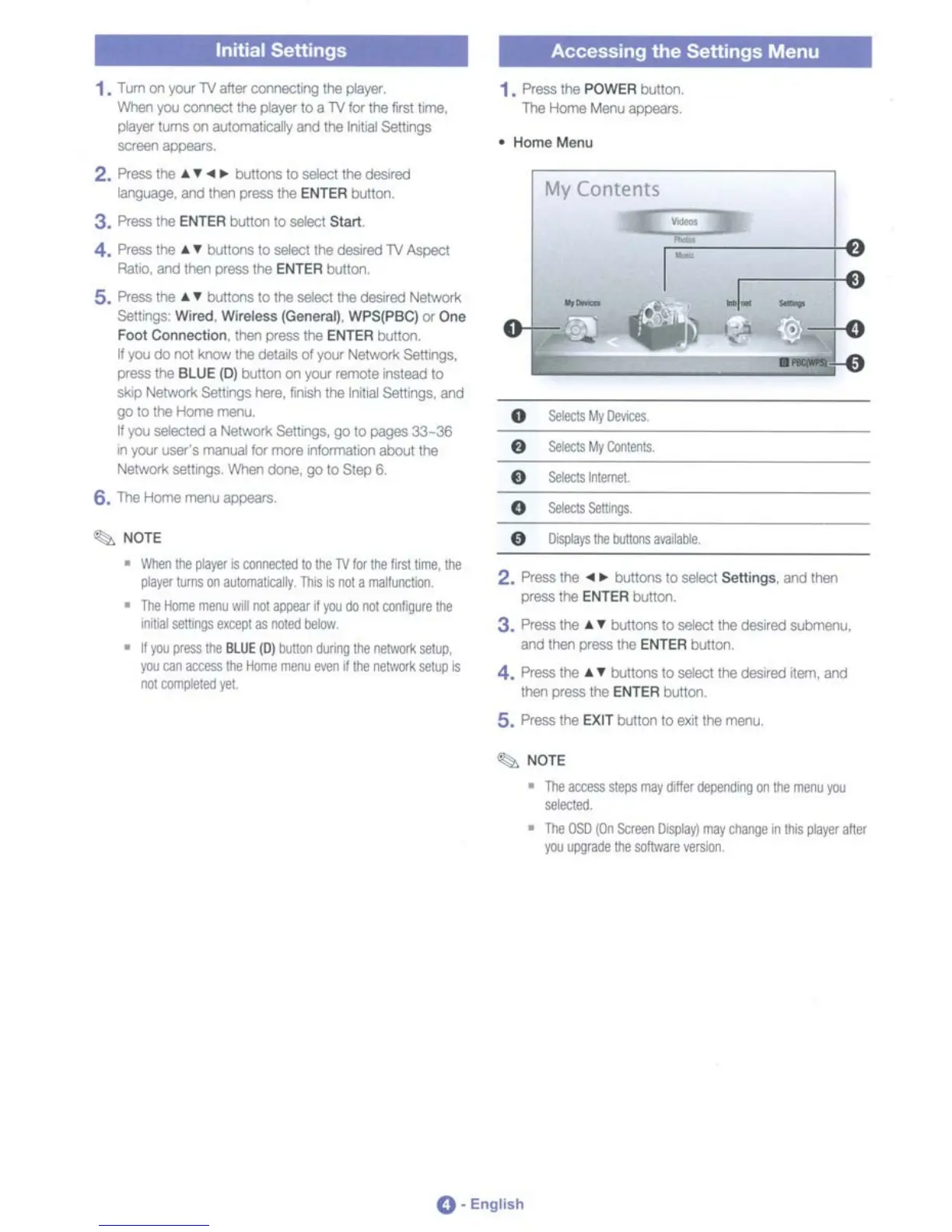
• Home Menu
f)
Selects
i'lternel.
-
My
Contents
~-J
1. Press
the
POWER
buttoo.
The
Home
Menu
appears,
2. Press the
....
bultons
10
select
Settings. and lharl
prOOOlhe
ENTER
bullon.
3. Press
the
"1'
buttons
to
select the
desired
so.b'nenu.
and
ttlBf1
press
the
ENTER
button,
4. Press
the
"1'
buttons
to
seIecIlhe desired
Ilem.
end
then
press
the
ENTER
bulton.
5. Press
the
EXIT
button
to
exrt
the
menu
~
NOTE
•
When
tile
player
IS
COMllCled
10
ltle
TV
lor
the
firstliOle.
the
player
turns
on
automa1l:a1ly
This
is
not
II
maI!unctlOr1.
•
The
Home
menu
'MIl
not
awear
If
you
00
not
contigoJre
ltle
l'UbaI
seltlllgS
rm:epl
as
noted
llekIw
•
~
you
press
ltle
BLUE
(0)
bu1Ioo
I1Jnng
the
oetwOOl
setuP,
you
coo
access
Ihe
Horne
menu
even
d
ltle
ne\I'<QIk
se!llllS
not
COfflllIeted
yet.
1.
T
Lm
on
you-
TV
after
comectng the pIaylll',
When
\'00 comect the pIaylll'
to
a
TV
lor the Iirstllme,
player
II,lITlS
on
alJlomatlCalty
and the Irllllal
SeUJ1gS
~
""",,",.
2.
Press
the
..
,.
....
buttons
10
select
the
desired
language. and
tharl
press
the
ENTER
buttoo.
3.
Press
the
ENTER
001100
to select
Slart
4.
Press
the
"1'
buttons
to
seIecl the
deslred
TV
Aspect
RallO.
and
thel1
press
the
ENTER
button,
5.
Press the
"1'
buttons
to
the
selecl the desired Netwo1l
SeUJ1gS:
Wired. Wireless (General).
WPS(PBC)
or
One
FOOl Connection.
then
press
the
ENTER
button,
W\'00
do
no!
know
the
de1ais
01
you-
Networ!<
Se11tngS.
press
the
BLUE
(0)
001100
00
your
remote
instead to
skip
Networ1<
SeUrlgS
here.
Iirvsh
the
Inl1l<ll
Serungs,
and
go
to
the
Home
menu,
W\'00
selectBd
II
Ne1Wl)1{
Settmgs, go
to
pages
33-36
II'!
you-
user's maruaI
for
more
II'!formatKll'lllbout the
Networ1<
se1ItngS
When
dontJ,
go
to
Step
6,
6.
The
Home
menu
appears,
~
NOTE
•
The
access
SleDS
IIla'Y
diller
dependIng
00
tile
merlJ
you
~.,,,
•
The
OSO
(On
Scfeen
0ispIay)
may
change
.,
ItIIS
player
after
you
upgrade
the
software
versiOO
O'
English

Table of Contents