EasyManua.ls Logo

Samsung BD-D5700 - Page 75

Samsung BD-D5700
87 pages
Print Icon
To Next Page IconTo Next Page
To Previous Page IconTo Previous Page
Loading...
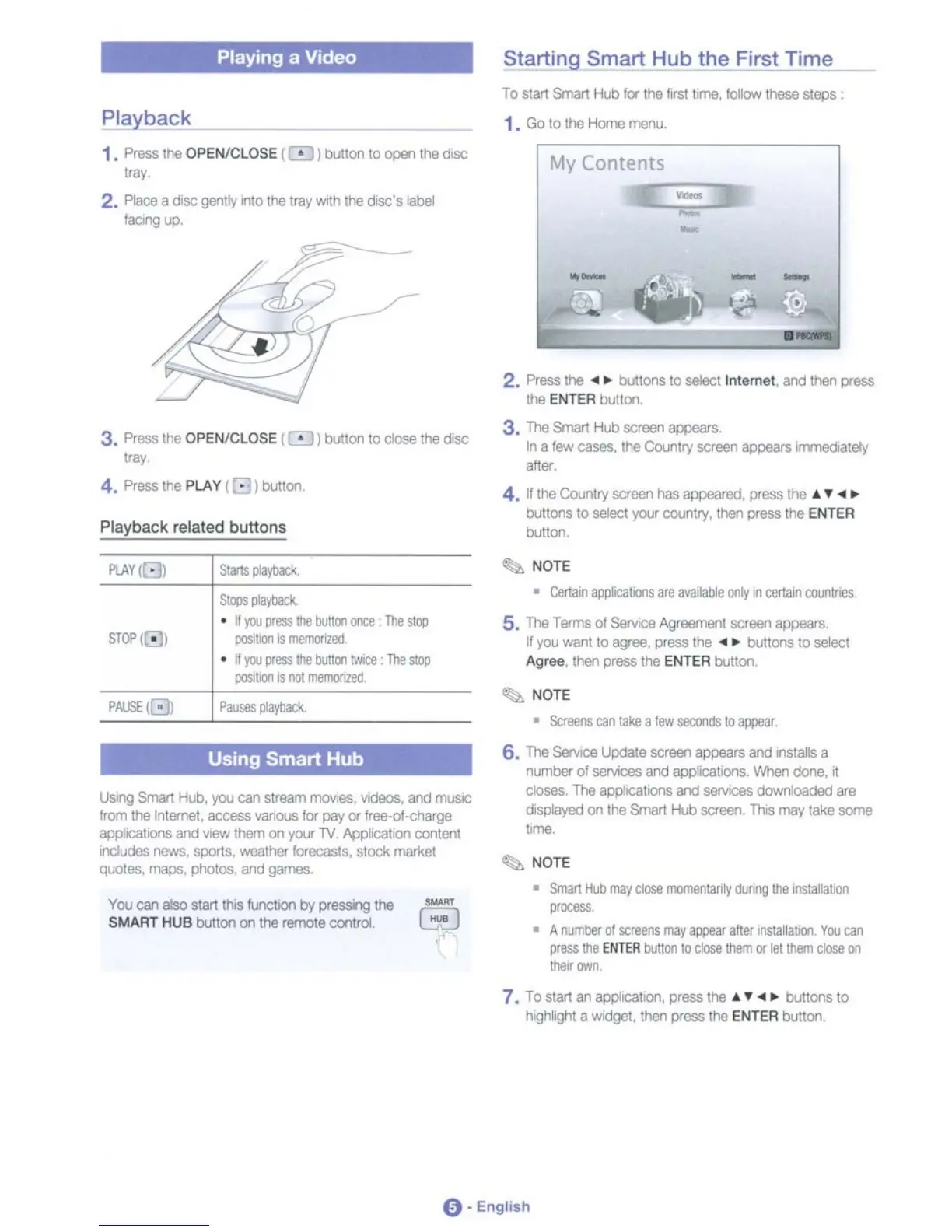
Playing a Video Starting Smart Hub
the
First Time
-
My Con[ents
~
-
To
SIa1
Smart
fUllor
the
first
tn"e,
IoIow
these steps
1.
Go
10
the
Home
"*"',
Playback
1.
Pl-.!he
OPENICLOSE l • 1
wnon
10
QPlln
d'e
dose
'"
2. F'lII::e. dtsc geml'f
rto
ttwJ
tray
w1n
h
dec',
...
_
...
3. Press
\tie
OPENICLOSE
101
bulton to
dose
\tie dtsc
""
4.
Press
!he
PLAY
(G)
bulton.
Playback
related
buttons
2.
Pless
the
...
buItons 10
seIl!Ict
1n1emet,
.-.d
the'! press
!he
ENTER
bulten
3.
The
Smart
HOO
ecreen
8l:JI)EIlWS.
In a
lew
ClIS8S.
1hl!I
ColJ'ltry
SCffI8l
~
s
.-rm9OOtet1
,ft.
4. N!he Colntry
SCfeen
has
8PlJ6ilIed.
press
the
......
bullons
10
seIecI
your country. then pi&ss the ENTER
",,"00
STI)'{
• I
--
• •
!OJ
lies
~
tIJttcrI
OIQ
TIlt
$qI
lOSIlilJ'llS
".1101IlfIlI
• •
pt
lies
tle
buIItrlr-.
TIll
sqI
pcJSilO'IlS
I'lIl
""OlltCl
~
NOTE
• Certail'IlIllI*atalS
are
MAble
Pi'"
ceI\aIl
cwnnes
5.
The
Tams
oISeNooe
Agl',*,*",
screen
apflilQIS
•
you
-.t
10
111M.
press It'e
....
buttons 10 seIecl
Agree the'! press It'e ENTER bJtton.
~NOTE
•
SCrl!IM'IS
an
I
..
-a
10
~
Using
Smart
Hub
I.Jwg 5rT.-t 11JJ.
~
Qr1
strelWTI
rTVo*.
YIOi!ICI8.
IrId
ITUSIC
!rom
!he
~
aa:essYirIOUS
lor
pay
()'
"-"<ll~
"IX**~
IrId
_them
en
)'011
TV
~m
CO'UtII
n;t..Il;la$
-.
sportS,
'MSlt
..
becas:s..
stock ITS'keI
q.ool8l.
mept.
~
.-.d
glWTlBS.
YQ.I
ClI"IlBl
SWllhlSII.n::tm
by
pi
'"
d'e
$MART
HUB button en !he remoll!l
0CI'lln:ll
-
EJ
6,
The
SErw;:e
\Jpl;IIIe
IICrllIl'lIPl*li
sand ns:aIs a
rurt&
01_
al"d
IR**0lS.
~
done. d
do8l!Is.
The
••
to
••
*1I1r1d
__
doWt*'""'ded
ere
•
kl
'
,.ad
en h Srrwt
l-lb
IICrllIl'l
Thls
IT0Y
Wle
!KmII
...
'"
NOTE
• Sn.-t
ItJ)
"lIr
dl*
"IO".lIaioly
clJmlllle
ilStalllla,
.....
• A
I'Ilmb!ir
lllllCl'MnS
JIIIy
~
aIW
1'llitIlIal.o'I,
You
an
lIesl!le
ENTEA
llAlon
10
~
tl-.n
lI"
lei
tl-.n dl;.-Oi"l
....
-
7.
To
start
8r1
appk;atm, press the
......
buttons
to
I1ogtWg'1t
a
WIdget,
then
piess
the ENTER bunon.
0-
English

Table of Contents