EasyManua.ls Logo

Samsung BD-D5700 - Page 76

Samsung BD-D5700
87 pages
Print Icon
To Next Page IconTo Next Page
To Previous Page IconTo Previous Page
Loading...
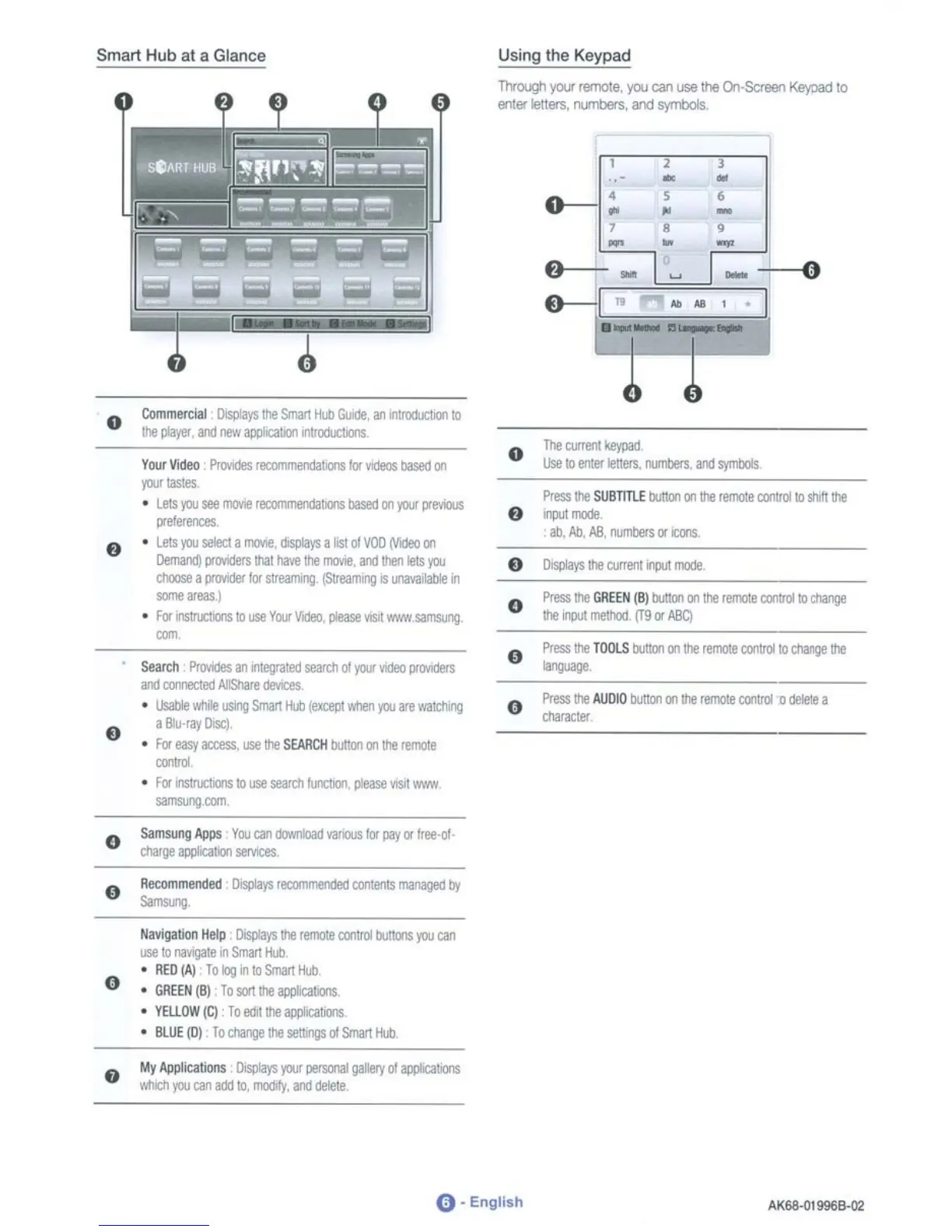
Smart Hub at a Glance
, ,
- -
0--
•
, ,
• •
-,
,
•
-
•
-
8
0
-
0------.1
•
•
Press
Ihe
GREEN
(B)
buttoo
on
the
remote
C«JlrollO
d'Iange
Ihe
l'f'Jl
melln:l_
(Tg
or
ABCl
Press
the
AUDIO
b1Jttoo
on
!hi:!
remole
control
0
delete
a
"""""
Press
the
SUBTITlE
buttoo
on
l!lII
Jerrol!!
aJIlrollO
stuh
Ihe
"'"-
all,
/lb,
.6Jl,
rumDers
or
ICOOS.
Press
l!lII
TOOLS
b1Jttoo
on
the
rerrote
crotrol
to
cnange
tile
......
o
o
o
o
..
..
Using
the
Keypad
TlvC10Qh
)OJ
rerno1e,
you
can
use
!hII Qn·SaElllO Keypad
10
eotlll'
l!!lters,
numbers, and symbols
Search
I'ro¥iOes
an
Ifltegr.lted
seardl
01
your
wJeo
pro.<Iders
lll'(I
~
~deW:es
•
lIsaIJi!
l'IiIiIe
llSIIlO
SmarI
Hub
(except
when
jOJ
are
m~
i18hl-ray
Discl
•
FO'
easy
access.
use
the
SEARCH
blJ\I(Wl
on
the
remote
-
•
I1:f
nstruo:oons
10
use
$ellrdl
hn:tioo,
please
visll
'N-HW
"'"""~
Your
Video
PrlMdes
recornmendatalS
Ill' I'l(leos
based
on
,.,.-
•
Lets
jOJ
see
rrKMe
Ja::o:nmeocIatalS
based
on
your
previous
prelerenc:es
• lets
jOJ
seIecI
a
rrKMe.
displays
a
list
01
VOO
IVideO
on
~
pl'(M(jers
lhat
haw
the
1JlO\'IB,
lll'(I!hen
lets
jOJ
cooose
a
prIMOOr!Qr
streamng,
(StreallWlg
IS
~Iabe
in
some
a"eaS_l
•
I1:f
irlslru:lJ::l1s
10
use
YlU
Videll,
l*ase
\'ISIt
'N-HW_saITlSIR'IG
~
Commerc\al
llIs¢l)1the
Smart
Hub
GoN.le,
an
IntrodixtJon
10
ltlIl_,
lll'(I
new
oppkallO'l
in~lX1.l:taIS.
o
..
..
o
Samsong
Aws
Yoo
canllownbad
\'iIOllUS
!Qr
pay
or
free·at-
d\arge
~lIO'I
~
o
o
liavigalion
Help
DIsplays
Ihe
remoIJl
control
t\lttl:fIs
jOJ
can
use
10
na\o193lllln
Smar1
Hub
•
RED(A)
TologinloSm.YlHub
•
GREEN
(B)
To
S(Wt
the
appIk;abOl'lS
•
YEUOW(C)
Toedittreawli:illms
•
8l.UE(Dl
lodlangetheset\lllgSoiSmartIUJ
o
My
Applications
~
your
pet3l)";1I
pery
01
appIICat.olS
\\tldl
jOJ
can
ac:J:l1O.
rr1(I(jfy,
and
delete
0-
English
AK&8-Ql996B-Q2

Table of Contents