Home
Samsung
Oven
BF62CCBST
Page 40
Samsung BF62CCBST - Page 40
46 pages
Manual
Save Page as PDF
To Next Page
To Next Page
To Previous Page
To Previous Page
Loading...
38
EN
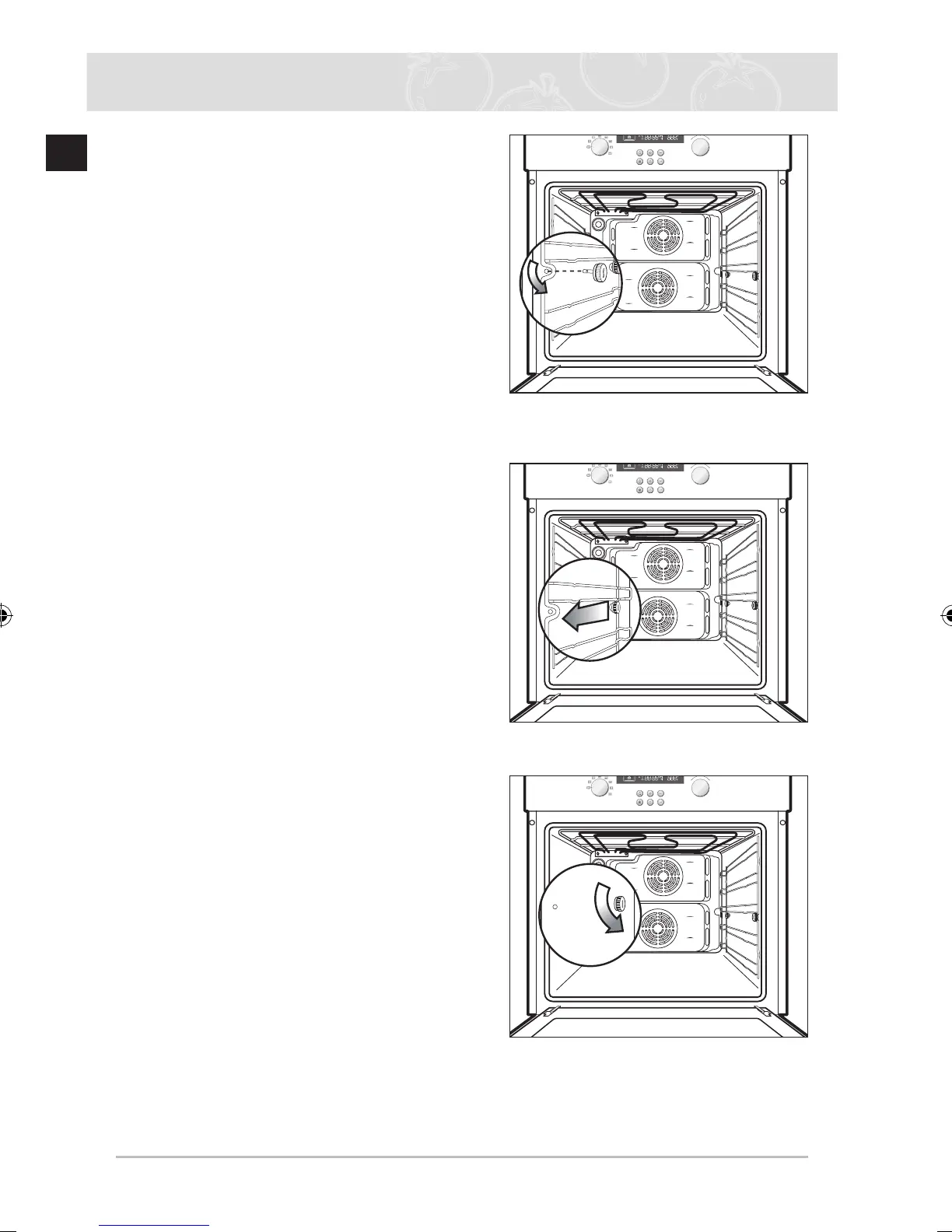
2.
Remove the screw at the front by turning it
anti-clockwise after latching the side runner
.
3.
Pull and remove the side runner
.
4.
Remove the screw from the back by
turning it anti-clockwise.
Cleaning and Care (Continued)
BF62CBST_XSA-00091B_EN.indd 38
2007-03-02 ¿ÀÈÄ 5:16:27
39
41
Table of Contents
Main Page
Default Chapter
3
Table of Contents
3
Using this Manual
4
Safety Instructions
4
Electrical Safety
4
Safety During Operation
5
Disposal Instructions
5
Installing the Oven
6
Safety Instructions for the Installer
6
Installing into a Low Cabinet
6
Connecting to the Mains Power Supply
7
Installing into a High Cabinet
8
Parts and Features
9
Oven
9
Oven Controls
10
Accessories
11
Using the Accessories
12
Safety Shutoff
12
Cooling Fan
12
Before You Begin
13
Setting the Clock
13
Initial Cleaning
14
Oven Functions
15
Test Dishes
23
Oven Use
24
Setting the Cooking Function Mode
24
Setting the Oven Temperature
25
Switching the Oven off
26
End Time
26
Cook Time
27
Delayed Start
28
Kitchen Timer
30
Auto Cook
31
Oven Lamp on / off
32
Child Safety Function
33
Switching the Beeper off
33
Cleaning and Care
34
Catalytic Enamel Surface
35
Cleaning the Oven Door
36
Side Runners
39
Changing the Lamp
42
Warranty & Service
43
Faqs and Troubleshooting
43
Technical Data
45
Other manuals for Samsung BF62CCBST
User Manual
40 pages
Related product manuals
Samsung BF62CCST
40 pages
Samsung BF641FST
12 pages
Samsung BF64CBST
40 pages
Samsung BF64CCST
44 pages
Samsung BF641 SERIES
12 pages
Samsung BF1C4T043
12 pages
Samsung BF1 Series
12 pages
Samsung BF3 Series
12 pages
Samsung BQ2Q7G078
52 pages
Samsung BQ1S4T133
160 pages
Samsung BQ1S6T077
24 pages
Samsung BT65TQBFST
52 pages



 To Next Page