5
Removing the Upper Rack
The rack can be removed when tall or oversized items
need to be loaded into the lower rack. Unload the
rack before removing it from the dishwasher.
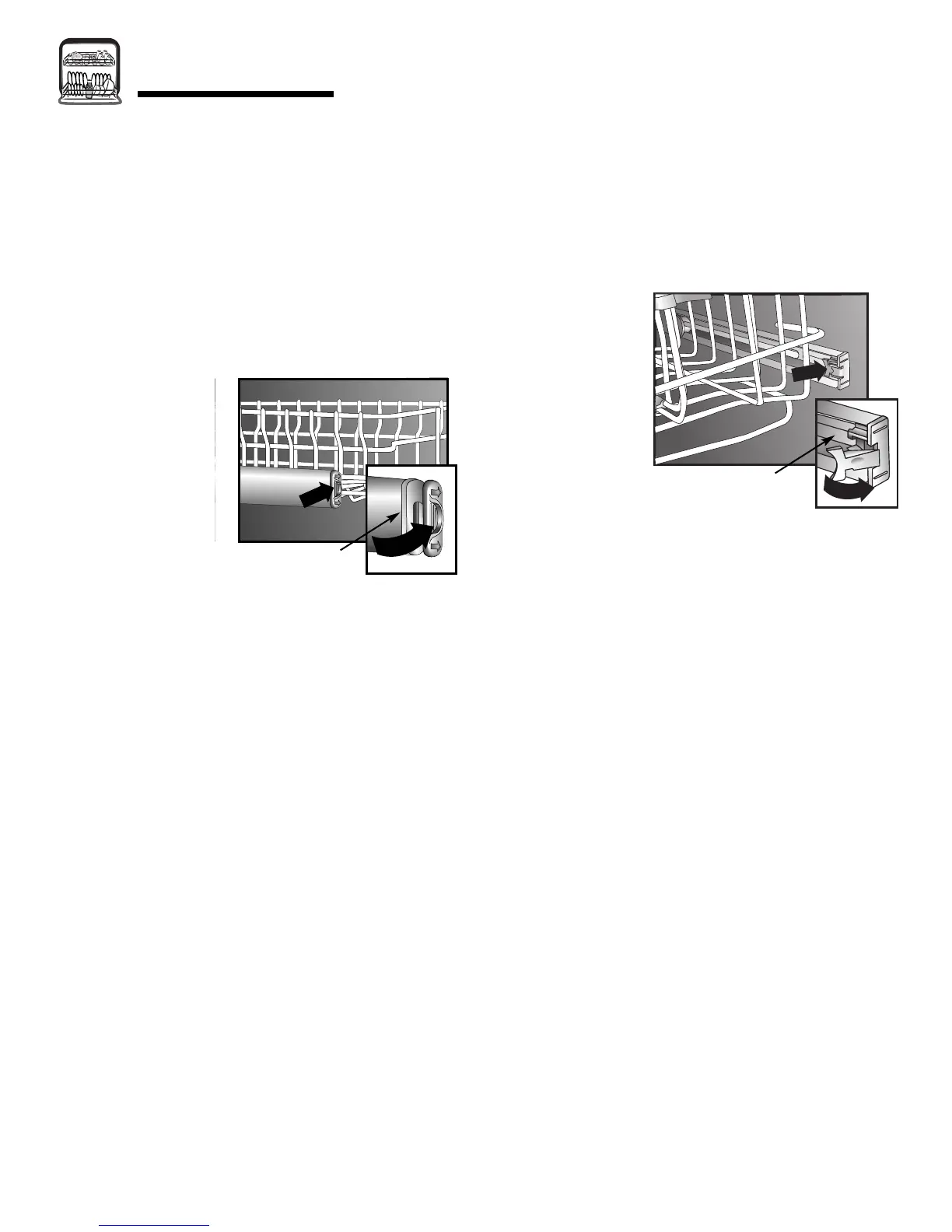
To remove rack with push tab rack stops (select
models):
1. Roll the rack
1
⁄3 to
1
⁄2 of the way out.
2. To remove each plastic push tab rack stop from the
end of each track, push inward (toward the rack) on
the ridged area of the rack stop. The rack stop will
snap open and
can be easily
removed by
pulling straight
out. Take care to
support the track
while removing
rack stops.
3. Roll the rack all
the way out of the
track and remove from the dishwasher.
To replace:
• Reverse the above procedure to replace the rack into
the dishwasher.
To remove rack with pull tab rack stops (select
models):
1. Roll the rack
1
⁄3 to
1
⁄2 of the way out.
2. To remove each plastic pull tab rack stop from the
end of each track, locate two-prong tab on inside of
the rail and pull tab out toward rack. The rack stop
can then be easily removed by pulling it straight out.
Take care to
support the track
while removing
the rack stops.
3. Roll the rack all
the way out of the
track and remove
from the
dishwasher.
To replace:
• Reverse the above procedure to replace the rack into
the dishwasher.
Push Tab
Rack Stop
Pull Tab
Rack Stop
LOADING



 To Next Page