Installation
English 33
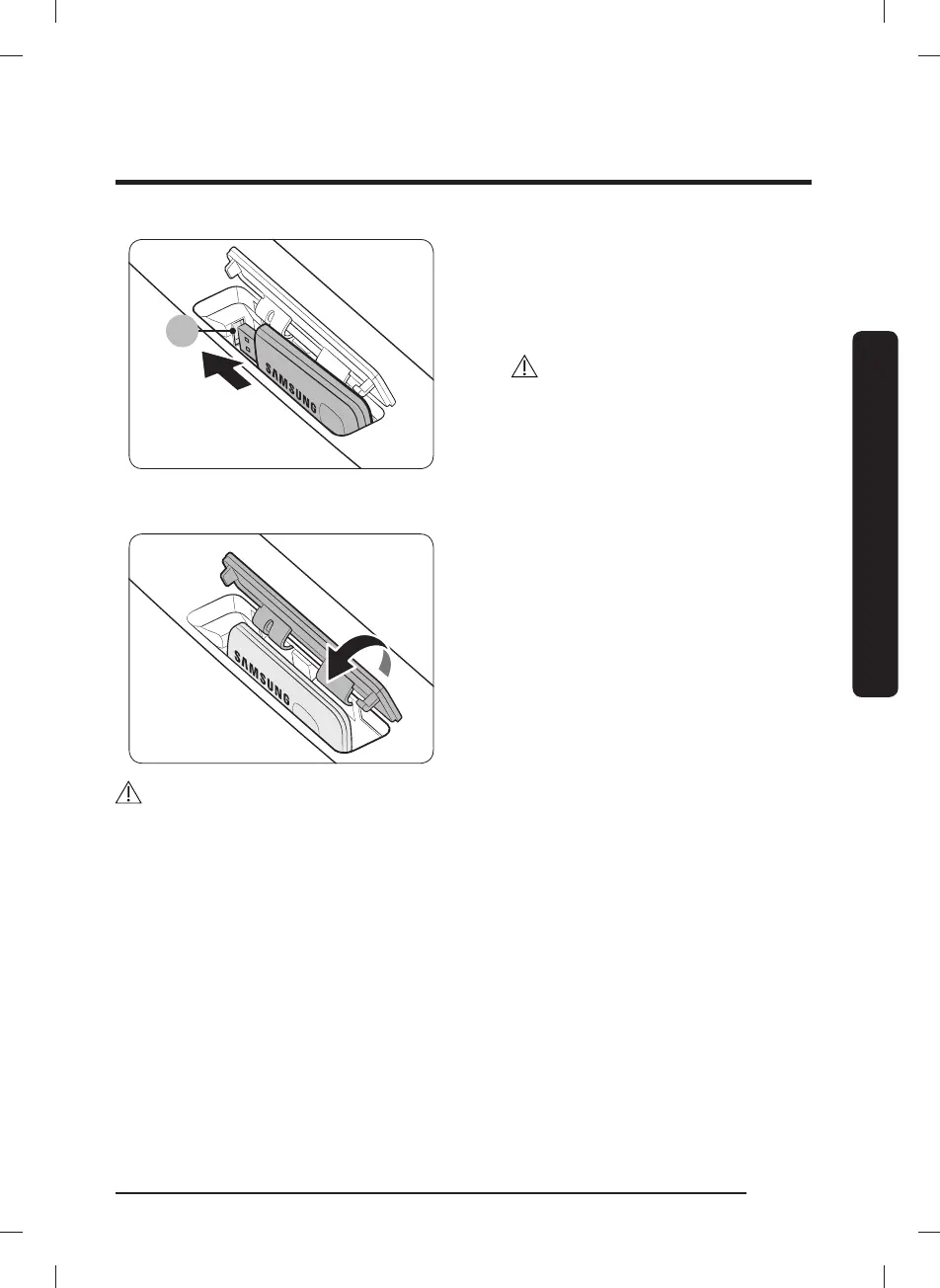
3. Insert the Smart Home Adapter into
the Adapter port (A) in the correct
direction.
Make sure the Samsung logo faces
forward.
CAUTION
Do not insert other USB devices such
as USB memory sticks or USB power
cables into the port. Incorrect use of
the port may damage the Samsung
Smart Home Adapter, causing system
failure.
4. Insert the upper area of the adapter
cover rst, and then press to lock as
shown.
CAUTION
• To prevent device damage or system failure, moisture away from the adapter cover. If
the adapter cover gets wet or stained, use a soft cloth or sponge wipe up the moisture
or wipe away the stain, and then dry well.
• In a poor signal reception area such as basements, you must install an additional AP for
normal connection.
DC68-03381C-15_IB_DV7500K_EN_230705.indd 33DC68-03381C-15_IB_DV7500K_EN_230705.indd 33 2023-06-28 6:14:262023-06-28 6:14:26



 To Next Page