Apps and features
64
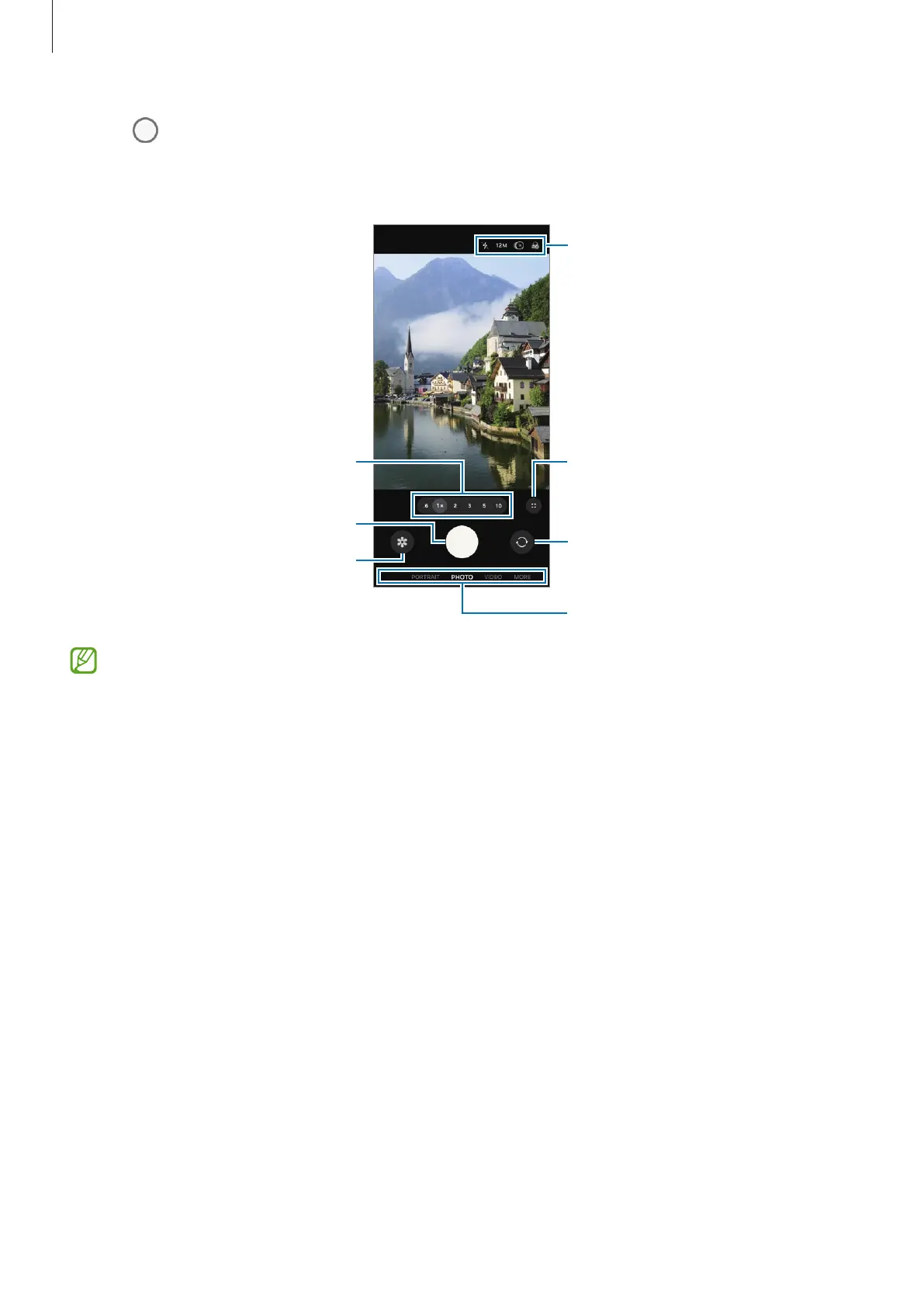
3 Tap to take a picture.
To change the shooting mode, drag the shooting modes list to the left or right, or
swipe to the left or right on the preview screen.
Take a picture.
Preview thumbnail
Quick settings
Zoom
Switch between the front and
rear cameras.
Options for current shooting
mode
•
The preview screen may vary depending on the shooting mode and which
camera is being used.
•
The focus may not be correct if the subject is close. Take pictures or videos from
a good distance.
•
If pictures you take appear blurry, clean the camera lens and try again.
•
Make sure that the lens is not damaged or contaminated. Otherwise, the device
may not work properly in some modes that require high resolution.
•
Your device’s camera features a wide-angle lens. Minor distortion may occur
in wide-angle pictures or videos and does not indicate device performance
problems.
•
The camera may fog up or form condensation if the device is exposed to sudden
changes in air temperature, because of the difference in temperature outside
and inside the camera cover. Try to avoid such conditions when planning to use
the camera. If fogging does occur, allow the camera to dry naturally at room
temperature before taking pictures or recording videos, otherwise results may
look hazy.








 To Next Page