
 Need help?
Do you have a question about the Samsung Galaxy Sky and is the answer not in the manual?
Lists the items included in the phone package for setup and initial use.
Step-by-step guide to activating your new TracFone wireless service.
Guide to creating and managing your TracFone online account.
Instructions on how to maintain your TracFone service by refilling plans.
Overview of available TracFone wireless service plans and features.
Details on different ways to enroll in TracFone service plans.
Unlocking the screen and finding device identifiers like serial/SIM.
Making, receiving calls, international calls, and texting.
Setting up Google account, voicemail, and Bluetooth.
Managing apps, internet, security, and other phone features.
Important legal information, limited warranty, and terms of use.
Information on Specific Absorption Rate (SAR) and RF exposure.
Guidelines for emergency calls, GPS, and hearing aid compatibility.
Warranty information, dispute resolution, and product disposal advice.
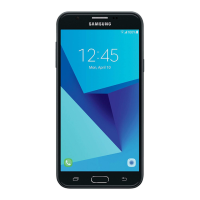
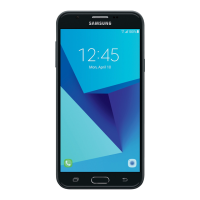
This document is a Services Guide for the Samsung Galaxy Sky TracFone, providing information on activation, service, and usage.
The guide begins by instructing users to locate the activation card inside their package first. This card contains the Serial and SIM Numbers necessary for phone activation. To activate service, users should visit TracFone.com or call 1-800-867-7183 from another phone. A TracFone Service Plan or a credit/debit card is needed for purchase during activation.
After activation, users can set up their TracFone account on TracFone.com. This online account allows users to create and update personal profile information, manage credit/billing details, and view their Service End Date. The TracFone My Account is a central hub for seeing TracFone Programs, accessing special offers and promotions, buying or adding service plans, enrolling in Monthly Value Plans, checking balance/service end date, updating personal profile and credit card info, getting international calling information, and viewing the TracFone Support Forum and FAQs. For on-the-go management, the free TracFone My Account app can be downloaded from Google Play™ to track minutes, text, and data balances, and view the Service End Date. Standard data rates may apply for app usage.
To keep service active, users must refill their Service Plan BEFORE their Service End Date. TracFone Airtime Plans add minutes and service days. The Service End Date can be found on TracFone.com by logging into the account or by calling Customer Care at 1-800-867-7183. TracFone Wireless Service Plans are exclusively for cellular phones and can be purchased at participating retailers nationwide, TracFone.com, or through the Customer Care Center.
TracFone offers Monthly Airtime Plans that provide the conveniences of contract plans without the commitment. These include Individual Plans, Family Value Plans, and TracFone Service Protection Plans. Enrolling in an Airtime Plan ensures automatic monthly receipt of minutes and service days, with plans starting at $9.99/month and no contracts or cancellation fees. Enrollment requires a valid credit or debit card and can be done at TracFone.com/valueplans or by calling 1-800-867-7183.
Unlocking Your Screen: To unlock the screen, swipe a finger in any direction. If the screen is dark, press POWER/LOCK or the HOME key.
Finding Your Serial Number: Press the HOME key, tap the Apps icon, then Settings. Slide up and tap About device, then Status, and finally IMEI information. The Serial Number will appear under IMEI. Do not use the number labeled "Serial number." Press HOME to return to the main screen.
Finding Your SIM Number: The SIM number is on the red Activation Card. If the card is unavailable, press the HOME key, tap the Apps icon, then Settings. Slide up and tap About device, then Status, and finally IMEI information. The SIM Number will appear under ICCID. Press HOME to return to the main screen.
Finding Your Phone Number: Press the HOME key, tap the Apps icon, then Settings. Slide up and tap About device, then Status, and finally SIM card status. Your Phone Number will appear under "My phone number." Press HOME to return to the main screen.
Making International Calls: TracFone allows calls to over 100 international destinations at no additional cost, typically after 2 business days post-activation.
Setting Up Your Google™ Account: To access Google Play™ and other apps, a free Google Account (Gmail) is required. Press the HOME key, tap the Google folder, then the Gmail icon. Follow the on-screen tutorial to add your account. The first account registered becomes your Primary Google account, syncing contacts, calendar entries, and Gmail. Syncing may take up to 15 minutes.
Setting Up Your Voicemail: Press the HOME key, tap the Phone icon (if keypad isn't visible, tap the keypad icon). Press and hold the '1' key for several seconds to automatically call Voicemail. Follow the prompts. Tap the End Call icon to end the call.
Sending Text Messages: Press the HOME key, tap Messages, then the Compose icon. Enter the mobile number or contact name of the recipient. Tap "Enter message" to type your message, then tap SEND. Press HOME to return to the main screen.
Setting Up Your Bluetooth®: Ensure both devices are fully charged and within 30 feet. Turn the Bluetooth device ON and set it to Pairing or Bonding Mode. Press the HOME key, tap the Apps icon, then Settings, and Bluetooth. Tap the ON/OFF button to turn Bluetooth ON. Tap the desired device name to pair. Follow on-screen prompts. Press HOME to return to the main screen. If a PIN is requested, refer to the headset's user guide; 0000 is a common PIN.
Managing Applications: Press the HOME key, tap Apps, then Settings. Slide up and tap Applications, then Application manager. Tap the desired application to manage it. Press HOME to return to the main screen. Running apps in the background can drain battery and slow down the phone.
Using Mobile Internet Services: Access news, sports, weather, and entertainment. Press the Home key, then tap the Internet icon. Your phone will connect to the Mobile Web. Data consumption begins and ends with the data connection. Charges depend on content size and transmission time. Refer to TracFone Wireless Terms and Conditions for data charges. It may take up to 1 hour to access Mobile Web Services after activation.
For more information, download the manufacturer's manual at Tracfone.com.
This section covers legal, health, and safety information. Important legal information is available on the device (Settings → About phone → Legal Information → Samsung legal) or at www.samsung.com. This document contains terms and conditions accepted by using the device.
Samsung Limited Warranty: This product is covered by a Samsung Limited Warranty, including a Dispute Resolution Procedure and a right to opt out of arbitration within 30 calendar days of purchase. Opt-out by emailing optout@sea.samsung.com with "Arbitration Opt-Out" as the subject, or by calling 1-800-SAMSUNG (726-7864). Full terms are available on the device or at www.samsung.com/us/Legal/Phone-HSGuide (English) or -SP (Spanish).
WARNING! This product contains chemicals known to the State of California to cause cancer, birth defects, or other reproductive harm. For more information, call 1-800-SAMSUNG (726-7864).
Intellectual Property: All Intellectual Property related to the SAMSUNG Phone (accessories, parts, software) is proprietary to Samsung and protected by laws. Users agree not to modify, reverse engineer, decompile, disassemble, or create source code from the software.
Open Source Software: Some components use open source licenses (GNU GPL, LGPL, OpenSSL, BSD). Source code is available at http://opensource.samsung.com.
Disclaimer of Warranties; Exclusion of Liability: The product is sold "AS IS." Samsung disclaims all express or implied warranties, including merchantability and fitness for a particular purpose. Samsung is not liable for damages resulting from product purchase or use, including incidental, special, or consequential damages.
Modification of Software: Samsung is not liable for performance issues from editing registry settings or modifying operating system software. Custom OS may cause improper device/app function. Carriers may prohibit certain software downloads. Unauthorized downloads may disable the device; contact your carrier to restore settings.
Samsung KNOX™: Samsung's security platform for enterprise use. Additional licensing fees may apply. More info at www.samsung.com/us/knox.
Specific Absorption Rate (SAR) Certification Information: The device is a radio transmitter/receiver designed to meet FCC RF exposure limits (1.6 watts per kilogram). SAR tests are conducted at highest certified power levels, but actual SAR is lower during operation. The device is certified by the FCC before sale. For body-worn operation, the device meets guidelines when used with a non-metal accessory that positions it at least 1.5 cm from the body.
FCC Part 15 Information to User: Changes not approved by Samsung could void authority to operate. The device complies with FCC Part 15, meaning it won't cause harmful interference and accepts interference. Equipment is tested to Class B digital device limits. If interference occurs, reorient/relocate antenna, increase separation, connect to a different outlet, or consult a technician.
Commercial Mobile Alerting System (CMAS): The device receives Wireless Emergency Alerts from CMAS if your provider participates. Alerts may not be available outside coverage. Contact your provider for more info.
Samsung Mobile Products and Recycling: Samsung encourages recycling of mobile devices and accessories. Proper disposal is important for safety and the environment. Batteries must be recycled. Dispose of unwanted electronics through an approved recycler. Samsung offers recycling programs: call2recycle.org or 1-800-822-8837 for battery recycling. Drop off devices/batteries at Samsung Recycling Direct (SM) locations (www.samsung.com/recyclingdirect or 1-877-278-0799). Mail in devices via the Samsung Mobile Take-Back Program (https://pages.samsung.com/recycling/index.jsp or 1-800-822-8837).
GPS & AGPS: Samsung mobile devices use GPS for location-based apps. GPS relies on U.S. Government satellites, subject to changes. AGPS uses the cellular network to improve GPS, incurring airtime/data charges. Location-based info may be shared with third parties.
Emergency Calls: The mobile device uses radio signals, wireless/landline networks, and user-programmed functions, which don't guarantee connection in all conditions. Never rely solely on it for essential communications. Plan alternate methods for remote areas. Device must be on and in a service area. Emergency calls may not be possible on all networks or with certain features in use. Deactivate features like call blocking if needed. Provide accurate info during emergency calls.
FCC Hearing Aid Compatibility (HAC) Regulations: FCC requires digital wireless devices to be compatible with hearing aids. Some hearing devices may detect buzzing/humming/whining. The wireless industry uses a rating system (M-ratings for acoustic coupling, T-ratings for inductive coupling) to indicate compatibility. M3/M4 and T3/T4 ratings meet FCC requirements, with M4/T4 being higher. Ratings are not guarantees; results vary. Trying the device with your hearing aid is the best way to evaluate it.
Caution! Device Temperature: Prolonged skin contact with a hot device can cause discomfort or burns. Discontinue use, close apps, or turn off the device until it cools. Ensure adequate ventilation; covering the device can affect performance and pose fire/explosion risks.
Restricting Children's Access: The mobile device is not a toy. Keep it and accessories out of reach of small children to prevent injury, damage, or unintended calls.
 General
| Display | 5.0 inches |
|---|---|
| Resolution | 720 x 1280 pixels |
| RAM | 1.5 GB |
| Internal Storage | 16 GB |
| Expandable Storage | microSD, up to 256 GB |
| Rear Camera | 5 MP |
| Front Camera | 2 MP |
| Battery | 2600 mAh |
| Processor | Quad-core 1.4 GHz |









 To Next Page