
 Need help?
Do you have a question about the Samsung Gear Sport and is the answer not in the manual?
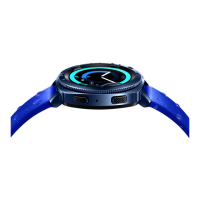
Identifies key buttons like Home/Power, Back, Bezel, and Microphone for device operation.
Instructions for charging the Gear using the provided wireless charging dock.
Guide to downloading the necessary app for pairing and device compatibility.
Step-by-step process to connect the Gear to a smartphone via Bluetooth.
Explains connecting via Wi-Fi and using the Gear independently without a phone.
How to navigate through menus and screens using the rotating bezel and swipe gestures.
How to set the watch screen to stay on continuously for quick viewing.
Steps to select, customize, and add new watch faces to personalize the device.
Instructions for removing and attaching different watch bands to the Gear.
How to view device status and configure basic settings by swiping from the top edge.
How to open the Apps screen and view all installed applications on the Gear.
Instructions on how to add new widgets and remove existing ones from the device.
How to check incoming alerts and messages and dismiss them.
Guide on how to initiate, receive, and reject phone calls directly from the Gear.
Steps to view message conversations and reply using quick responses or voice input.
Using emoticons, handwriting, and keyboarding for composing messages.
How to monitor daily steps taken and measure the distance traveled.
Instructions for measuring and recording your heart rate using the device.
Steps to find a misplaced Gear device or the paired smartphone using the Samsung Gear app.
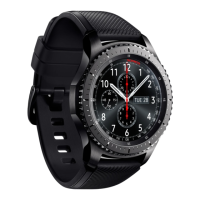
The Samsung Gear Sport is a smartwatch designed to help users manage their wellness and fitness, as well as provide convenient access to smartphone features directly from their wrist. It serves as a companion device to a smartphone, though it also offers standalone functionality for certain tasks.
The primary function of the Gear Sport is to extend smartphone capabilities to the wrist, allowing users to receive notifications, make and answer calls, send messages, and control music without needing to take out their phone. Beyond communication, it acts as a comprehensive fitness tracker, monitoring steps, heart rate, and various activities like swimming. The device is designed for active individuals, offering features like a water lock mode for aquatic exercises. Its customizable interface allows users to personalize the watch face and add widgets for quick access to information.
To begin using the Gear Sport, it must first be turned on by pressing and holding the Home/Power button. For full functionality, the device should be fully charged using the wireless charging dock before its first use.
The Gear Sport is designed to be paired with a smartphone, primarily through the Samsung Gear app, which can be downloaded from Galaxy Apps or the Google Play™ store. Compatibility requires select devices using Android 4.4 and later, with at least 1.5 GB RAM. For optimal performance, connecting with compatible Samsung Galaxy devices is recommended. The pairing process involves launching the Samsung Gear app on the smartphone, selecting the Gear, turning on Bluetooth, confirming a Bluetooth passkey, and following on-screen prompts.
For situations where the smartphone is not physically close, the Gear Sport can maintain a remote connection via a Wi-Fi network. Both the Gear and the smartphone must be connected to the same Wi-Fi network for this feature to work. This is enabled through the Samsung Gear app settings under "Gear connection" and "Remote connection."
The Gear Sport can also be used independently without being paired to a smartphone or Wi-Fi network. In standalone mode, users can select a language and proceed with basic setup, though some features may not be available.
Interaction with the Gear Sport is intuitive, combining touch gestures with the physical bezel.
The Gear Sport offers several customization options to personalize the user experience.
Swiping down from the top edge of the Home screen reveals the Status panel, which provides quick access to current status information and basic settings. From here, users can:
The Apps screen displays icons for all installed applications. It can be accessed by pressing the Home button from the Home screen.
Widgets provide quick access to specific information or functions.
The Gear Sport keeps users updated with events, notifications, and messages.
The Gear Sport allows users to make and answer calls when paired with a smartphone.
Users can view and reply to messages, or call the sender directly from the Gear.
Samsung Health is an integral part of the Gear Sport, helping users manage their wellness and fitness.
If the Gear Sport or the connected smartphone is misplaced, the Samsung Gear app can help locate it.
The Gear Sport is charged wirelessly using the provided charging dock. It is recommended to fully charge the device before its first use to ensure optimal battery performance.
The Samsung Gear app on the smartphone may require updates. Keeping the app updated ensures compatibility and access to the latest features and improvements for the Gear Sport.
While not explicitly detailed in the provided text, general smartwatch maintenance would involve regularly cleaning the device, especially after workouts or exposure to water, to prevent build-up and maintain hygiene. The water lock mode suggests it's designed to withstand water exposure, but proper drying and cleaning afterward are usually recommended.
The ability to change watch bands allows for customization and replacement if a band becomes worn or damaged, extending the aesthetic and functional life of the device.
 General
| Shape | Round |
|---|---|
| Watch case size | 42 mm |
| Watch case color | Black |
| Market positioning | Smartwatch |
| Protection features | Splash proof, Waterproof |
| Watch case material | - |
| Display type | Digital |
| Display diagonal | 1.2 \ |
| Display resolution | 360 x 360 pixels |
| Display technology | AMOLED |
| Flash memory | 4 GB |
| RAM capacity | 750 MB |
| Processor cores | 2 |
| Languages support | Multi |
| Built-in speaker(s) | No |
| Processor frequency | 1000 MHz |
| Compatible memory cards | Not supported |
| Mobile operating systems supported | Tizen |
| Audio formats supported | 3GA, AAC, AMR, AWB, M4A, MP3, OGA, OGG, WAV, WMA |
| Wi-Fi standards | 802.11b, 802.11g, Wi-Fi 4 (802.11n) |
| Bluetooth version | 4.2 |
| Battery capacity | 300 mAh |
| Battery life (max) | 96 h |
 Weight and Dimensions
| Depth | 44.6 mm |
|---|---|
| Width | 42.9 mm |
| Weight | 50 g |
| Thickness | 11.6 mm |




 To Next Page