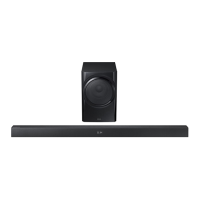
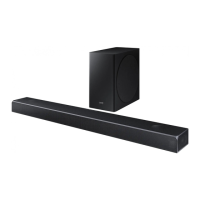
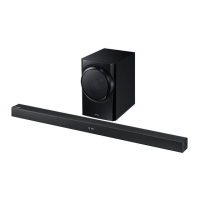
This document describes the Samsung HW-K350 and HW-K355 Soundbar models, providing a user manual for installation, operation, and maintenance.
Function Description
The Samsung Soundbar is a home audio device designed to enhance the sound experience of your television and other external devices. It offers various input modes, including Digital Optical, AUX, Bluetooth, TV SoundConnect, and USB, allowing for versatile connectivity. The Soundbar features a front panel display, volume controls, and a source selection button. It also comes with a remote control for convenient operation, offering functions such as power on/off, volume adjustment, mute, repeat, skip, Bluetooth power control, surround sound effects, and sound effect modes (Standard, Music, Clear Voice, Sports, Movie, Night). The Soundbar supports dynamic range control (DRC) for Dolby Digital audio.
A key feature is TV SoundConnect, which allows the Soundbar to connect wirelessly to compatible Samsung TVs, enabling TV sound to be played through the Soundbar. This function also includes Bluetooth POWER On, which can automatically turn the Soundbar on or off with the connected TV.
For external devices, it supports connection via Digital Audio In (Optical) for digital audio signals and AUX In for analogue audio signals. The USB port allows for playing music files from storage devices, supporting FAT16 and FAT32 file systems.
The Soundbar can be controlled not only by its dedicated remote but also by a compatible TV remote control for basic functions like volume and mute, provided the "TV REMOTE" function is enabled. Additionally, a Samsung Audio Remote App is available for Android mobile devices (OS 3.0 or later) to control the Soundbar via a smart device.
The device also supports firmware updates via USB to ensure optimal performance and access to new features.
Important Technical Specifications
GENERAL:
- Dimensions (W x H x D):
- Main Unit: 907.5 x 53.5 x 70.5 mm
- Subwoofer (PS-HW2-1): 240.0 x 360.0 x 329.0 mm
- Weight:
- Main Unit: 1.5 kg
- Subwoofer (PS-HW2-1): 4.6 kg
- Operating Temperature Range: +5°C to +35°C
- Operating Humidity Range: 10% to 75%
- USB: 5V / 0.5A
AMPLIFIER:
- Rated Output Power:
- Main Unit: 35W x 2, 6 ohm, THD ≤ 10%
- Subwoofer (PS-HW2-1): 80W, 3 ohm, THD ≤ 10%
Supported Play Formats (DTS 2.0 sound is played in DTS format.):
- LPCM 2ch
- Dolby Audio™ (supporting Dolby® Digital)
- DTS
File Format Type Compatibility (USB):
- .mp3: MPEG 1 Layer2/3, MPEG 2 Layer3, MPEG 2.5 Layer3
- Sampling Rate: 16KHz ~ 48KHz
- Bit Rate: 80kbps ~ 320kbps
- .wma: Wave_Format_MSAudio1/2
- Sampling Rate: 16KHz ~ 48KHz
- Bit Rate: 56kbps ~ 128kbps
- .aac: AAC, AAC-LC, HE-AAC
- Sampling Rate: 16KHz ~ 96KHz (AAC, AAC-LC), 24KHz ~ 96KHz (HE-AAC)
- Bit Rate: 48kbps ~ 320kbps (AAC), 128kbps ~ 192kbps (AAC-LC), 5.1ch 320kbps (AAC-LC), 48kbps ~ 64kbps (HE-AAC), 5.1ch 160kbps (HE-AAC)
- .wav:
- Sampling Rate: 16KHz ~ 48KHz
- Bit Rate: up to 3000kbps
- .ogg: OGG 1.1.0
- Sampling Rate: 16KHz ~ 48KHz
- Bit Rate: 50kbps ~ 500kbps
- .flac: FLAC 1.1.0, FLAC 1.2.1
- Sampling Rate: 16KHz ~ 96KHz
- Bit Rate: up to 3000kbps
Usage Features
Installation:
- The Soundbar can be installed horizontally on a suitable base or wall-mounted.
- For wall mounting, ensure the wall is strong enough to support the unit's weight. Use appropriate screws and anchors for the wall type.
- Maintain 7-10 cm of space around the unit for ventilation.
- If wall-mounted below a TV, install the Soundbar at least 5 cm below the TV.
- All connections to external devices should be made before wall mounting.
Connectivity:
- Digital Optical Input: Connects to the digital optical output of a TV or other external device.
- AUX Input: Connects to the analogue output of an external device.
- USB Port: For playing music from USB storage devices (Micro USB to USB adapter cable required).
- Bluetooth: Connects wirelessly to Bluetooth-compatible devices for audio streaming. Supports A2DP (AV) function. Pairing requires selecting "[AV] Samsung Soundbar Kxxx K-Series" from the device list.
- TV SoundConnect: Wirelessly connects to compatible Samsung TVs (2012 models and later) for TV audio playback. Recommended pairing range is within 2 meters, operational range within 10 meters.
Operation:
- Power On/Off: The power button on the unit or remote control turns the Soundbar on/off. There is a 4-6 second delay for the power button to work after plugging in, and a 4-5 second delay before sound is produced after turning on.
- Volume Control: Adjusts the volume level, displayed numerically on the front panel.
- Source Selection: Cycles through D.IN, AUX, BT, TV, or USB input modes.
- Mute: Temporarily silences the sound.
- Sound Effects: Offers various sound modes (Standard, Music, Clear Voice, Sports, Movie, Night) and surround sound settings (ON/OFF).
- DRC (Dynamic Range Control): Can be turned on/off for Dolby Digital audio by holding the SOUND EFFECT button for 5 seconds in standby mode.
- Audio Sync: Adjusts audio delay (0-300 ms) to synchronize with video when connected to a digital TV. Not available in USB, TV, and BT modes.
- Auto Power Link: When connected to a TV via digital optical cable, this function automatically turns the Soundbar on when the TV is turned on. Available only in D.IN mode.
- Auto Power Down: The unit automatically turns off if there's no audio signal for 5 minutes (D.IN/BT/TV/USB modes) or if the AUX cable is disconnected for 5 minutes, or no key input for 8 hours (AUX mode). This function can be turned off in AUX mode by holding the Play/Pause button for 5 seconds.
Remote Control:
- Uses a 3V lithium battery (CR2032).
- Provides comprehensive control over Soundbar functions.
- Can be used to enable "TV REMOTE" function, allowing basic control (volume, mute) via a compatible TV remote.
Samsung Audio Remote App:
- Available on Google Play for Android devices (OS 3.0 or later).
- Allows control of the Soundbar from a smart device.
Maintenance Features
Safety Information:
- Do not remove the cover; refer servicing to qualified personnel.
- Avoid exposure to rain or moisture to reduce fire/electric shock risk.
- Ensure proper grounding connection.
- The mains plug must be readily operable for disconnection.
- Do not expose to dripping or splashing liquids; do not place liquid-filled objects on the apparatus.
- Disconnect the power plug completely to turn off the apparatus.
Battery Handling (Remote Control):
- Batteries contain harmful chemicals; dispose of them properly, not in general household trash or fire.
- Do not short circuit, disassemble, or overheat batteries.
- Replace with the same or equivalent type.
- WARNING: Coin/button cell battery can cause severe internal burns if swallowed. Keep away from children. Seek immediate medical attention if ingested.
General Care:
- Protect the product from moisture, excess heat, and strong magnetic/electric fields.
- Unplug the unit during thunderstorms or if it malfunctions.
- If the unit has been stored in cold temperatures, allow it to reach room temperature for approximately 2 hours before use to prevent condensation.
- Ensure the AC/DC adapter rests flat on a table or floor to prevent water or foreign substances from entering and causing malfunction.
Firmware Updates:
- Firmware updates can be performed via USB storage device.
- Download update files from samsung.com/register.
- Ensure the storage device contains only one update file at a time.
- Do not disconnect power or remove the storage device during an update.
- If an update fails, the Soundbar has a DUAL BOOT function, allowing another attempt.
- After an update, user settings are initialized, so it's recommended to note them down beforehand.
- Mac OS users should format USB storage devices as MS-DOS (FAT).


 To Next Page
 General