EasyManua.ls Logo

Samsung HW-K470 - User Manual

Samsung HW-K470
34 pages
Print Icon
To Next Page IconTo Next Page
Loading...
Wireless Audio - Soundbar
Imagine the possibilities
Thank you for purchasing this Samsung product.
To receive more complete service, please register your product at
www.samsung.com/register
User manual
HW-K470
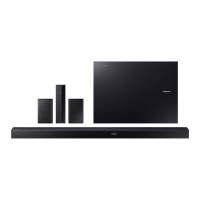
Wireless Subwoofer
(PS-WK450)
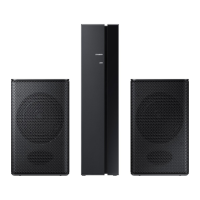
Wireless Receiver Module (SWA-8000S)
HW-K470_ZA_Web_0204.indd 1 2016/3/17 10:24:05

Questions and Answers

  • J
    Joseph NorrisAug 13, 2025
    How to fix sound not working on Samsung Speaker System?
    • T
      Tracy SmithAug 13, 2025
      If no sound is coming from your Samsung Speaker System, ensure that the Mute function is off by pressing the (Mute) button. Also, check that the volume isn't set to the minimum and adjust it as needed.
  • J
    James CannonAug 16, 2025
    Why is my Samsung Speaker System remote control not working?
    • C
      colelindseyAug 16, 2025
      If the remote control for your Samsung Speaker System isn't working, first, replace the batteries with new ones. If that doesn't solve the problem, try moving closer to the main unit.
  • A
    anthonycamposAug 20, 2025
    What to do if TV SoundConnect (TV pairing) failed on Samsung Speaker System?
    • C
      Cory ButlerAug 20, 2025
      If the TV SoundConnect (TV pairing) failed on your Samsung Speaker System, first ensure that your TV supports TV SoundConnect, which is available on some Samsung TVs released from 2012. Then, update your TV with the latest firmware. If the problem persists, press and hold the p button for 5 seconds to reset the TV SoundConnect connection. If all else fails, contact the Samsung Call Center.
  • A
    Angela FosterAug 25, 2025
    Why is there no sound coming from my Samsung HW-K470 Speakers?
    • J
      johnmatthewsAug 25, 2025
      If your Samsung Speakers aren't producing sound, check if the Mute function is on or the volume is set to the minimum. To resolve this, press the (Mute) button to cancel the Mute function and adjust the volume to a suitable level.
  • L
    Lauren HumphreyAug 28, 2025
    How to fix Samsung HW-K470 TV SoundConnect pairing failed?
    • K
      Kristie MorrisAug 28, 2025
      If TV SoundConnect (TV pairing) failed on your Samsung Speakers, it might be due to several reasons: your TV might not support TV SoundConnect (supported by some Samsung TVs released from 2012), your TV firmware might not be the latest version, or an error occurred during connection. Check if your TV supports TV SoundConnect and update your TV with the latest firmware. You can also try pressing and holding the p button for 5 seconds to reset the TV SoundConnect connection.
  • H
    hmasonSep 1, 2025
    Why is the red LED blinking on my Samsung Speaker System subwoofer?
    • R
      Ryan MarshallSep 1, 2025
      If the red LED on the subwoofer of your Samsung Speaker System is blinking and no sound is produced, it could mean that your subwoofer isn't connected to the main unit. Try to connect your subwoofer again. (See Page18)
  • J
    John BushSep 4, 2025
    What to do if the remote control for my Samsung HW-K470 Speakers does not work?
    • T
      Tonya WalkerSep 5, 2025
      If the Samsung Speakers remote control isn't working, it might be due to drained batteries or excessive distance from the main unit. Try replacing the batteries with new ones and ensure you're closer to the unit.
  • J
    Justin PachecoSep 8, 2025
    Why is a function not working when I press the button on my Samsung Speakers?
    • L
      Lindsey SheaSep 8, 2025
      If a function on your Samsung Speakers doesn't work when the button is pressed, it could be due to static electricity in the air. Try disconnecting the power plug and connecting it again.

Summary

GETTING STARTED

Product Features Overview

Lists and describes various Soundbar features like apps, sound expansion, and connectivity.

SAFETY INFORMATION

Safety Warnings and Symbols

Explains hazard symbols and provides critical warnings for user safety.

General Warnings and Cautions

Provides warnings about fire, electric shock, and chemical exposure.

IMPORTANT SAFETY INSTRUCTIONS

Detailed Usage and Maintenance Safety

Comprehensive list of safety precautions for operating and maintaining the device.

PRODUCT PRECAUTIONS

Installation and Environmental Precautions

Guidelines for safe installation, ventilation, and avoiding environmental hazards.

Battery Handling Safety

Critical warnings and instructions for handling batteries in the remote control.

PRODUCT DESCRIPTIONS - FRONT PANEL

Front and Right Side Panel Controls

Details the buttons and display located on the front and right side of the Soundbar.

PRODUCT DESCRIPTIONS - REMOTE FUNCTIONS

Remote Control Basic Functions

Explains basic controls like Source, Mute, Repeat, and Sound Effect modes.

INSTALLATION - TV REMOTE CONTROL

INSTALLATION - WALL MOUNT

INSTALLATION - WALL MOUNT MARKING

INSTALLATION - WALL MOUNT BRACKETS

INSTALLATION - MOUNTING ON WALL

INSTALLATION - DETACHING FROM WALL

CONNECTIONS - SUBWOOFER

Connecting Subwoofer and Receiver Module

Steps for automatically and manually linking the subwoofer and SWA-8000S.

CONNECTIONS - SURROUND SPEAKERS

CONNECTIONS - TV OPTICAL

CONNECTIONS - TV HDMI

CONNECTIONS - BLUETOOTH POWER

CONNECTIONS - EXTERNAL AUDIO

CONNECTIONS - EXTERNAL HDMI & USB

FUNCTIONS - INPUT & POWER

FUNCTIONS - BLUETOOTH PAIRING

Connecting to a Bluetooth Device

Step-by-step guide to pair the Soundbar with a Bluetooth-enabled device.

FUNCTIONS - BLUETOOTH MANAGEMENT

FUNCTIONS - SAMSUNG REMOTE APP

FUNCTIONS - SOFTWARE UPDATE

Updating Soundbar Firmware

Instructions for updating the system firmware using a USB device.

TROUBLESHOOTING

Troubleshooting Common Issues

Solutions for common problems like no power, no sound, or connection failures.

Samsung HW-K470 Specifications

General IconGeneral
TypeSoundbar
Channels2.1
Total Power Output300 W
SubwooferWireless
BluetoothYes
HDMIYes
Optical Audio InYes
USB PlaybackYes
Audio DecodingDolby Digital
Wall MountableYes
HDMI Inputs1

Related product manuals