ENG - 23
Setting Repeat Play Options
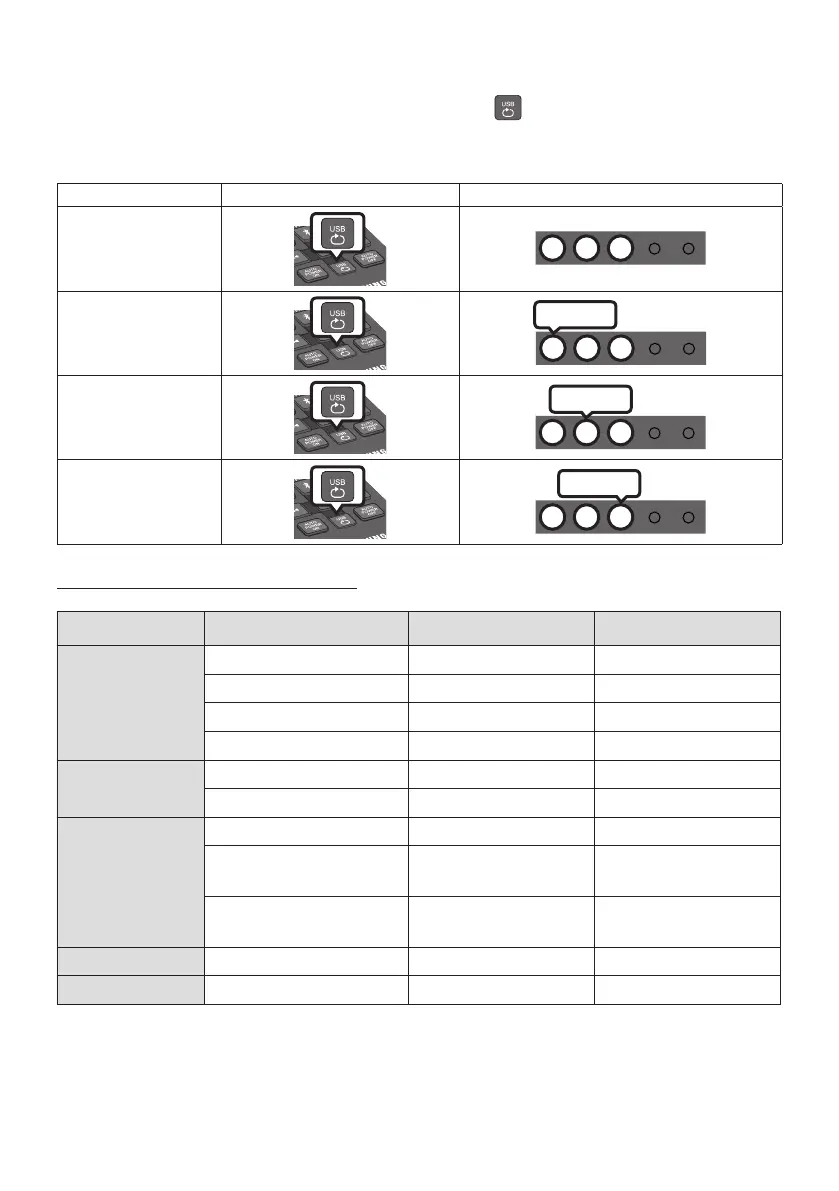
When the Soundbar is in “USB” mode, each time you press the button the “USB” mode changes
how it plays tracks in the following order: Repeat - Off > Repeat - 1 song > Repeat - All songs >
Repeat - Random. See the table below for details.
Mode Remote control Button LED indicator
Repeat - Off
W W W
Repeat - 1 song
W W W
Blinking
Repeat - All songs
W W W
Blinking
Repeat - Random
W W W
Blinking
File Format Type Compatibility list
Extension Codec Sampling Rate Bitrate
*.mp3 MPEG 1 Layer2 16KHz ~ 48KHz 80kbps~320kbps
MPEG 1 Layer3 16KHz ~ 48KHz 80kbps~320kbps
MPEG 2 Layer3 16KHz ~ 48KHz 80kbps~320kbps
MPEG 2.5 Layer3 16KHz ~ 48KHz 80kbps~320kbps
*.wma Wave_Format_MSAudio1 16KHz ~ 48KHz 56kbps~128kbps
Wave_Format_MSAudio2 16KHz ~ 48KHz 56kbps~128kbps
*.aac AAC 16KHz ~ 96KHz 48kbps~320kbps
A AC- LC 16KHz ~ 96KHz
128kbps~192kbps
5.1ch 320kbps
HE-AAC 24KHz ~ 96KHz
48kbps~64kbps
5.1ch 160kbps
*.wav - 16KHz ~ 48KHz up to 3000kbps
*.ac FLAC 1.1.0, FLAC 1.2.1 16KHz ~ 96KHz up to 3000kbps
• If there are too many folders and les stored on the USB device, it may take the Soundbar some
time to access and play les.






 To Next Page