8
Charging the Battery
Your phone is powered by a rechargeable standard Li-ion battery.
Only use Samsung-approved charging devices and batteries.
Samsung accessories are designed to maximize battery life.
Using other accessories may invalidate your warranty and may
cause damage.
Note:
The phone can be used while charging but will charge faster when
powered off.
Wall/USB Charger
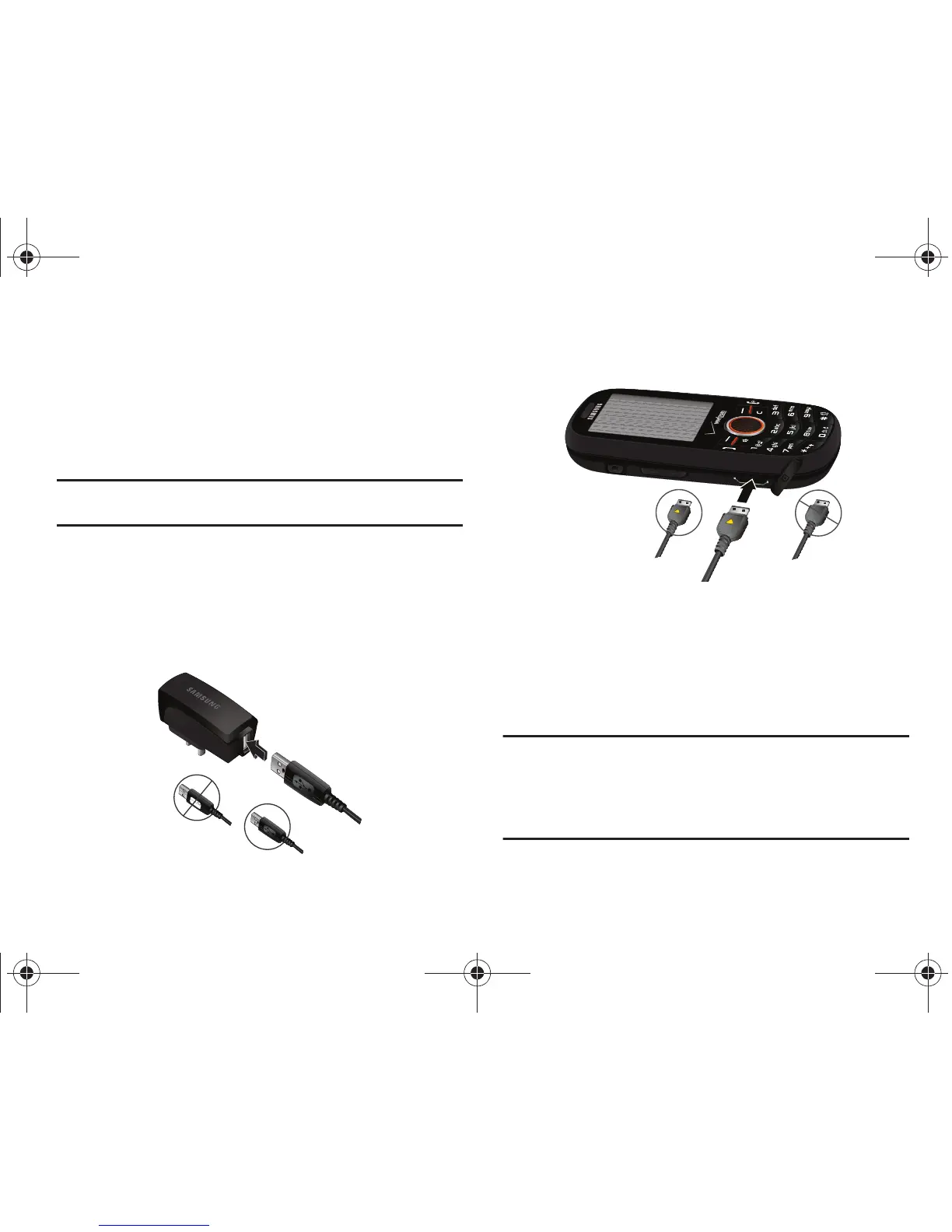
The Wall/USB Charger is a convenient, light-weight charger that
rapidly charges your phone from any 120/220 VAC outlet.
1. Pull the connector cover out and turn to expose the
connector.
2. Insert the Wall/USB Charger end, with the arrow up, into
the connector.
3. Plug the Wall/USB Charger into a standard AC wall outlet.
4. When the phone is completely charged (the battery icon
becomes still), unplug the Wall/USB Charger from the
power outlet. Remove the adapter end from the connector
and replace the connector cover.
Warning!:
If your handset has a touch screen display, please note that a
touch screen responds best to a light touch from the pad of your
finger or a non-metallic stylus. Using excessive force or a metallic
object when pressing on the touch screen may damage the
tempered glass surface and void the warranty. For more
information, refer to “Standard Limited Warranty” on page 152.












 To Next Page