English - 4
Viewing the Remote Control
✎
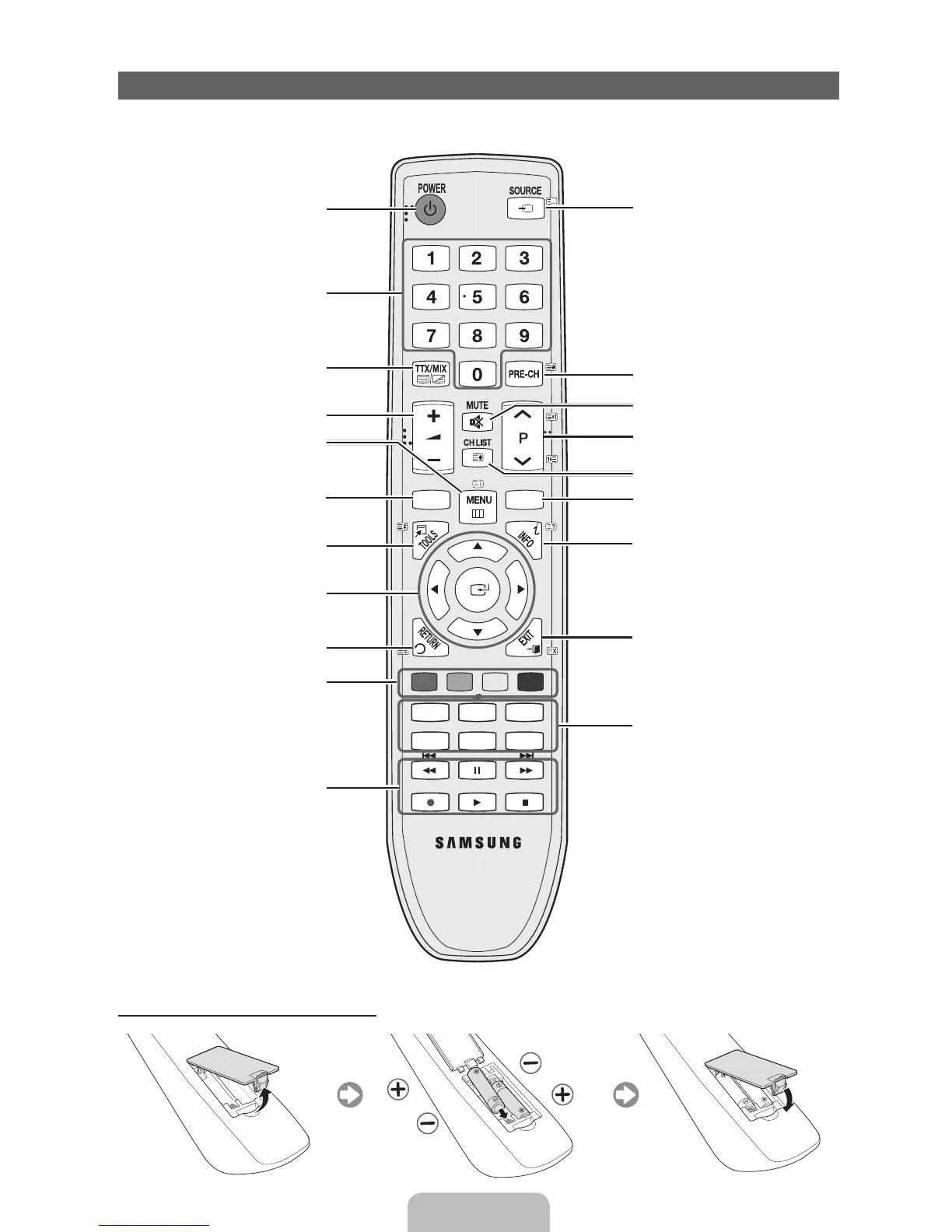
This is a special remote control for the visually impaired persons and has Braille points on the Power,
Channel, and Volume buttons.
A B C D
P.MODE
E-MANUAL
P.SIZE
SRS
DUAL I-II
AD/SUBT.
CONTENT
GUIDE
Turns the TV on and off.
Displays and selects the available
video sources.
Returns to the previous channel.
Cuts off the sound temporarily.
Changes channels.
Displays channel lists on the screen.
Displays the EPG (Electronic
Programme Guide).
Displays information on the TV
screen.
Exits the menu.
Have direct access to channels.
Adjusts the volume.
Alternately select Teletext ON,
Double, Mix or OFF.
Displays the main on-screen menu.
Quickly select frequently used
functions.
Displays the My Downloads,
Watch TV and Source.
Returns to the previous menu.
Selects the on-screen menu items
and changes the values seen on the
menu.
Buttons used in the Channel List,
Channel Manager, My Downloads,
Network, AllShare™ menu, etc.
Use these buttons in My
Downloads and Anynet+ modes.
P.MODE: Selects picture mode.
SRS: Selects the SRS TruSurround
HD mode.
DUAL I-II: Select Dual sound mode.
E-MANUAL: Displays the e-Manual
guide.
P.SIZE: Selects the picture size.
AD: Audio Description selection.
(Not available in some locations)
SUBT.: Displays digital subtitles.
Installing batteries (Battery size: AAA)
[LD550-XY]BN68-03400A-ENG.indd 4 2011-02-28 �� 2:56:01



 To Next Page