EasyManua.ls Logo

Samsung LE19A656A1C - Connecting a Cable Box;Satellite Receiver (Set-Top Box); Connecting a Cable Box;Satellite Receiver (Set-Top Box) Via DVI

Samsung LE19A656A1C
6 pages
Print Icon
To Next Page IconTo Next Page
To Previous Page IconTo Previous Page
Loading...
English - 2
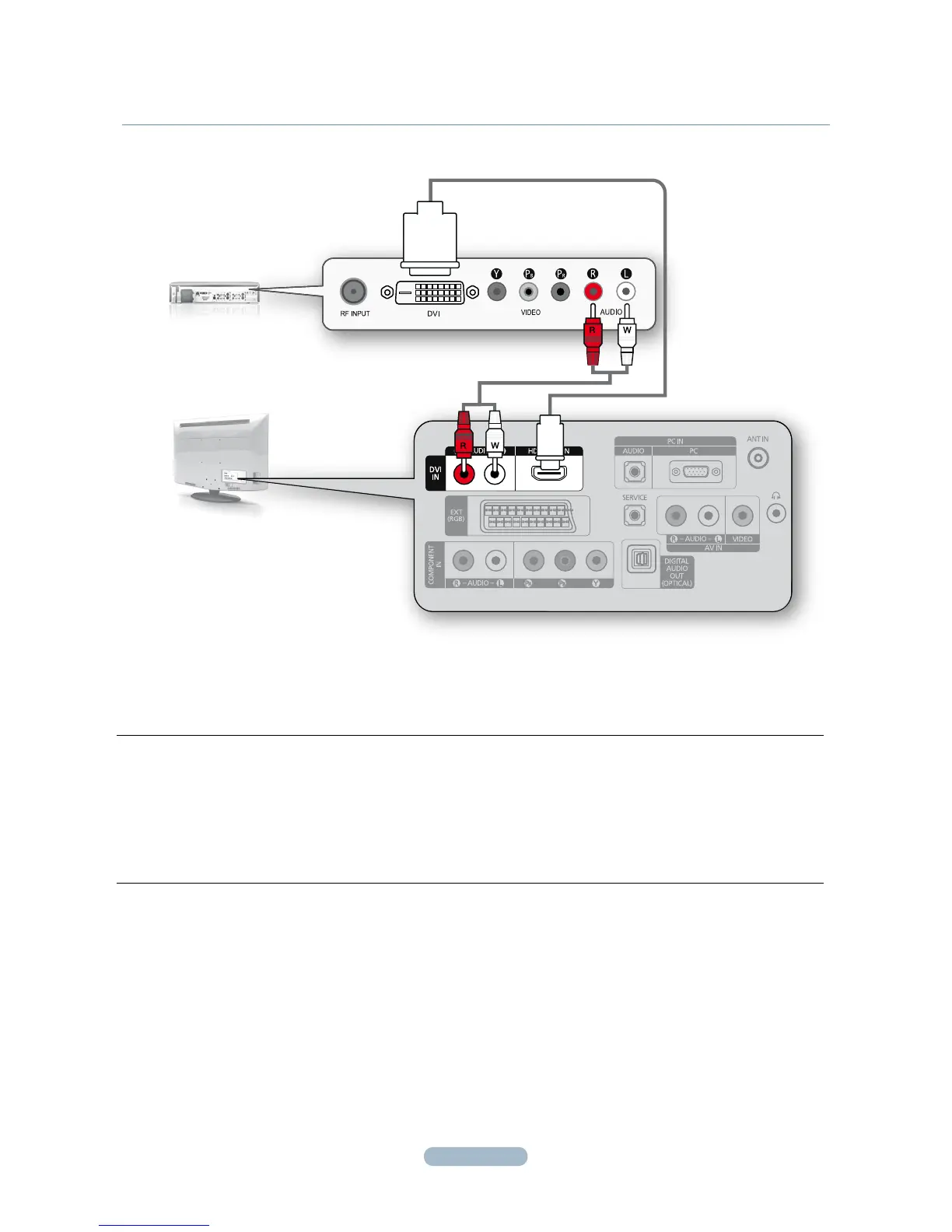
CONNECTINg A CABLE BOX/SATELLITE RECEIVER (SET-TOP BOX)
VIA DVI
CABLE BOX/SATELLITE
RECEIVER (SET-TOP BOX)
REAR PANEL
TV REAR PANEL
1
2
1.
Connect an HDMI Cable (Not supplied) between the HDMI/DVI IN jack on the TV and the HDMI jack on the Cable
Box/Satellite receiver (Set-Top Box).
2.
Connect Audio Cables (Not supplied) between the DVI IN [R-AUDIO-L] jack on the TV and the Cable Box/Satellite
receiver (Set-Top Box).
When using an HDMI/DVI cable(Not supplied) connection, you must use the HDMI/DVI IN
N
jack.

Related product manuals