English - 3
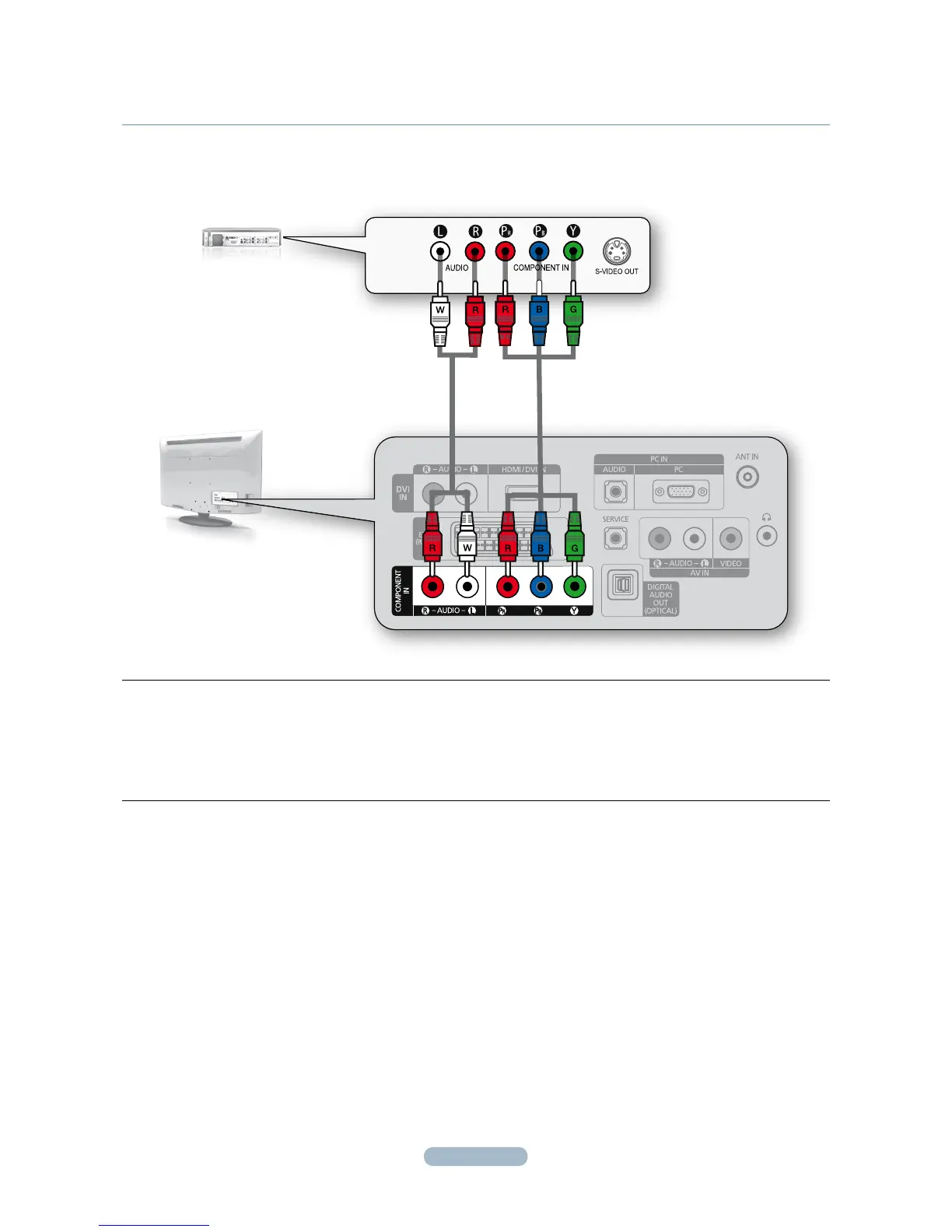
CONNECTINg A CABLE BOX/SATELLITE RECEIVER (SET-TOP BOX)
VIA COMPONENT CABLES
TV REAR PANEL
CABLE BOX/SATELLITE
RECEIVER (SET-TOP BOX)
REAR PANEL
12
1.
Connect a Component Cable (Not supplied) between the COMPONENT IN [PR, PB, Y] jacks on the TV and the
COMPONENT jacks on the Cable Box/Satellite receiver (Set-Top Box).
2.
Connect Audio Cables (Not supplied) between the COMPONENT IN [R-AUDIO-L] jacks on the TV and the AUDIO
OUT jacks on the Cable Box/Satellite receiver (Set-Top Box).





 To Next Page