5
GB
Installing Your Microwave Oven
Place the oven on a flat, level surface that is strong enough to safely
bear the weight of the oven.
☛ Never block the air vents as the oven may overheat and
automatically switch itself off. It will remain inoperable until it has
cooled sufficiently.
☛ For your personal safety, plug the cable into a 3-pin, 230 Volt,
50Hz, AC earthed socket. If the power cable of this appliance is
damaged, it must be replaced by a special cable (I-SHENG
SP022, KDK KKP4819D, EUROELECTRIC 3410, SAMIL SP-
106B, MOONSUNG EP-48E, HIGH PROJECT H.P 3). Contact
your local dealer to have it replaced. The power cable of ISRAEL
is PENCON(ZD16A), S/AFRICA APEX LEADS SA16 and
NIGERIA, GHANA, KENYA and U.A.E is PENCON(UD13A1).
☛ Do not install the microwave oven in hot or damp surroundings
like next to a traditional oven or radiator. The power supply
specifications of the oven must be respected and any extension
cable used must be of the same standard as the power cable
supplied with the oven. Wipe the interior and the door seal with a
damp cloth before using your microwave oven for the first time.
Setting the Time
Your microwave oven has an inbuilt clock. The time can be displayed
in either the 24-hour or 12-hour notation. You must set the clock:
• When you first install your microwave oven
• After a power failure
✉ Do not forget to reset the clock when you switch to and from summer
or winter time.
✉ When you plug the power cable, the unit is initialized to MWO Mode.
"MWO" and will be displayed on the screen.
If there is a recorded message, "Play" icon appears on the screen at
that time.
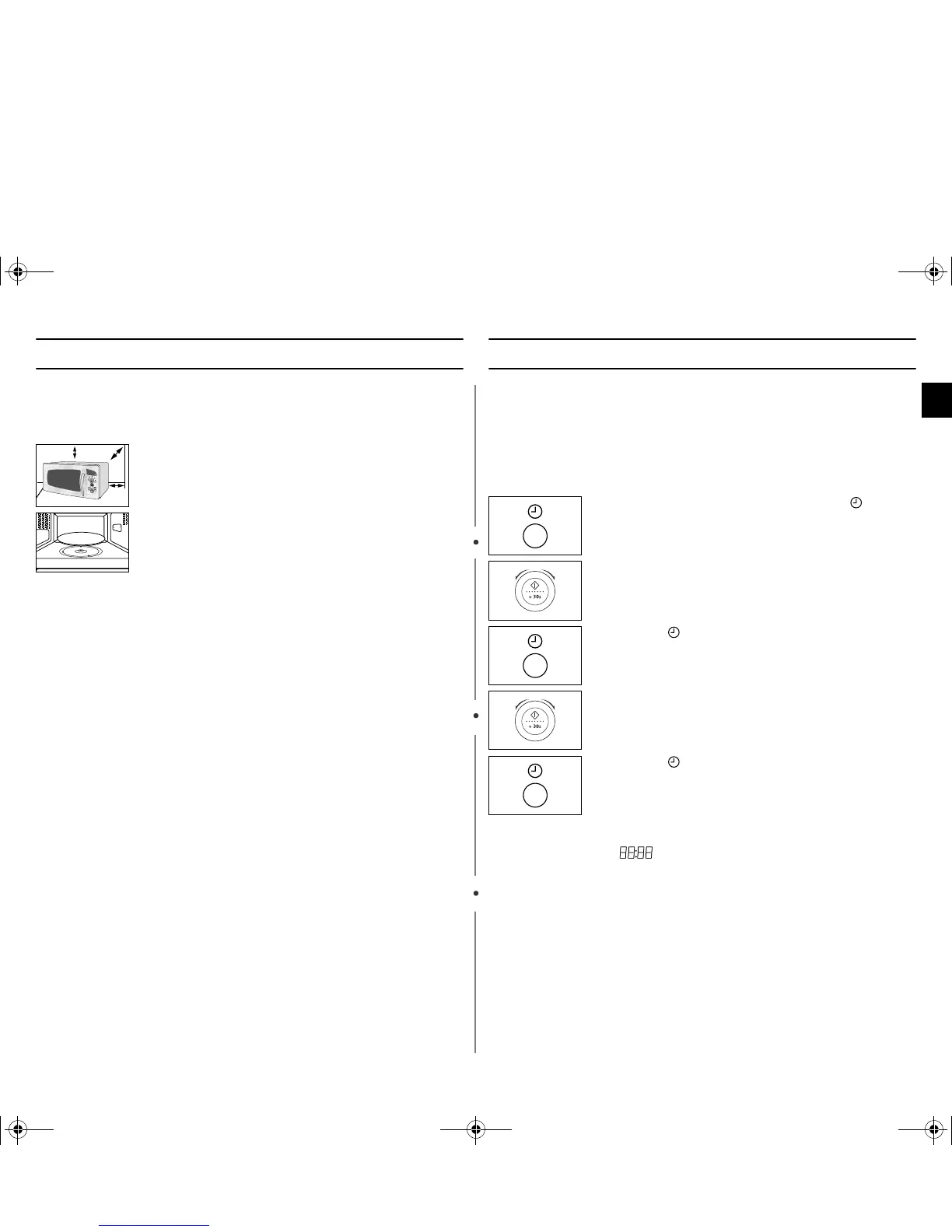
1. When you install your oven, Make sure there is adequate
ventilation for your oven by leaving at least 10 cm (4
inches) of space behind, and on the sides of the oven, at
least 20 cm (8 inches) of space above the oven.
2. Remove all packing materials inside the oven.
Install the roller ring and turntable.
Check that the turntable rotates freely.
3. This microwave oven has to be positioned so that plug is
accessible.
20cm
above
10cm
behind
10cm
on the side
1. To display the Then press the button...
time in the...
24-hour notation Once
12-hour notation Twice
2. Turn the dial knob to set the hour.
3. Press the button.
4. Turn the dial knob to set the minute.
5. Press the button.
tX`^kmTniUGGwG\GG~SGhGXZSGYWWZGG`a[XGht


 To Next Page