05 SET & LiNK
Set & Link
Set & Link / Basic Use _04
06 BaSiC uSE
Basic Use
Begin with call functions, camera, music player, webbrowser
and other special features
CALLS
Make a call
To make a voice call:
1. In Idle mode, enter an area code and phone number.
2. Press [ ]. Press [ + / - ] to adjust the volume.
3. Press [ ] to end the call.
Answer a call
1. When the phone rings, press[ ].
If it is a video call, press<Show me> to allow the
caller to see you via the camera.
2. Press [ ] to end the call.
T9 mode
To enter a word:
1. Press [2] to [9] to start entering a word.
2. Enter the whole word before editing or deleting
characters.
3. When the word displays correctly, press [#]
to insert a space. Otherwise, press [0]
to display alternate word choices.
ABC mode
To enter a word:
Press the appropriate key until the character you want
appears on the display.
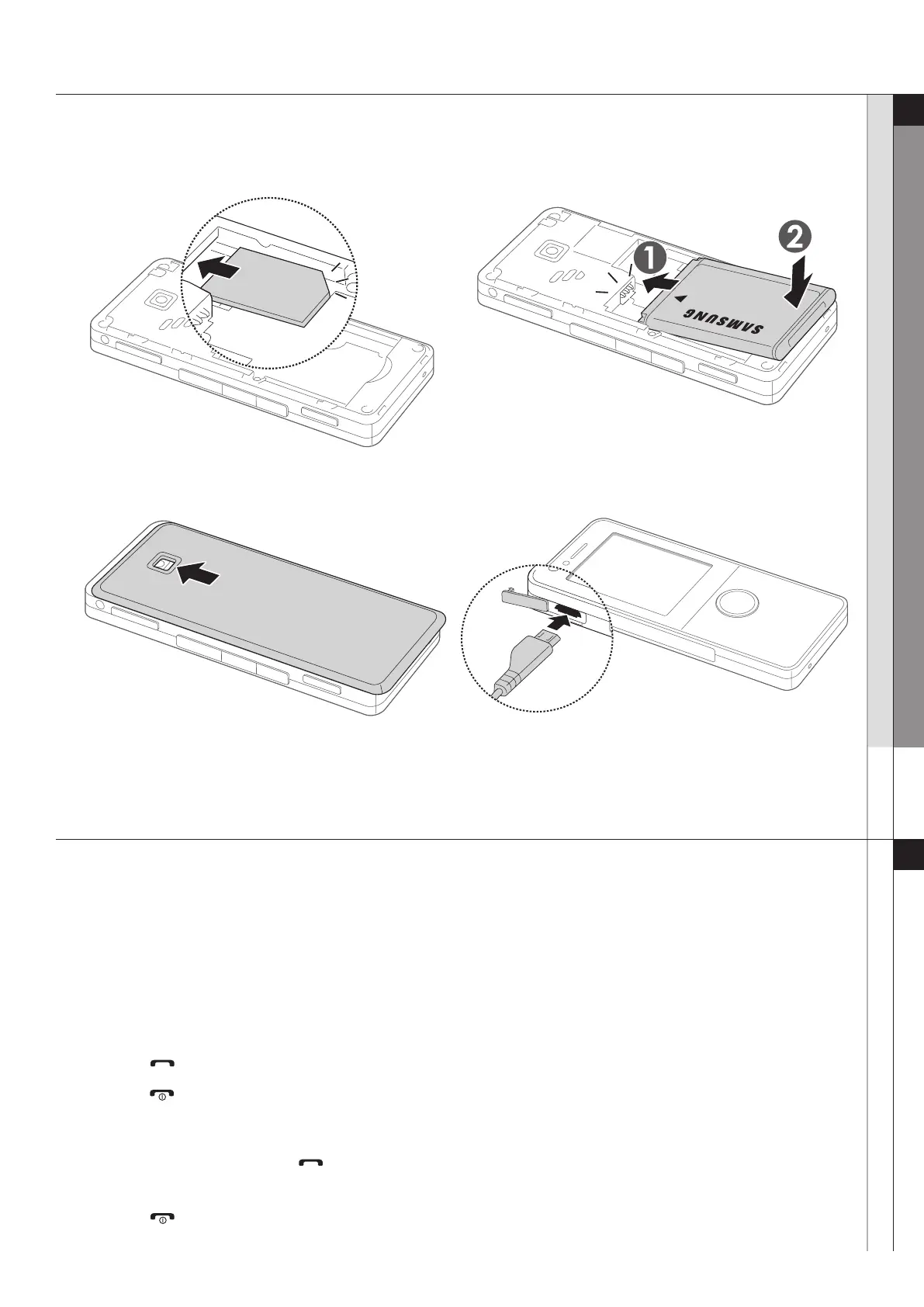
First steps to operating your phone
To AC power outlet
INSERT THE SIM OR USIM CARD.
REPLACE THE BATTERY COVER.
INSERT THE BATTERY.
PLUG THE TRAVEL ADAPTER INTO THE PHONE.



 To Next Page
 Loading...